¿Por qué React Hook Form + Zod?
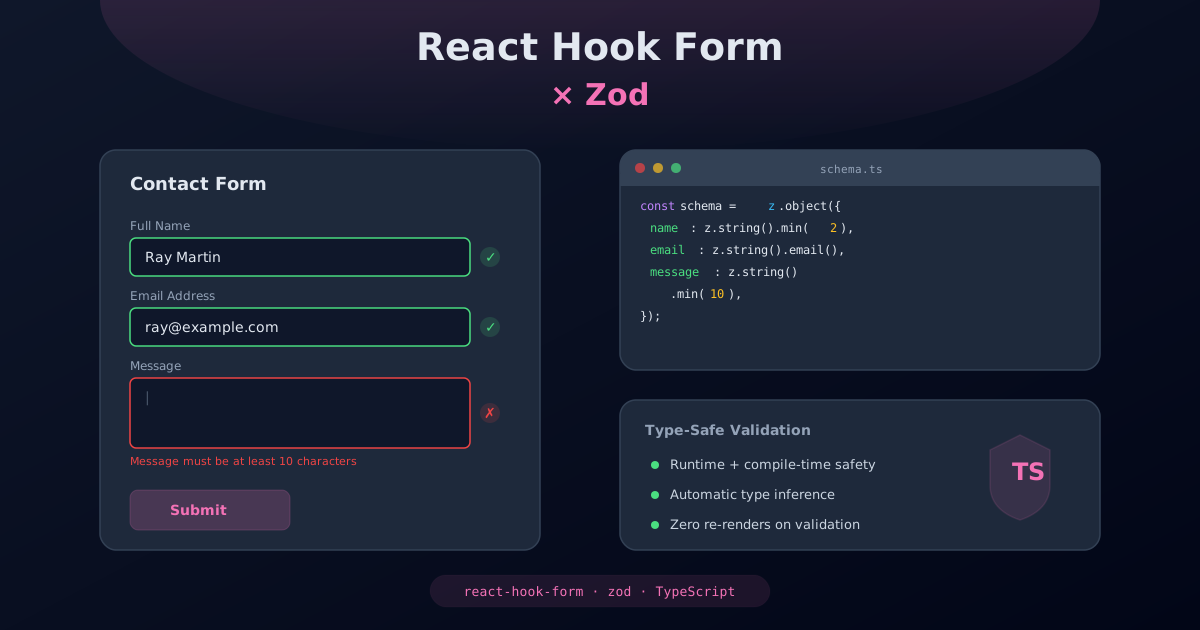
La validación de formularios es una de las tareas más comunes y a la vez más propensas a errores en el desarrollo web. Combinar React Hook Form con Zod en Next.js 16 ofrece una solución robusta, performante y con seguridad de tipos completa.
React Hook Form destaca por su enfoque en el rendimiento: utiliza refs no controlados en lugar de re-renderizar el componente completo con cada cambio de input. Esto significa que tu formulario se mantiene rápido incluso con decenas de campos. Zod, por su parte, es una librería de validación y parsing con soporte nativo de TypeScript que permite definir schemas de datos con una API declarativa y expresiva.
Las ventajas de esta combinación son claras:
- Rendimiento óptimo: React Hook Form minimiza los re-renders al usar referencias no controladas, lo que resulta en formularios extremadamente rápidos.
- Seguridad de tipos: Zod infiere tipos TypeScript directamente desde los schemas, eliminando la duplicación entre validación y tipado.
- Validación declarativa: Los schemas de Zod describen la forma y restricciones de tus datos de manera clara y mantenible.
- Validación compartida: El mismo schema Zod se puede usar tanto en el cliente como en el servidor con Server Actions.
- Mensajes de error personalizados: Ambas librerías permiten personalizar los mensajes de error para cada campo y tipo de validación.
- Ecosistema maduro: Amplia comunidad, documentación excelente y soporte activo para Next.js.
En comparación con alternativas como Formik o validaciones manuales con useState,
esta combinación ofrece mejor rendimiento, menos código repetitivo y una experiencia de desarrollo
superior gracias a la inferencia de tipos automática.
Instalación
Instalamos las tres dependencias necesarias: React Hook Form para la gestión del formulario, el resolver de Zod para la integración, y Zod para la definición de schemas.
npm install react-hook-form @hookform/resolvers zodVerificamos que las versiones instaladas son compatibles con React 19 y Next.js 16:
# Comprobar las versiones instaladas
npm ls react-hook-form @hookform/resolvers zod
Asegúrate de tener al menos react-hook-form@7.60+, @hookform/resolvers@3.9+
y zod@4.0+ para compatibilidad completa con React 19 y las últimas características.
Crear un schema con Zod
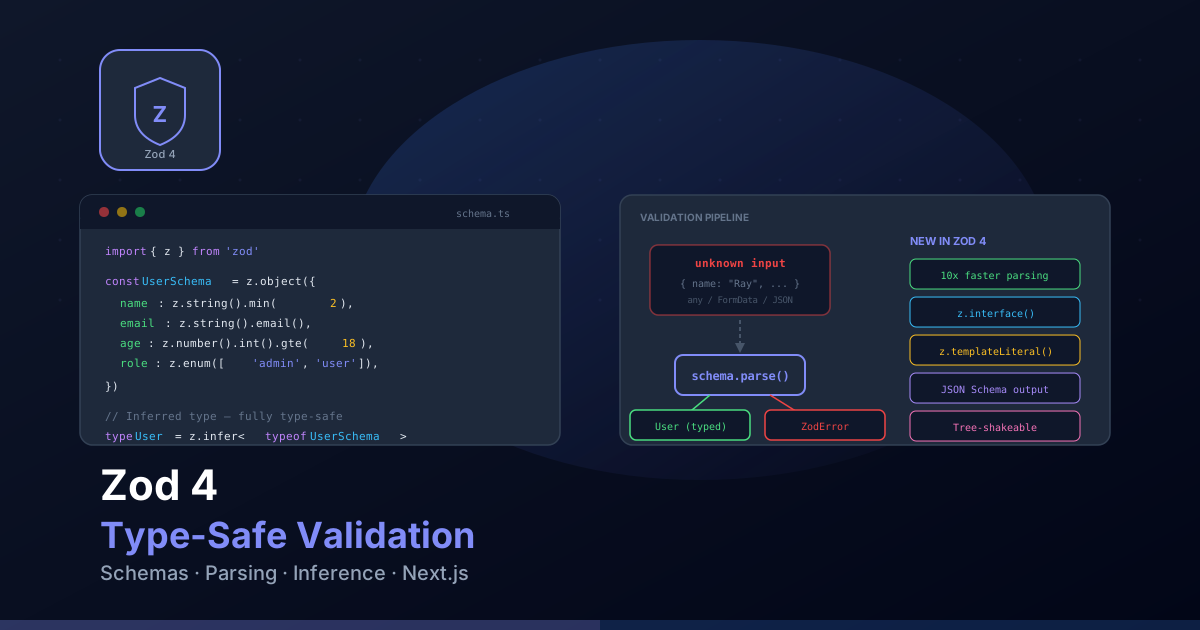
Los schemas de Zod definen la estructura, tipos y restricciones de validación de tus datos. Una de las mayores ventajas es que el tipo TypeScript se infiere automáticamente del schema, eliminando la duplicación.
// schemas/contact.ts
import { z } from "zod";

export const contactSchema = z.object({
  name: z
    .string()
    .min(2, { message: "El nombre debe tener al menos 2 caracteres" })
    .max(100, { message: "El nombre no puede exceder los 100 caracteres" })
    .trim(),

  email: z
    .string()
    .email({ message: "Introduce un correo electrónico válido" })
    .toLowerCase(),

  phone: z
    .string()
    .regex(/^+?[0-9s-()]{7,20}$/, {
      message: "Introduce un número de teléfono válido",
    })
    .optional()
    .or(z.literal("")),

  subject: z.enum(["general", "project", "consulting", "other"], {
    errorMap: () => ({ message: "Selecciona un asunto válido" }),
  }),

  message: z
    .string()
    .min(10, { message: "El mensaje debe tener al menos 10 caracteres" })
    .max(2000, { message: "El mensaje no puede exceder los 2000 caracteres" }),

  acceptTerms: z.literal(true, {
    errorMap: () => ({ message: "Debes aceptar los términos y condiciones" }),
  }),
});

// El tipo se infiere automáticamente del schema
export type ContactFormData = z.infer<typeof contactSchema>;

// Schema para validación parcial (por ejemplo, guardar borradores)
export const contactDraftSchema = contactSchema.partial({
  message: true,
  subject: true,
  acceptTerms: true,
});
Algunas técnicas avanzadas para schemas de Zod:
// schemas/advanced.ts
import { z } from "zod";

// Validación condicional con refine
const registrationSchema = z
  .object({
    password: z
      .string()
      .min(8, "La contraseña debe tener al menos 8 caracteres")
      .regex(/[A-Z]/, "Debe contener al menos una mayúscula")
      .regex(/[0-9]/, "Debe contener al menos un número")
      .regex(/[^A-Za-z0-9]/, "Debe contener al menos un carácter especial"),
    confirmPassword: z.string(),
  })
  .refine((data) => data.password === data.confirmPassword, {
    message: "Las contraseñas no coinciden",
    path: ["confirmPassword"], // Asocia el error al campo correcto
  });

// Transformaciones con transform
const priceSchema = z
  .string()
  .transform((val) => parseFloat(val.replace(",", ".")))
  .refine((val) => !isNaN(val), "Introduce un precio válido")
  .refine((val) => val > 0, "El precio debe ser mayor que 0");

// Schema con discriminated union
const notificationSchema = z.discriminatedUnion("type", [
  z.object({
    type: z.literal("email"),
    emailAddress: z.string().email(),
  }),
  z.object({
    type: z.literal("sms"),
    phoneNumber: z.string().min(9),
  }),
  z.object({
    type: z.literal("push"),
    deviceToken: z.string().uuid(),
  }),
]);
Configurar el formulario
La integración entre React Hook Form y Zod se realiza mediante el zodResolver.
Este resolver conecta automáticamente la validación del schema con el ciclo de vida del formulario.
// components/ContactForm.tsx
"use client";

import { useForm } from "react-hook-form";
import { zodResolver } from "@hookform/resolvers/zod";
import { contactSchema, type ContactFormData } from "@/schemas/contact";

export default function ContactForm() {
  const {
    register,     // Conecta inputs al formulario
    handleSubmit,  // Maneja el envío con validación
    formState: {
      errors,      // Errores de validación por campo
      isSubmitting, // Estado de envío en curso
      isValid,     // Si el formulario es válido
      isDirty,     // Si el usuario ha modificado algún campo
      touchedFields, // Campos que el usuario ha tocado
    },
    reset,         // Reiniciar el formulario
    watch,         // Observar valores de campos en tiempo real
    setError,      // Establecer errores programáticamente
    clearErrors,   // Limpiar errores
    setValue,      // Establecer valores programáticamente
  } = useForm<ContactFormData>({
    resolver: zodResolver(contactSchema),
    defaultValues: {
      name: "",
      email: "",
      phone: "",
      subject: "general",
      message: "",
      acceptTerms: false as unknown as true,
    },
    mode: "onBlur", // Validar al salir del campo
    reValidateMode: "onChange", // Revalidar al cambiar tras primer error
  });

  async function onSubmit(data: ContactFormData) {
    try {
      const response = await fetch("/api/contact", {
        method: "POST",
        headers: { "Content-Type": "application/json" },
        body: JSON.stringify(data),
      });

      if (!response.ok) {
        const result = await response.json();
        // Manejar errores del servidor campo por campo
        if (result.errors) {
          Object.entries(result.errors).forEach(([field, message]) => {
            setError(field as keyof ContactFormData, {
              type: "server",
              message: message as string,
            });
          });
          return;
        }
        throw new Error(result.message || "Error al enviar el formulario");
      }

      reset(); // Limpiar el formulario tras envío exitoso
    } catch (error) {
      setError("root", {
        type: "server",
        message: "Ha ocurrido un error. Por favor, inténtalo de nuevo.",
      });
    }
  }

  return (
    <form onSubmit={handleSubmit(onSubmit)} noValidate>
      {/* Campos del formulario aquí */}
    </form>
  );
}
Las opciones de configuración más importantes son:
mode: "onBlur": Valida cuando el usuario sale de un campo. Ofrece un buen equilibrio entre feedback inmediato y no ser invasivo.mode: "onChange": Valida con cada cambio. Útil para feedback en tiempo real pero puede ser excesivo.mode: "onSubmit": Solo valida al enviar. Menos invasivo pero el usuario no recibe feedback hasta que intenta enviar.reValidateMode: Define cuándo revalidar después del primer error."onChange"permite que el error desaparezca en tiempo real al corregirlo.
Campos y mensajes de error
Cada campo del formulario se conecta mediante register y muestra mensajes de error
del schema de Zod. Es fundamental incluir atributos ARIA para accesibilidad.
// Componente de campo reutilizable
"use client";

import { FieldError, UseFormRegisterReturn } from "react-hook-form";

interface FormFieldProps {
  label: string;
  id: string;
  type?: string;
  registration: UseFormRegisterReturn;
  error?: FieldError;
  required?: boolean;
  placeholder?: string;
}

export function FormField({
  label,
  id,
  type = "text",
  registration,
  error,
  required = false,
  placeholder,
}: FormFieldProps) {
  const errorId = `${id}-error`;

  return (
    <div className="mb-4">
      <label
        htmlFor={id}
        className="block text-sm font-medium text-gray-700 mb-1"
      >
        {label}
        {required && (
          <span className="text-red-500 ml-1" aria-hidden="true">
            *
          </span>
        )}
      </label>

      <input
        id={id}
        type={type}
        placeholder={placeholder}
        aria-invalid={error ? "true" : "false"}
        aria-describedby={error ? errorId : undefined}
        aria-required={required}
        className={`w-full px-4 py-2 border rounded-lg transition-colors
          focus:outline-none focus:ring-2 focus:ring-primary/50
          ${error
            ? "border-red-500 focus:ring-red-500/50"
            : "border-gray-300 focus:border-primary"
          }`}
        {...registration}
      />

      {error && (
        <p
          id={errorId}
          role="alert"
          className="mt-1 text-sm text-red-600"
        >
          {error.message}
        </p>
      )}
    </div>
  );
}
Uso del componente en el formulario:
// Dentro del formulario
<FormField
  label="Nombre completo"
  id="name"
  registration={register("name")}
  error={errors.name}
  required
  placeholder="Tu nombre"
/>

<FormField
  label="Correo electrónico"
  id="email"
  type="email"
  registration={register("email")}
  error={errors.email}
  required
  placeholder="tu@email.com"
/>

<FormField
  label="Teléfono"
  id="phone"
  type="tel"
  registration={register("phone")}
  error={errors.phone}
  placeholder="+34 600 000 000"
/>
Para campos especiales como selects y textareas, necesitas adaptar el componente:
// Campo de tipo select
<div className="mb-4">
  <label htmlFor="subject" className="block text-sm font-medium text-gray-700 mb-1">
    Asunto
    <span className="text-red-500 ml-1" aria-hidden="true">*</span>
  </label>

  <select
    id="subject"
    aria-invalid={errors.subject ? "true" : "false"}
    aria-describedby={errors.subject ? "subject-error" : undefined}
    className="w-full px-4 py-2 border rounded-lg"
    {...register("subject")}
  >
    <option value="general">Consulta general</option>
    <option value="project">Nuevo proyecto</option>
    <option value="consulting">Consultoría</option>
    <option value="other">Otro</option>
  </select>

  {errors.subject && (
    <p id="subject-error" role="alert" className="mt-1 text-sm text-red-600">
      {errors.subject.message}
    </p>
  )}
</div>

// Campo de tipo textarea
<div className="mb-4">
  <label htmlFor="message" className="block text-sm font-medium text-gray-700 mb-1">
    Mensaje
    <span className="text-red-500 ml-1" aria-hidden="true">*</span>
  </label>

  <textarea
    id="message"
    rows={5}
    aria-invalid={errors.message ? "true" : "false"}
    aria-describedby={errors.message ? "message-error" : undefined}
    className="w-full px-4 py-2 border rounded-lg resize-y"
    {...register("message")}
  />

  {errors.message && (
    <p id="message-error" role="alert" className="mt-1 text-sm text-red-600">
      {errors.message.message}
    </p>
  )}
</div>
Validación server-side con Server Actions
Next.js 16 con Server Actions permite ejecutar la validación de Zod directamente en el servidor, sin exponer la lógica de validación al cliente. Esto es esencial para la seguridad: nunca confíes únicamente en la validación del lado del cliente.
// app/actions/contact.ts
"use server";

import { contactSchema } from "@/schemas/contact";

export type ContactActionState = {
  success: boolean;
  message: string;
  errors?: Record<string, string[]>;
};

export async function submitContact(
  prevState: ContactActionState,
  formData: FormData
): Promise<ContactActionState> {
  // Extraer datos del FormData
  const rawData = {
    name: formData.get("name"),
    email: formData.get("email"),
    phone: formData.get("phone"),
    subject: formData.get("subject"),
    message: formData.get("message"),
    acceptTerms: formData.get("acceptTerms") === "on",
  };

  // Validar con el mismo schema de Zod
  const result = contactSchema.safeParse(rawData);

  if (!result.success) {
    // Formatear errores para el cliente
    const fieldErrors: Record<string, string[]> = {};
    for (const issue of result.error.issues) {
      const field = issue.path.join(".");
      if (!fieldErrors[field]) {
        fieldErrors[field] = [];
      }
      fieldErrors[field].push(issue.message);
    }

    return {
      success: false,
      message: "Por favor, corrige los errores del formulario.",
      errors: fieldErrors,
    };
  }

  // Procesar datos validados
  try {
    // Aquí enviarías el email, guardarías en base de datos, etc.
    const { name, email, message } = result.data;

    // Simular envío de email
    await sendEmail({
      to: process.env.MAILJET_TO_EMAIL!,
      subject: `Nuevo contacto de ${name}`,
      body: message,
      replyTo: email,
    });

    return {
      success: true,
      message: "Tu mensaje ha sido enviado correctamente.",
    };
  } catch (error) {
    return {
      success: false,
      message: "Error interno del servidor. Inténtalo de nuevo más tarde.",
    };
  }
}

async function sendEmail(params: {
  to: string;
  subject: string;
  body: string;
  replyTo: string;
}) {
  // Implementación con Mailjet u otro servicio
  const response = await fetch("https://api.mailjet.com/v3.1/send", {
    method: "POST",
    headers: {
      "Content-Type": "application/json",
      Authorization: `Basic ${Buffer.from(
        `${process.env.MAILJET_API_KEY}:${process.env.MAILJET_API_SECRET}`
      ).toString("base64")}`,
    },
    body: JSON.stringify({
      Messages: [
        {
          From: {
            Email: process.env.MAILJET_SENDER_EMAIL,
            Name: process.env.MAILJET_SENDER_NAME,
          },
          To: [{ Email: params.to, Name: process.env.MAILJET_TO_NAME }],
          Subject: params.subject,
          TextPart: params.body,
          ReplyTo: { Email: params.replyTo },
        },
      ],
    }),
  });

  if (!response.ok) {
    throw new Error("Error al enviar el email");
  }
}
Puedes combinar la validación del cliente (para feedback inmediato) con la del servidor (para seguridad) usando el mismo schema de Zod en ambos lados:
// Uso de Server Action con React Hook Form
"use client";

import { useForm } from "react-hook-form";
import { zodResolver } from "@hookform/resolvers/zod";
import { useActionState, useEffect } from "react";
import { contactSchema, type ContactFormData } from "@/schemas/contact";
import { submitContact, type ContactActionState } from "@/app/actions/contact";

export default function ContactFormWithServerAction() {
  const [state, formAction, isPending] = useActionState(submitContact, {
    success: false,
    message: "",
  });

  const {
    register,
    handleSubmit,
    formState: { errors },
    setError,
    reset,
  } = useForm<ContactFormData>({
    resolver: zodResolver(contactSchema),
    mode: "onBlur",
  });

  // Sincronizar errores del servidor con React Hook Form
  useEffect(() => {
    if (state.errors) {
      Object.entries(state.errors).forEach(([field, messages]) => {
        setError(field as keyof ContactFormData, {
          type: "server",
          message: messages[0],
        });
      });
    }
    if (state.success) {
      reset();
    }
  }, [state, setError, reset]);

  return (
    <form action={formAction}>
      {/* Campos del formulario */}
      <button type="submit" disabled={isPending}>
        {isPending ? "Enviando..." : "Enviar mensaje"}
      </button>

      {state.message && (
        <div
          role="status"
          aria-live="polite"
          className={state.success ? "text-green-600" : "text-red-600"}
        >
          {state.message}
        </div>
      )}
    </form>
  );
}
Formulario de contacto completo
A continuación, un ejemplo completo de un formulario de contacto que integra todas las piezas que hemos visto: schema de Zod, React Hook Form, validación en cliente y servidor, manejo de errores, estados de carga y accesibilidad completa.
// components/common/ContactForm.tsx
"use client";

import { useForm } from "react-hook-form";
import { zodResolver } from "@hookform/resolvers/zod";
import { useTranslations } from "next-intl";
import { useState, useRef, useEffect } from "react";
import { contactSchema, type ContactFormData } from "@/schemas/contact";

export default function ContactForm() {
  const t = useTranslations("contact");
  const [submitStatus, setSubmitStatus] = useState<
    "idle" | "success" | "error"
  >("idle");
  const formRef = useRef<HTMLFormElement>(null);
  const statusRef = useRef<HTMLDivElement>(null);

  const {
    register,
    handleSubmit,
    formState: { errors, isSubmitting, isValid, isDirty },
    reset,
    setError,
    watch,
  } = useForm<ContactFormData>({
    resolver: zodResolver(contactSchema),
    defaultValues: {
      name: "",
      email: "",
      phone: "",
      subject: "general",
      message: "",
      acceptTerms: false as unknown as true,
    },
    mode: "onBlur",
    reValidateMode: "onChange",
  });

  // Contador de caracteres para el mensaje
  const messageValue = watch("message");
  const messageLength = messageValue?.length || 0;
  const maxMessageLength = 2000;

  // Enfocar el mensaje de estado cuando cambia
  useEffect(() => {
    if (submitStatus !== "idle" && statusRef.current) {
      statusRef.current.focus();
    }
  }, [submitStatus]);

  async function onSubmit(data: ContactFormData) {
    setSubmitStatus("idle");

    try {
      const response = await fetch("/api/contact", {
        method: "POST",
        headers: { "Content-Type": "application/json" },
        body: JSON.stringify(data),
      });

      if (!response.ok) {
        const result = await response.json();

        if (result.fieldErrors) {
          Object.entries(result.fieldErrors).forEach(([field, msg]) => {
            setError(field as keyof ContactFormData, {
              type: "server",
              message: msg as string,
            });
          });
          return;
        }

        throw new Error(result.message);
      }

      setSubmitStatus("success");
      reset();
    } catch {
      setSubmitStatus("error");
      setError("root", {
        type: "server",
        message: t("form.error"),
      });
    }
  }

  return (
    <form
      ref={formRef}
      onSubmit={handleSubmit(onSubmit)}
      noValidate
      aria-label={t("title")}
      className="max-w-lg mx-auto space-y-6"
    >
      {/* Nombre */}
      <div>
        <label htmlFor="contact-name" className="block text-sm font-medium mb-1">
          {t("form.name")}
          <span className="text-red-500 ml-1" aria-hidden="true">*</span>
        </label>
        <input
          id="contact-name"
          type="text"
          autoComplete="name"
          aria-invalid={errors.name ? "true" : "false"}
          aria-describedby={errors.name ? "name-error" : undefined}
          aria-required="true"
          className="w-full px-4 py-2 border border-gray-300 rounded-lg
            focus:outline-none focus:ring-2 focus:ring-primary/50"
          {...register("name")}
        />
        {errors.name && (
          <p id="name-error" role="alert" className="mt-1 text-sm text-red-600">
            {errors.name.message}
          </p>
        )}
      </div>

      {/* Email */}
      <div>
        <label htmlFor="contact-email" className="block text-sm font-medium mb-1">
          {t("form.email")}
          <span className="text-red-500 ml-1" aria-hidden="true">*</span>
        </label>
        <input
          id="contact-email"
          type="email"
          autoComplete="email"
          aria-invalid={errors.email ? "true" : "false"}
          aria-describedby={errors.email ? "email-error" : undefined}
          aria-required="true"
          className="w-full px-4 py-2 border border-gray-300 rounded-lg
            focus:outline-none focus:ring-2 focus:ring-primary/50"
          {...register("email")}
        />
        {errors.email && (
          <p id="email-error" role="alert" className="mt-1 text-sm text-red-600">
            {errors.email.message}
          </p>
        )}
      </div>

      {/* Teléfono (opcional) */}
      <div>
        <label htmlFor="contact-phone" className="block text-sm font-medium mb-1">
          {t("form.phone") || "Teléfono"}
          <span className="text-gray-400 text-xs ml-2">(opcional)</span>
        </label>
        <input
          id="contact-phone"
          type="tel"
          autoComplete="tel"
          aria-invalid={errors.phone ? "true" : "false"}
          aria-describedby={errors.phone ? "phone-error" : undefined}
          className="w-full px-4 py-2 border border-gray-300 rounded-lg
            focus:outline-none focus:ring-2 focus:ring-primary/50"
          {...register("phone")}
        />
        {errors.phone && (
          <p id="phone-error" role="alert" className="mt-1 text-sm text-red-600">
            {errors.phone.message}
          </p>
        )}
      </div>

      {/* Asunto */}
      <div>
        <label htmlFor="contact-subject" className="block text-sm font-medium mb-1">
          Asunto
          <span className="text-red-500 ml-1" aria-hidden="true">*</span>
        </label>
        <select
          id="contact-subject"
          aria-invalid={errors.subject ? "true" : "false"}
          aria-describedby={errors.subject ? "subject-error" : undefined}
          aria-required="true"
          className="w-full px-4 py-2 border border-gray-300 rounded-lg
            focus:outline-none focus:ring-2 focus:ring-primary/50"
          {...register("subject")}
        >
          <option value="general">Consulta general</option>
          <option value="project">Nuevo proyecto</option>
          <option value="consulting">Consultoría</option>
          <option value="other">Otro</option>
        </select>
        {errors.subject && (
          <p id="subject-error" role="alert" className="mt-1 text-sm text-red-600">
            {errors.subject.message}
          </p>
        )}
      </div>

      {/* Mensaje */}
      <div>
        <label htmlFor="contact-message" className="block text-sm font-medium mb-1">
          {t("form.message")}
          <span className="text-red-500 ml-1" aria-hidden="true">*</span>
        </label>
        <textarea
          id="contact-message"
          rows={5}
          aria-invalid={errors.message ? "true" : "false"}
          aria-describedby="message-count message-error"
          aria-required="true"
          className="w-full px-4 py-2 border border-gray-300 rounded-lg resize-y
            focus:outline-none focus:ring-2 focus:ring-primary/50"
          {...register("message")}
        />
        <div className="flex justify-between items-center mt-1">
          {errors.message ? (
            <p id="message-error" role="alert" className="text-sm text-red-600">
              {errors.message.message}
            </p>
          ) : (
            <span />
          )}
          <span
            id="message-count"
            className={`text-xs ${
              messageLength > maxMessageLength ? "text-red-600" : "text-gray-400"
            }`}
            aria-live="polite"
          >
            {messageLength}/{maxMessageLength}
          </span>
        </div>
      </div>

      {/* Términos y condiciones */}
      <div className="flex items-start gap-3">
        <input
          id="contact-terms"
          type="checkbox"
          aria-invalid={errors.acceptTerms ? "true" : "false"}
          aria-describedby={errors.acceptTerms ? "terms-error" : undefined}
          className="mt-1 size-4 rounded border-gray-300"
          {...register("acceptTerms")}
        />
        <div>
          <label htmlFor="contact-terms" className="text-sm text-gray-700">
            Acepto los términos y condiciones y la política de privacidad
          </label>
          {errors.acceptTerms && (
            <p id="terms-error" role="alert" className="mt-1 text-sm text-red-600">
              {errors.acceptTerms.message}
            </p>
          )}
        </div>
      </div>

      {/* Error global */}
      {errors.root && (
        <div role="alert" className="p-3 bg-red-50 border border-red-200 rounded-lg">
          <p className="text-sm text-red-700">{errors.root.message}</p>
        </div>
      )}

      {/* Mensaje de éxito */}
      {submitStatus === "success" && (
        <div
          ref={statusRef}
          role="status"
          tabIndex={-1}
          className="p-3 bg-green-50 border border-green-200 rounded-lg"
        >
          <p className="text-sm text-green-700">{t("form.success")}</p>
        </div>
      )}

      {/* Botón de envío */}
      <button
        type="submit"
        disabled={isSubmitting}
        aria-busy={isSubmitting}
        className="w-full bg-primary text-white py-3 px-6 rounded-lg
          font-medium transition-colors hover:bg-primary/90
          focus:outline-none focus:ring-2 focus:ring-primary/50 focus:ring-offset-2
          disabled:opacity-50 disabled:cursor-not-allowed"
      >
        {isSubmitting ? (
          <span className="flex items-center justify-center gap-2">
            <span className="animate-spin size-4 border-2 border-white border-t-transparent rounded-full" />
            Enviando...
          </span>
        ) : (
          t("form.submit")
        )}
      </button>
    </form>
  );
}
Patrones avanzados
React Hook Form ofrece funcionalidades avanzadas que permiten construir formularios dinámicos y complejos. Veamos algunos patrones que encontrarás en proyectos reales.
Campos condicionales con watch
Usa watch para mostrar u ocultar campos basándote en el valor de otros:
// Campos condicionales
"use client";

import { useForm } from "react-hook-form";
import { zodResolver } from "@hookform/resolvers/zod";
import { z } from "zod";

const projectSchema = z
  .object({
    projectType: z.enum(["web", "mobile", "consulting"]),
    budget: z.string().optional(),
    timeline: z.string().optional(),
    appPlatform: z.enum(["ios", "android", "both"]).optional(),
  })
  .refine(
    (data) => {
      if (data.projectType === "mobile" && !data.appPlatform) {
        return false;
      }
      return true;
    },
    {
      message: "Selecciona la plataforma para aplicaciones móviles",
      path: ["appPlatform"],
    }
  );

type ProjectFormData = z.infer<typeof projectSchema>;

export default function ProjectForm() {
  const { register, watch, formState: { errors } } = useForm<ProjectFormData>({
    resolver: zodResolver(projectSchema),
  });

  const projectType = watch("projectType");

  return (
    <form>
      <select {...register("projectType")}>
        <option value="web">Sitio web</option>
        <option value="mobile">App móvil</option>
        <option value="consulting">Consultoría</option>
      </select>

      {/* Solo visible para apps móviles */}
      {projectType === "mobile" && (
        <div>
          <label htmlFor="appPlatform">Plataforma</label>
          <select id="appPlatform" {...register("appPlatform")}>
            <option value="ios">iOS</option>
            <option value="android">Android</option>
            <option value="both">Ambas</option>
          </select>
          {errors.appPlatform && (
            <p role="alert">{errors.appPlatform.message}</p>
          )}
        </div>
      )}

      {/* Solo visible para web y móvil */}
      {(projectType === "web" || projectType === "mobile") && (
        <div>
          <label htmlFor="budget">Presupuesto estimado</label>
          <input id="budget" type="text" {...register("budget")} />
        </div>
      )}
    </form>
  );
}
Campos dinámicos con useFieldArray
useFieldArray permite añadir y eliminar campos dinámicamente. Es ideal para listas
de elementos como skills, enlaces o experiencias laborales.
// Campos dinámicos con useFieldArray
"use client";

import { useForm, useFieldArray } from "react-hook-form";
import { zodResolver } from "@hookform/resolvers/zod";
import { z } from "zod";

const teamSchema = z.object({
  teamName: z.string().min(2),
  members: z
    .array(
      z.object({
        name: z.string().min(2, "El nombre es obligatorio"),
        role: z.string().min(2, "El rol es obligatorio"),
        email: z.string().email("Email inválido"),
      })
    )
    .min(1, "Añade al menos un miembro")
    .max(10, "Máximo 10 miembros"),
});

type TeamFormData = z.infer<typeof teamSchema>;

export default function TeamForm() {
  const {
    register,
    control,
    handleSubmit,
    formState: { errors },
  } = useForm<TeamFormData>({
    resolver: zodResolver(teamSchema),
    defaultValues: {
      teamName: "",
      members: [{ name: "", role: "", email: "" }],
    },
  });

  const { fields, append, remove } = useFieldArray({
    control,
    name: "members",
  });

  return (
    <form onSubmit={handleSubmit((data) => console.log(data))}>
      <input {...register("teamName")} placeholder="Nombre del equipo" />

      {fields.map((field, index) => (
        <div key={field.id} className="flex gap-2 mb-2">
          <input
            {...register(`members.${index}.name`)}
            placeholder="Nombre"
            aria-label={`Nombre del miembro ${index + 1}`}
          />
          <input
            {...register(`members.${index}.role`)}
            placeholder="Rol"
            aria-label={`Rol del miembro ${index + 1}`}
          />
          <input
            {...register(`members.${index}.email`)}
            placeholder="Email"
            type="email"
            aria-label={`Email del miembro ${index + 1}`}
          />
          {fields.length > 1 && (
            <button
              type="button"
              onClick={() => remove(index)}
              aria-label={`Eliminar miembro ${index + 1}`}
            >
              Eliminar
            </button>
          )}
        </div>
      ))}

      {fields.length < 10 && (
        <button
          type="button"
          onClick={() => append({ name: "", role: "", email: "" })}
        >
          Añadir miembro
        </button>
      )}

      <button type="submit">Guardar equipo</button>
    </form>
  );
}
Accesibilidad en formularios
Los formularios son uno de los elementos más críticos para la accesibilidad. Un formulario mal implementado puede ser completamente inutilizable para personas que dependen de lectores de pantalla o navegación por teclado. A continuación, las pautas esenciales según WCAG 2.2.
-
aria-invalid: Indica al lector de pantalla que un campo tiene un error. Debe ser"true"cuando hay error y"false"(o estar ausente) cuando no lo hay. -
aria-describedby: Conecta el campo con su mensaje de error para que el lector de pantalla anuncie el error al enfocar el campo. -
aria-required: Indica que el campo es obligatorio. Complementa el asterisco visual con información semántica. -
aria-busy: En el botón de envío, indica que se está procesando la solicitud. -
role="alert": Hace que los mensajes de error sean anunciados inmediatamente por el lector de pantalla cuando aparecen. -
aria-live="polite": Para mensajes de estado (éxito, contadores) que deben anunciarse sin interrumpir al usuario.
// Patrón accesible completo para un campo de formulario
function AccessibleField({
  name,
  label,
  error,
  helpText,
  required,
  register,
}: {
  name: string;
  label: string;
  error?: { message?: string };
  helpText?: string;
  required?: boolean;
  register: any;
}) {
  const errorId = `${name}-error`;
  const helpId = `${name}-help`;

  // Construir la lista de IDs para aria-describedby
  const describedByIds: string[] = [];
  if (helpText) describedByIds.push(helpId);
  if (error) describedByIds.push(errorId);

  return (
    <div className="mb-4">
      <label htmlFor={name} className="block text-sm font-medium mb-1">
        {label}
        {required && (
          <span className="text-red-500 ml-1" aria-hidden="true">*</span>
        )}
        {required && <span className="sr-only"> (obligatorio)</span>}
      </label>

      {helpText && (
        <p id={helpId} className="text-xs text-gray-500 mb-1">
          {helpText}
        </p>
      )}

      <input
        id={name}
        aria-invalid={error ? "true" : "false"}
        aria-required={required || undefined}
        aria-describedby={
          describedByIds.length > 0 ? describedByIds.join(" ") : undefined
        }
        className={`w-full px-4 py-2 border rounded-lg
          focus-visible:outline-none focus-visible:ring-2
          focus-visible:ring-primary/50 focus-visible:ring-offset-2
          ${error ? "border-red-500" : "border-gray-300"}`}
        {...register(name)}
      />

      {error?.message && (
        <p id={errorId} role="alert" className="mt-1 text-sm text-red-600">
          {error.message}
        </p>
      )}
    </div>
  );
}
Además de los atributos ARIA, asegúrate de cumplir estas pautas:
- Todos los campos deben tener un
<label>asociado mediantehtmlFor/id. Nunca uses solo el placeholder como etiqueta. - Los errores deben ser visibles y anunciados: Usa colores, iconos y texto para los errores. No dependas solo del color.
- Navegación por teclado: Todos los campos e interacciones deben ser accesibles con Tab, Enter y Escape.
- Estados de
focus-visible: Usa anillos de enfoque visibles para usuarios de teclado, sin mostrarlos al hacer clic con ratón. - Mensajes de éxito: Anuncia el resultado del envío con
role="status"y enfoca el mensaje programáticamente. - Autocompletado: Usa atributos
autoCompleteapropiados (name, email, tel) para facilitar el llenado.
Buenas prácticas
Para cerrar esta guía, aquí tienes un resumen de las mejores prácticas para formularios con React Hook Form y Zod en Next.js 16:
- Un schema, dos validaciones: Define el schema de Zod una sola vez y úsalo tanto en el cliente (con zodResolver) como en el servidor (con safeParse en Server Actions o API routes).
- Valida siempre en el servidor: La validación del cliente es para UX; la del servidor es para seguridad. Nunca confíes únicamente en la validación del frontend.
-
Usa
mode: "onBlur"por defecto: Ofrece el mejor equilibrio entre feedback inmediato y experiencia de usuario no invasiva. -
Sanitiza los inputs: Usa
.trim()y.toLowerCase()en el schema de Zod para normalizar los datos antes de validarlos. -
Maneja errores del servidor: Usa
setErrorpara mostrar errores que provienen del servidor en los campos correspondientes. -
Deshabilita el envío durante la carga: Usa
isSubmittingpara deshabilitar el botón y evitar envíos duplicados. -
Accesibilidad primero: Incluye
aria-invalid,aria-describedby,role="alert"y etiquetas<label>en todos los campos sin excepción. - Componentes reutilizables: Crea componentes de campo genéricos que encapsulen la lógica de registro, errores y accesibilidad para mantener la consistencia en toda la aplicación.
- Feedback visual claro: Diferencia visualmente entre campos válidos, inválidos y en estado neutral. Usa colores, bordes e iconos de forma consistente.
-
Evita
noValidateen desarrollo: Aunque usamosnoValidatepara controlar la validación con JavaScript, asegúrate de que la validación HTML nativa funciona como fallback cuando JavaScript no está disponible.
Con estas herramientas y patrones, estás preparado para construir formularios robustos, accesibles y mantenibles en tus aplicaciones Next.js 16. La combinación de React Hook Form y Zod no solo simplifica el código, sino que mejora la experiencia tanto del desarrollador como del usuario final.