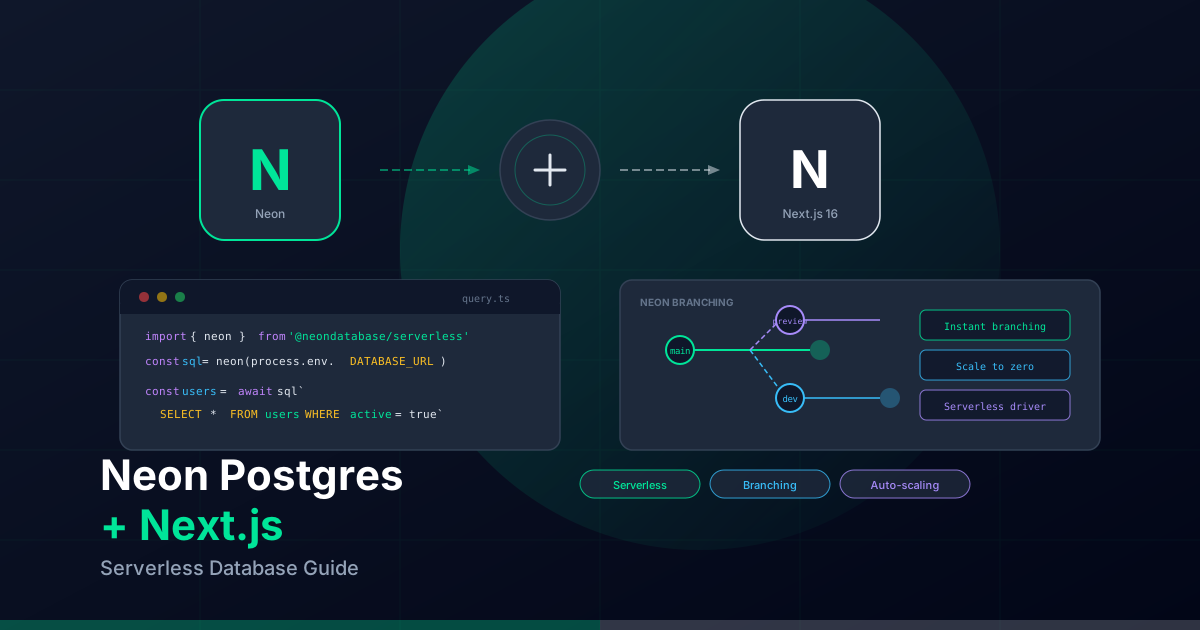
Neon is a serverless Postgres platform that brings features like instant branching, scale-to-zero, and a purpose-built serverless driver to modern web applications. Combined with Next.js 16, it provides a powerful, cost-efficient database layer that scales automatically with your traffic.
Why Neon Postgres?
Traditional Postgres requires always-on servers that charge you even during idle periods. Neon changes this by introducing serverless compute that scales to zero when there's no activity:
- Scale to zero: No charges when your database is idle — perfect for side projects and staging environments.
- Instant branching: Create database branches like Git branches — each preview deployment gets its own isolated database.
- Serverless driver:
@neondatabase/serverlessuses HTTP and WebSockets instead of TCP, making it compatible with Edge and Serverless runtimes. - Autoscaling: Compute scales from 0.25 to 10+ CU based on query load.
- Vercel Marketplace: One-click install with auto-provisioned environment variables.
Setting up Neon with Next.js
Option 1: Via Vercel Marketplace (recommended)
The easiest way to get started is through the Vercel Marketplace, which auto-provisions your database and environment variables:
# Install the Neon integration via Vercel CLI
vercel integration add neon

# Pull environment variables to your local project
vercel env pull .env.local
This automatically sets DATABASE_URL and DATABASE_URL_UNPOOLED in your Vercel project.
Option 2: Manual setup
# Install the serverless driver
npm install @neondatabase/serverless
Then add your connection string to .env.local:
DATABASE_URL=postgresql://user:pass@ep-xxx.eu-west-2.aws.neon.tech/neondb?sslmode=requireUsing the Serverless Driver
The Neon serverless driver (@neondatabase/serverless) is designed specifically for serverless and edge environments. Unlike pg, it doesn't require persistent TCP connections:
// lib/db.ts
import { neon } from '@neondatabase/serverless';

const sql = neon(process.env.DATABASE_URL!);

// Simple query
export async function getUsers() {
  const users = await sql`SELECT * FROM users WHERE active = true`;
  return users;
}

// Parameterized query (safe from SQL injection)
export async function getUserById(id: number) {
  const [user] = await sql`SELECT * FROM users WHERE id = ${id}`;
  return user;
}

// Insert with returning
export async function createUser(name: string, email: string) {
  const [user] = await sql`
    INSERT INTO users (name, email)
    VALUES (${name}, ${email})
    RETURNING *
  `;
  return user;
}
Querying from Server Components
Since Server Components run on the server, you can query Neon directly without an API layer:
// app/users/page.tsx
import { neon } from '@neondatabase/serverless';

const sql = neon(process.env.DATABASE_URL!);

export default async function UsersPage() {
  const users = await sql`
    SELECT id, name, email, created_at
    FROM users
    ORDER BY created_at DESC
  `;

  return (
    <main>
      <h1>Users</h1>
      <ul>
        {users.map((user) => (
          <li key={user.id}>
            <strong>{user.name}</strong> — {user.email}
          </li>
        ))}
      </ul>
    </main>
  );
}
Mutations with Server Actions
Use Server Actions for data mutations — they integrate naturally with forms and revalidation:
// app/users/actions.ts
'use server';

import { neon } from '@neondatabase/serverless';
import { revalidatePath } from 'next/cache';
import { z } from 'zod';

const sql = neon(process.env.DATABASE_URL!);

const CreateUserSchema = z.object({
  name: z.string().min(2).max(100),
  email: z.string().email(),
});

export async function createUser(formData: FormData) {
  const parsed = CreateUserSchema.safeParse({
    name: formData.get('name'),
    email: formData.get('email'),
  });

  if (!parsed.success) {
    return { error: parsed.error.flatten().fieldErrors };
  }

  await sql`
    INSERT INTO users (name, email)
    VALUES (${parsed.data.name}, ${parsed.data.email})
  `;

  revalidatePath('/users');
}
Database Branching for Preview Deployments
One of Neon's killer features is database branching. Each branch is a copy-on-write clone of your main database — instant to create, zero storage overhead until data diverges:
# Create a branch for a feature
neonctl branches create --name feat/new-feature --parent main

# Each Vercel preview deployment can use its own branch
# Configure this in your Vercel project settings under "Neon Integration"
This means your preview deployments get isolated databases with real production data (or a seed), so QA can test without risk.
Using Neon with Prisma
If you prefer an ORM, Neon works seamlessly with Prisma using the serverless adapter:
// lib/prisma.ts
import { PrismaClient } from '@prisma/client';
import { neonConfig, Pool } from '@neondatabase/serverless';
import { PrismaNeon } from '@prisma/adapter-neon';

// Enable WebSocket connections for Prisma
neonConfig.webSocketConstructor = globalThis.WebSocket;

const pool = new Pool({ connectionString: process.env.DATABASE_URL });
const adapter = new PrismaNeon(pool);

export const prisma = new PrismaClient({ adapter });
Connection Pooling
Neon provides built-in connection pooling via PgBouncer. Your connection string determines whether pooling is used:
DATABASE_URL— Pooled connection (default, recommended for queries)DATABASE_URL_UNPOOLED— Direct connection (needed for migrations and schema changes)
// For migrations (prisma/schema.prisma)
datasource db {
  provider  = "postgresql"
  url       = env("DATABASE_URL")
  directUrl = env("DATABASE_URL_UNPOOLED")
}
Performance Tips
- Use the serverless driver for simple queries: It's lighter than Prisma and avoids cold start overhead.
- Enable autoscaling: Set min CU to 0.25 for dev, higher for production.
- Use connection pooling: Always use the pooled URL for application queries.
- Cache aggressively: Combine with Next.js
'use cache'or ISR to reduce database hits. - Index your queries: Use
EXPLAIN ANALYZEin Neon's SQL editor to identify slow queries.
Conclusion
Neon Postgres is the natural database choice for Next.js applications on Vercel. Its serverless architecture, instant branching, and purpose-built driver eliminate the traditional friction of database management. Whether you're building a side project or a production SaaS, Neon scales with you — from zero to thousands of concurrent queries.