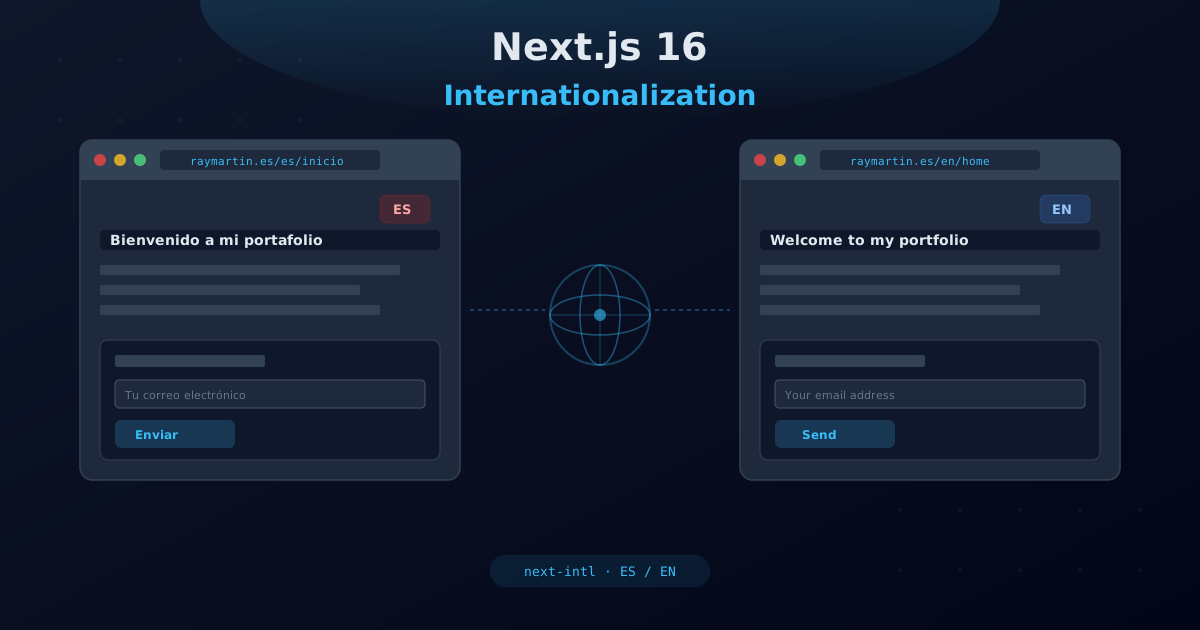
Building a web application that serves users across different languages and regions is no longer optional for modern products. Whether you are targeting Spanish-speaking markets, expanding into English-speaking territories, or planning for global reach, internationalization (i18n) must be a first-class concern in your architecture. In this guide, we will walk through how to internationalize a Next.js 16 application using next-intl, one of the most robust and developer-friendly i18n libraries in the React ecosystem.
We will cover everything from initial setup to advanced patterns like rich text interpolation, plural rules, and multilingual SEO. By the end, you will have a fully internationalized Next.js app with clean, maintainable translation architecture.
Why Internationalize?
Internationalization is not just about translating text. It is about building software that adapts to different languages, regions, and cultural conventions. Here are the key reasons to invest in i18n early:
- Broader audience reach: By supporting multiple languages, you immediately open your product to millions of additional users who prefer browsing in their native language.
- Improved SEO: Search engines index content per language. A properly internationalized site with hreflang tags and locale-specific URLs will rank better in local search results.
- Better user experience: Users are far more likely to engage with content presented in their own language. Studies show that over 70% of internet users prefer content in their native tongue.
- Regulatory compliance: In some regions, providing content in the local language is a legal requirement, especially for e-commerce and financial services.
- Future-proofing: Adding i18n after the fact is significantly more expensive than building it in from the start. Retrofitting translations into an existing codebase often requires touching every component.
The next-intl library is purpose-built for the Next.js App Router. It supports both server and client components, provides type-safe message access, and integrates seamlessly with Next.js middleware for locale detection and routing.
Installation and Initial Setup
Getting started with next-intl in a Next.js 16 project is straightforward. Begin by installing the package:
npm install next-intlNext, create the i18n configuration file at the root of your project. This file defines your supported locales and the default locale:
// i18n.ts
import { getRequestConfig } from "next-intl/server";

export const locales = ["en", "es"] as const;
export type Locale = (typeof locales)[number];
export const defaultLocale: Locale = "es";

export default getRequestConfig(async ({ locale }) => ({
  messages: (await import(`./messages/${locale}.json`)).default,
}));
This configuration does several important things:
- Defines the supported locales as a const tuple for type safety
- Exports a
Localetype that can be used throughout the application - Sets the default locale (in this case, Spanish)
- Dynamically imports the correct message file based on the active locale
You also need to update your next.config.ts to include the next-intl plugin:
// next.config.ts
import createNextIntlPlugin from "next-intl/plugin";

const withNextIntl = createNextIntlPlugin();

const nextConfig = {
  // your existing config
};

export default withNextIntl(nextConfig);
This plugin ensures that the i18n configuration is properly loaded and that message files are watched during development for hot reloading.
Message Structure
Translation messages are stored as JSON files in the /messages directory. Each locale gets its own file, and messages are organized into namespaces that correspond to different parts of the application.
// messages/en.json
{
  "hero_banner": {
    "title": "Building Digital Experiences",
    "subtitle": "Fullstack developer specializing in modern web applications",
    "cta_primary": "View Projects",
    "cta_secondary": "Contact Me"
  },
  "services": {
    "title": "Services",
    "description": "Professional web development services tailored to your needs",
    "items": {
      "web_development": {
        "title": "Web Development",
        "description": "Custom web applications built with modern frameworks"
      },
      "consulting": {
        "title": "Technical Consulting",
        "description": "Architecture reviews and technology recommendations"
      }
    }
  },
  "contact": {
    "title": "Get in Touch",
    "form": {
      "name": "Your Name",
      "email": "Email Address",
      "message": "Your Message",
      "submit": "Send Message",
      "success": "Message sent successfully!",
      "error": "Something went wrong. Please try again."
    }
  }
}// messages/es.json
{
"hero_banner": {
"title": "Construyendo Experiencias Digitales",
"subtitle": "Desarrollador fullstack especializado en aplicaciones web modernas",
"cta_primary": "Ver Proyectos",
"cta_secondary": "Contactar"
},
"services": {
"title": "Servicios",
"description": "Servicios profesionales de desarrollo web adaptados a tus necesidades",
"items": {
"web_development": {
"title": "Desarrollo Web",
"description": "Aplicaciones web personalizadas con frameworks modernos"
},
"consulting": {
"title": "Consultoría Técnica",
"description": "Revisiones de arquitectura y recomendaciones tecnológicas"
}
}
},
"contact": {
"title": "Contacto",
"form": {
"name": "Tu Nombre",
"email": "Correo Electrónico",
"message": "Tu Mensaje",
"submit": "Enviar Mensaje",
"success": "¡Mensaje enviado con éxito!",
"error": "Algo salió mal. Por favor, inténtalo de nuevo."
}
}
}Key principles for message structure:
- Use namespaces: Group related translations under a common key. This keeps files organized and allows for targeted loading.
- Keep keys consistent: Both locale files must have identical key structures. Missing keys will cause runtime errors.
- Use descriptive keys: Prefer
form.submitoverbtn1. Keys should describe the purpose, not the content. - Nest logically: Use nesting to reflect UI hierarchy, but avoid going deeper than three levels.
Configuring the Middleware
The middleware is responsible for detecting the user's preferred locale, managing locale-prefixed URLs, and redirecting when necessary. Create or update your middleware.ts file:
// middleware.ts
import createMiddleware from "next-intl/middleware";
import { locales, defaultLocale } from "./i18n";

export default createMiddleware({
  locales,
  defaultLocale,
  localePrefix: "as-needed",
  localeDetection: true,
});

export const config = {
  matcher: [
    // Match all pathnames except for
    // - API routes
    // - _next (Next.js internals)
    // - Static files with extensions
    "/((?!api|_next|.*\..*).*)",
  ],
};
The middleware configuration options explained:
- locales: The array of supported locale codes. Must match the locales defined in your i18n config.
- defaultLocale: The fallback locale when no match is found. For a Spanish-first site, this would be "es".
- localePrefix: Controls how locale prefixes appear in URLs. Options include:
"always": every URL includes the locale prefix (e.g., /es/about, /en/about)"as-needed": the default locale has no prefix, others do (e.g., /about for ES, /en/about for EN)"never": no locale prefix in URLs (locale stored in cookie)
- localeDetection: When true, the middleware reads the Accept-Language header and stored cookies to automatically detect the user's preferred language.
The matcher pattern ensures that the middleware only runs on page routes, not on API endpoints, Next.js internal routes, or static file requests.
Routing with [locale]
Next.js App Router uses the [locale] dynamic segment to handle locale-based routing. Your app directory structure should look like this:
app/
├── [locale]/
│   ├── layout.tsx      # Root layout with locale providers
│   ├── page.tsx         # Home page
│   ├── about/
│   │   └── page.tsx     # About page
│   └── projects/
│       └── page.tsx     # Projects page
└── api/
    └── contact/
        └── route.ts     # API route (no locale needed)
The root layout wraps everything with the NextIntlClientProvider to make translations available in client components:
// app/[locale]/layout.tsx
import { NextIntlClientProvider } from "next-intl";
import { getMessages, getTranslations } from "next-intl/server";
import { locales } from "@/i18n";
import { notFound } from "next/navigation";

interface LayoutProps {
  children: React.ReactNode;
  params: { locale: string };
}

export async function generateMetadata({
  params: { locale },
}: LayoutProps) {
  const t = await getTranslations({ locale, namespace: "metadata" });

  return {
    title: t("title"),
    description: t("description"),
  };
}

export default async function LocaleLayout({
  children,
  params: { locale },
}: LayoutProps) {
  if (!locales.includes(locale as any)) {
    notFound();
  }

  const messages = await getMessages();

  return (
    <html lang={locale}>
      <body>
        <NextIntlClientProvider messages={messages}>
          {children}
        </NextIntlClientProvider>
      </body>
    </html>
  );
}
Notice that the layout validates the locale parameter against the supported locales array. If an unsupported locale is requested, it triggers a 404 response. The getMessages() function loads all messages for the current locale, which are then passed to the client provider.
For pages, the locale is available through the params and can be used to fetch locale-specific data:
// app/[locale]/page.tsx
import { getTranslations } from "next-intl/server";

export default async function HomePage() {
  const t = await getTranslations("hero_banner");

  return (
    <main>
      <h1>{t("title")}</h1>
      <p>{t("subtitle")}</p>
    </main>
  );
}
Using Translations in Components
How you access translations depends on whether your component is a server component or a client component.
Server Components
In server components, use the async getTranslations function:
// components/sections/Services.tsx (Server Component)
import { getTranslations } from "next-intl/server";

export default async function Services() {
  const t = await getTranslations("services");

  return (
    <section aria-labelledby="services-title">
      <h2 id="services-title">{t("title")}</h2>
      <p>{t("description")}</p>
      <div>
        <h3>{t("items.web_development.title")}</h3>
        <p>{t("items.web_development.description")}</p>
      </div>
    </section>
  );
}
Client Components
In client components, use the useTranslations hook:
// components/common/ContactModal.tsx
"use client";

import { useTranslations } from "next-intl";

export default function ContactModal() {
  const t = useTranslations("contact");

  return (
    <dialog aria-label={t("title")}>
      <h2>{t("title")}</h2>
      <form>
        <label>
          {t("form.name")}
          <input
            type="text"
            placeholder={t("form.name")}
            aria-label={t("form.name")}
          />
        </label>
        <button type="submit">
          {t("form.submit")}
        </button>
      </form>
    </dialog>
  );
}
You can also access translations from multiple namespaces in a single component:
"use client";

import { useTranslations } from "next-intl";

export default function Footer() {
  const tFooter = useTranslations("footer");
  const tRoutes = useTranslations("routes");

  return (
    <footer role="contentinfo">
      <nav aria-label={tFooter("nav_label")}>
        <a href="/">{tRoutes("home")}</a>
        <a href="/about">{tRoutes("about")}</a>
      </nav>
      <p>{tFooter("copyright")}</p>
    </footer>
  );
}
Rich Text and Plurals
Real-world applications need more than simple string translations. You will often need to embed HTML elements, components, or handle plural forms within translated text. next-intl provides powerful APIs for these use cases.
Rich Text with t.rich()
The t.rich() method allows you to embed React elements within translated strings:
// messages/en.json
{
  "about": {
    "bio": "I am a <strong>fullstack developer</strong> with over <highlight>10 years</highlight> of experience building <link>modern web applications</link>."
  }
}"use client";
import { useTranslations } from "next-intl";
export default function About() {
const t = useTranslations("about");
return (
<p>
{t.rich("bio", {
strong: (chunks) => <strong>{chunks}</strong>,
highlight: (chunks) => (
<span className="text-primary font-bold">{chunks}</span>
),
link: (chunks) => (
<a href="/projects" className="underline">{chunks}</a>
),
})}
</p>
);
}Plural Forms
Handling plurals correctly is essential for natural-sounding translations. next-intl uses ICU message syntax for pluralization:
// messages/en.json
{
  "projects": {
    "count": "You have {count, plural, =0 {no projects} one {# project} other {# projects}} in your portfolio."
  }
}

// messages/es.json
{
  "projects": {
    "count": "Tienes {count, plural, =0 {ningún proyecto} one {# proyecto} other {# proyectos}} en tu portafolio."
  }
}const t = useTranslations("projects");
// Output: "You have no projects in your portfolio."
t("count", { count: 0 });
// Output: "You have 1 project in your portfolio."
t("count", { count: 1 });
// Output: "You have 5 projects in your portfolio."
t("count", { count: 5 });You can combine rich text and plurals for complex messages that include formatted elements and proper grammatical number agreement.
Multilingual SEO
Proper SEO for multilingual sites requires telling search engines about the relationship between your localized pages. This involves generating alternate hreflang tags and locale-specific metadata.
Alternate Hreflang Tags
Add alternate links in your root layout to inform search engines about equivalent pages in other languages:
// app/[locale]/layout.tsx
import { locales } from "@/i18n";

export async function generateMetadata({
  params: { locale },
}: LayoutProps) {
  const t = await getTranslations({ locale, namespace: "metadata" });
  const baseUrl = "https://raymartin.es";

  return {
    title: t("title"),
    description: t("description"),
    alternates: {
      canonical: `${baseUrl}/${locale}`,
      languages: Object.fromEntries(
        locales.map((l) => [l, `${baseUrl}/${l}`])
      ),
    },
    openGraph: {
      title: t("title"),
      description: t("description"),
      locale: locale,
      alternateLocale: locales.filter((l) => l !== locale),
      url: `${baseUrl}/${locale}`,
    },
  };
}
Locale-Specific Sitemaps
Generate a sitemap that includes all locale variants of each page:
// app/sitemap.ts
import { locales } from "@/i18n";

const baseUrl = "https://raymartin.es";

export default function sitemap() {
  const routes = ["", "/about", "/projects"];

  const entries = routes.flatMap((route) =>
    locales.map((locale) => ({
      url: `${baseUrl}/${locale}${route}`,
      lastModified: new Date(),
      alternates: {
        languages: Object.fromEntries(
          locales.map((l) => [l, `${baseUrl}/${l}${route}`])
        ),
      },
    }))
  );

  return entries;
}
Structured Data
Include the language in your JSON-LD structured data to help search engines understand the content language:
export default async function LocaleLayout({
  children,
  params: { locale },
}: LayoutProps) {
  const jsonLd = {
    "@context": "https://schema.org",
    "@type": "WebSite",
    name: "Ray Martin Portfolio",
    url: `https://raymartin.es/${locale}`,
    inLanguage: locale === "es" ? "es-ES" : "en-US",
  };

  return (
    <html lang={locale}>
      <body>
        <script
          type="application/ld+json"
          dangerouslySetInnerHTML={{ __html: JSON.stringify(jsonLd) }}
        />
        <NextIntlClientProvider messages={await getMessages()}>
          {children}
        </NextIntlClientProvider>
      </body>
    </html>
  );
}
Best Practices
After working with next-intl across multiple production applications, here are the practices that consistently lead to maintainable, performant internationalized codebases:
1. Organize Messages by Feature, Not by Page
Structure your namespaces around features and components rather than pages. A "contact" namespace is reusable across any page that shows a contact form, while a "home_page" namespace creates unnecessary duplication if the same elements appear elsewhere.
2. Use TypeScript for Type-Safe Messages
Create a global type declaration that provides autocomplete and type checking for your translation keys:
// global.d.ts
type Messages = typeof import("./messages/en.json");

declare interface IntlMessages extends Messages {}
With this in place, your IDE will autocomplete translation keys and warn you about missing or incorrect keys at compile time.
3. Keep the Default Locale File as Source of Truth
Pick one locale file (typically the default locale) as the authoritative source. All other locale files should mirror its structure exactly. Consider using a linting script to verify key parity across locale files.
4. Avoid Concatenating Translated Strings
Never build sentences by concatenating translated fragments. Different languages have different word orders, grammatical genders, and cases. Always translate complete sentences:
// Bad: concatenation breaks in other languages
const greeting = t("hello") + " " + t("world");

// Good: single translatable unit
const greeting = t("hello_world");
5. Handle Loading States Gracefully
When using dynamic imports for message files, ensure that loading states do not flash untranslated content. The NextIntlClientProvider handles this automatically for client components, but be mindful of suspense boundaries.
6. Test with Real Translations
German text is typically 30% longer than English. Arabic reads right-to-left. Japanese has no spaces between words. Test your layouts with actual translations to catch overflow, alignment, and readability issues.
7. Use Namespaced Access Patterns
When a component only needs translations from a single namespace, pass the namespace to useTranslations or getTranslations. This keeps your component code clean and makes the translation dependencies explicit:
// Scoped to a single namespace
const t = useTranslations("services");
t("title"); // accesses services.title

// Avoid: accessing root-level translations
const t = useTranslations();
t("services.title"); // works but less explicit
8. Provide Context in Translation Keys
When the same word might be translated differently depending on context (e.g., "Post" as a noun vs. a verb), use descriptive keys that clarify the intended meaning:
{
  "blog": {
    "post_noun": "Post",
    "post_verb": "Publish"
  }
}
9. Centralize Locale Switching Logic
Use the next-intl navigation APIs for locale switching to ensure consistent behavior across your application:
import { useRouter, usePathname } from "next-intl/client";

export function LocaleSwitcher() {
  const router = useRouter();
  const pathname = usePathname();

  function switchLocale(newLocale: string) {
    router.replace(pathname, { locale: newLocale });
  }

  return (
    <button onClick={() => switchLocale("en")}>
      English
    </button>
  );
}
10. Performance Considerations
Load only the messages you need. For large applications, consider splitting messages by route or feature using next-intl's message loading API. Server components have zero client-side overhead for translations since the text is rendered on the server and sent as HTML. Reserve useTranslations for components that genuinely need client-side interactivity.
By following these patterns and practices, you will build an internationalized Next.js application that is maintainable, performant, and ready to scale to any number of supported languages.