Why Vercel for Next.js?
Vercel is the company behind Next.js, and their platform is purpose-built to deliver the best possible experience for Next.js applications. While you can deploy Next.js to virtually any hosting provider, Vercel offers first-class support for every Next.js feature out of the box, including Server Components, Incremental Static Regeneration, Edge Functions, and Middleware.
When you deploy to Vercel, you get automatic HTTPS, a global CDN with edge nodes in over 30 regions, seamless preview deployments for every pull request, and built-in analytics. There is zero configuration needed for most Next.js features, which means you spend less time on DevOps and more time building your application.
Key advantages of deploying Next.js 16 on Vercel include:
- Zero-config deployments that automatically detect your Next.js version and settings
- Native support for the App Router, Server Actions, and Partial Prerendering
- Automatic code splitting and optimized bundling at the edge
- Built-in image optimization via the Vercel Image Optimization API
- Integrated serverless and edge function runtimes
- Real-time logs, monitoring, and Web Vitals tracking
- Instant rollbacks to any previous deployment
For production-grade applications, Vercel provides the infrastructure layer so you can focus entirely on your product. The tight integration between the framework and the platform eliminates entire categories of deployment issues.
Project Configuration
While Vercel works without any configuration file, you can fine-tune deployment behavior by adding
a vercel.json file to your project root. This file lets you configure redirects, headers,
rewrites, and other platform-specific settings.
{
  "framework": "nextjs",
  "buildCommand": "npm run build",
  "outputDirectory": ".next",
  "regions": ["iad1", "cdg1"],
  "headers": [
    {
      "source": "/api/(.*)",
      "headers": [
        { "key": "Access-Control-Allow-Origin", "value": "*" },
        { "key": "Cache-Control", "value": "no-store, max-age=0" }
      ]
    },
    {
      "source": "/(.*)",
      "headers": [
        { "key": "X-Content-Type-Options", "value": "nosniff" },
        { "key": "X-Frame-Options", "value": "DENY" },
        { "key": "Referrer-Policy", "value": "strict-origin-when-cross-origin" }
      ]
    }
  ],
  "redirects": [
    {
      "source": "/blog/:slug",
      "destination": "/articles/:slug",
      "permanent": true
    }
  ],
  "rewrites": [
    {
      "source": "/sitemap.xml",
      "destination": "/api/sitemap"
    }
  ]
}
The regions field specifies where your serverless functions execute. Choose regions
closest to your database or primary user base. For a bilingual site serving Spain and the US,
cdg1 (Paris) and iad1 (Washington, D.C.) provide excellent coverage.
You can also configure build settings directly in the Vercel dashboard under
Settings > General. Dashboard settings override vercel.json for
build commands and output directories.
For advanced production setups, combine vercel.json with your next.config.ts
to control both framework-level and platform-level behavior:
// next.config.ts
import type { NextConfig } from "next";

const nextConfig: NextConfig = {
  reactStrictMode: true,

  async headers() {
    return [
      {
        source: "/:path*",
        headers: [
          {
            key: "Strict-Transport-Security",
            value: "max-age=63072000; includeSubDomains; preload",
          },
        ],
      },
    ];
  },

  async redirects() {
    return [
      {
        source: "/:path*",
        has: [{ type: "host", value: "www.example.com" }],
        destination: "https://example.com/:path*",
        permanent: true,
      },
    ];
  },
};

export default nextConfig;
First Deployment
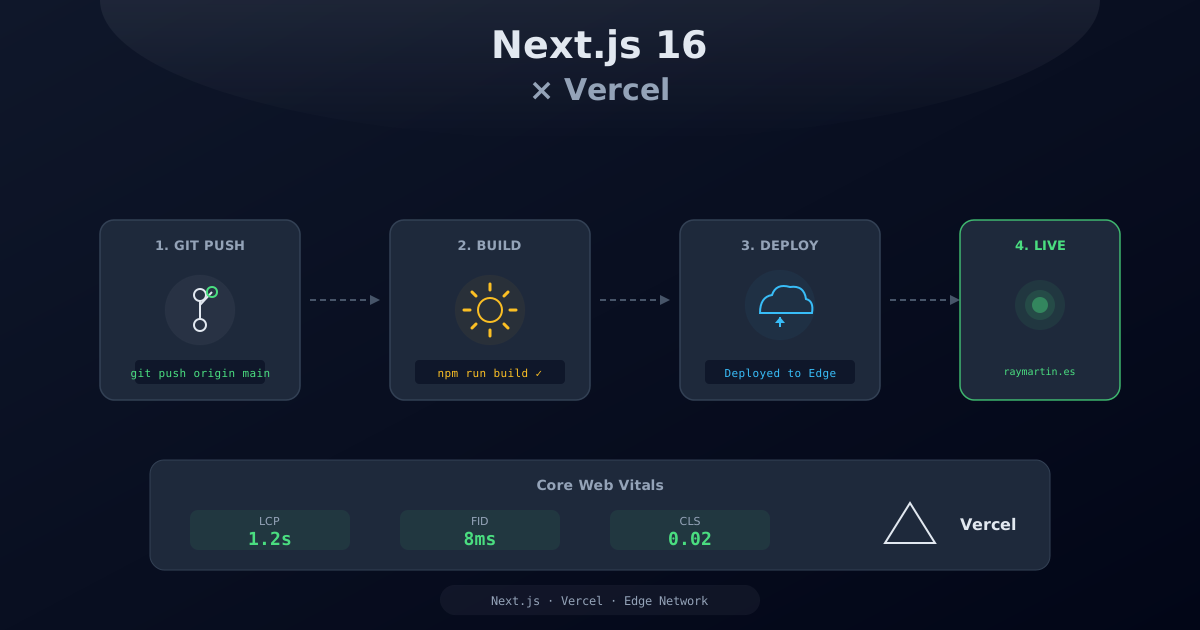
There are two primary ways to deploy your Next.js project to Vercel: connecting your GitHub repository for automatic deployments, or using the Vercel CLI for manual deployments.
Connecting GitHub
The recommended approach is to connect your GitHub repository directly to Vercel. Every push to your main branch triggers a production deployment, and every pull request gets its own preview deployment.
- Sign in to vercel.com with your GitHub account
- Click Add New Project and select your repository
- Vercel automatically detects Next.js and configures build settings
- Add your environment variables (API keys, secrets)
- Click Deploy
Your first deployment typically takes 1-3 minutes. Once complete, you receive a unique URL
like your-project-abc123.vercel.app.
Using the Vercel CLI
For more control over the deployment process, install and use the Vercel CLI:
# Install the Vercel CLI globally
npm install -g vercel

# Log in to your Vercel account
vercel login

# Deploy to preview (staging)
vercel

# Deploy directly to production
vercel --prod

# Deploy with specific environment variables
vercel --env DATABASE_URL=postgres://... --prod

# Link your local project to an existing Vercel project
vercel link
The CLI is especially useful for CI/CD pipelines, scripted deployments, and testing configuration changes before pushing to your main branch.
# Common CI/CD workflow
npm ci
npm run build
npm run lint
vercel --prod --token $VERCEL_TOKEN
You can also pull environment variables from Vercel to your local development environment:
# Pull environment variables for local development
vercel env pull .env.local

# List all environment variables
vercel env ls
Setting Up a Custom Domain
After your first deployment, add a custom domain through the Vercel dashboard or CLI:
# Add a custom domain via CLI
vercel domains add yourdomain.com

# Verify DNS configuration
vercel domains inspect yourdomain.com- Enter your domain name in the Vercel dashboard under Project Settings > Domains
- Vercel provides the DNS records to add at your registrar
- For root domains, add an
Arecord pointing to76.76.21.21 - For subdomains, add a
CNAMErecord pointing tocname.vercel-dns.com - Vercel automatically provisions and renews SSL/TLS certificates via Let's Encrypt
ISR and Revalidation
Incremental Static Regeneration (ISR) is one of the most powerful features of Next.js on Vercel. It allows you to serve static pages while revalidating them in the background, giving you the performance of static sites with the freshness of server-rendered pages.
Time-Based Revalidation
In Next.js 16 with the App Router, you configure revalidation at the page or layout level:
// app/[locale]/page.tsx
export const revalidate = 86400; // Revalidate every 24 hours (in seconds)

export default async function HomePage() {
  const data = await fetch("https://api.example.com/content", {
    next: { revalidate: 3600 }, // Per-fetch revalidation (1 hour)
  });

  return <main>{/* Page content */}</main>;
}
When a user visits a page after the revalidation period has elapsed, they immediately receive the cached version. Vercel then regenerates the page in the background so the next visitor gets fresh content. This is known as stale-while-revalidate.
On-Demand Revalidation
For content that changes at unpredictable intervals (such as CMS updates or user-generated
content), you can trigger revalidation programmatically using revalidatePath
or revalidateTag:
// app/api/revalidate/route.ts
import { revalidatePath, revalidateTag } from "next/cache";
import { NextRequest, NextResponse } from "next/server";

export async function POST(request: NextRequest) {
  const secret = request.headers.get("x-revalidation-secret");

  if (secret !== process.env.REVALIDATION_SECRET) {
    return NextResponse.json({ error: "Unauthorized" }, { status: 401 });
  }

  const body = await request.json();

  if (body.path) {
    revalidatePath(body.path);
    return NextResponse.json({ revalidated: true, path: body.path });
  }

  if (body.tag) {
    revalidateTag(body.tag);
    return NextResponse.json({ revalidated: true, tag: body.tag });
  }

  return NextResponse.json(
    { message: "No path or tag provided" },
    { status: 400 }
  );
}
You can call this endpoint from a CMS webhook or an admin panel to instantly invalidate cached content:
# Revalidate a specific page
curl -X POST "https://your-site.vercel.app/api/revalidate" \
  -H "Content-Type: application/json" \
  -H "x-revalidation-secret: YOUR_SECRET" \
  -d '{"path": "/blog/my-post"}'

# Revalidate all pages using a specific data tag
curl -X POST "https://your-site.vercel.app/api/revalidate" \
  -H "Content-Type: application/json" \
  -H "x-revalidation-secret: YOUR_SECRET" \
  -d '{"tag": "blog-posts"}'
On Vercel, on-demand revalidation propagates globally across all edge nodes, ensuring every user receives fresh content regardless of their geographic location.
Edge Functions and Middleware
Vercel Edge Functions run at the CDN edge, closer to your users, with near-instant cold starts. Next.js Middleware is the primary way to leverage edge computing in your application. Middleware executes before every request, making it ideal for locale detection, authentication, A/B testing, and URL rewrites.
// middleware.ts
import createMiddleware from "next-intl/middleware";
import { NextRequest, NextResponse } from "next/server";

const intlMiddleware = createMiddleware({
  locales: ["es", "en"],
  defaultLocale: "es",
  localeDetection: true,
});

export default function middleware(request: NextRequest) {
  const { pathname } = request.nextUrl;

  // Skip middleware for static assets and API routes
  if (
    pathname.startsWith("/_next") ||
    pathname.startsWith("/api") ||
    pathname.includes(".")
  ) {
    return NextResponse.next();
  }

  // Geo-based logic
  const country = request.geo?.country || "US";

  // A/B testing with cookies
  const bucket = request.cookies.get("ab-bucket")?.value;
  if (!bucket) {
    const response = intlMiddleware(request);
    const newBucket = Math.random() > 0.5 ? "a" : "b";
    response.cookies.set("ab-bucket", newBucket, {
      maxAge: 60 * 60 * 24 * 30,
    });
    return response;
  }

  return intlMiddleware(request);
}

export const config = {
  matcher: ["/((?!_next|api|favicon.ico).*)"],
};
Common middleware use cases on Vercel include:
- Locale detection and redirect: Detect the user's language from headers and redirect to the appropriate locale
- Authentication checks: Verify JWT tokens or session cookies before allowing access to protected routes
- A/B testing: Assign users to experiment buckets and rewrite requests to variant pages
- Rate limiting: Throttle requests from individual IPs to protect your API routes
- Feature flags: Enable or disable features based on cookies, headers, or geo location
- Bot detection: Block or redirect suspicious user agents from API endpoints
You can also run API routes at the edge for ultra-low latency responses:
// app/api/geo/route.ts
import { NextRequest, NextResponse } from "next/server";

export const runtime = "edge";

export async function GET(request: NextRequest) {
  const country = request.geo?.country || "unknown";
  const city = request.geo?.city || "unknown";
  const region = request.geo?.region || "unknown";

  return NextResponse.json({
    country,
    city,
    region,
    timestamp: Date.now(),
  });
}
Edge functions use a lightweight runtime based on Web APIs. They cannot use Node.js-specific modules
like fs or native dependencies. Use the edge runtime for lightweight, latency-sensitive
operations and the Node.js runtime for heavier processing.
Image Optimization
Next.js provides a built-in <Image> component that automatically optimizes
images on the fly. On Vercel, this is powered by the Vercel Image Optimization API, which
resizes, compresses, and serves images in modern formats like WebP and AVIF.
import Image from "next/image";

export function HeroSection() {
  return (
    <section className="relative h-screen">
      <Image
        src="/images/hero-background.jpg"
        alt="Hero background showcasing a modern workspace"
        fill
        priority
        fetchPriority="high"
        sizes="100vw"
        className="object-cover"
        quality={85}
      />
      <div className="relative z-10 flex items-center justify-center h-full">
        <h1 className="text-5xl font-bold text-white">Welcome</h1>
      </div>
    </section>
  );
}
For external images, you must configure remotePatterns in your Next.js config:
// next.config.ts
import type { NextConfig } from "next";

const nextConfig: NextConfig = {
  images: {
    remotePatterns: [
      {
        protocol: "https",
        hostname: "images.unsplash.com",
        pathname: "/**",
      },
      {
        protocol: "https",
        hostname: "cdn.example.com",
        pathname: "/assets/**",
      },
    ],
    formats: ["image/avif", "image/webp"],
    deviceSizes: [640, 750, 828, 1080, 1200, 1920, 2048],
    imageSizes: [16, 32, 48, 64, 96, 128, 256, 384],
  },
};

export default nextConfig;
Best practices for image optimization on Vercel:
- Use the
priorityprop for above-the-fold images (LCP candidates) to preload them - Always provide a descriptive
altattribute for accessibility - Use the
sizesprop to help the browser select the right image size for the viewport - Prefer
fillwithobject-coverfor responsive hero images - Set
qualitybetween 75-85 for a good balance of file size and visual clarity - Enable AVIF format for maximum compression in modern browsers
Vercel's image optimization service processes images on demand and caches them globally at the edge. The first request to a new image size is slower while it processes, but subsequent requests are served from the cache in milliseconds.
Analytics and Web Vitals
Vercel provides built-in analytics that track real-user performance metrics, including all Core Web Vitals. This helps you monitor your application's performance in production and identify regressions before they impact users.
To enable Vercel Analytics, install the required packages and add them to your layout:
npm install @vercel/analytics @vercel/speed-insights// app/[locale]/layout.tsx
import { Analytics } from "@vercel/analytics/next";
import { SpeedInsights } from "@vercel/speed-insights/next";
export default function RootLayout({
children,
}: {
children: React.ReactNode;
}) {
return (
<html>
<body>
{children}
<Analytics />
<SpeedInsights />
</body>
</html>
);
}
The <Analytics /> component tracks page views and custom events, while
<SpeedInsights /> measures Core Web Vitals from real user sessions:
- LCP (Largest Contentful Paint): measures loading performance, target under 2.5 seconds
- INP (Interaction to Next Paint): measures overall responsiveness, target under 200ms
- CLS (Cumulative Layout Shift): measures visual stability, target under 0.1
- TTFB (Time to First Byte): measures server responsiveness
- FCP (First Contentful Paint): measures when the first content appears on screen
You can also track custom events for business metrics:
import { track } from "@vercel/analytics";

function ContactButton() {
  const handleClick = () => {
    track("contact_form_opened", {
      source: "hero_section",
      locale: "en",
    });
  };

  return <button onClick={handleClick}>Contact Us</button>;
}
If you also use Google Analytics alongside Vercel Analytics, both systems operate independently and do not conflict. Vercel Analytics uses its own lightweight collection mechanism that does not add significant overhead to your page load.
// utils/analytics.ts: Google Analytics helper
export function trackEvent(
  action: string,
  category: string,
  label?: string,
  value?: number
) {
  if (typeof window !== "undefined" && window.gtag) {
    window.gtag("event", action, {
      event_category: category,
      event_label: label,
      value: value,
    });
  }
}

// Usage
trackEvent("click", "CTA", "hero_banner_cta");
Environment Variables
Vercel provides a robust environment variable system with different scopes for different deployment contexts. Understanding these scopes is critical for security and correct behavior.
Variable Scopes
- Production: Only available in production deployments (your live site on the main branch)
- Preview: Available in preview deployments (pull request and feature branch previews)
- Development: Available when running
vercel devlocally
# Add a variable for all environments
vercel env add MAILJET_API_KEY

# Add a variable for production only
vercel env add DATABASE_URL production

# Add a variable for preview only
vercel env add PREVIEW_DATABASE_URL preview

# Pull variables to local .env.local
vercel env pull .env.local

# List all environment variables
vercel env ls

# Remove a variable
vercel env rm OLD_VARIABLE
In Next.js, variables prefixed with NEXT_PUBLIC_ are exposed to the browser.
All other variables are only available server-side. Never put secrets in
NEXT_PUBLIC_ variables.
// This is safe: server-side only
const apiSecret = process.env.MAILJET_API_SECRET;

// This is exposed to the browser. Never put secrets here
const featureFlag = process.env.NEXT_PUBLIC_ENABLE_CONTACT_FORM;
For sensitive values like API keys and database credentials, always use server-side environment variables and access them only in Server Components, API routes, or Server Actions.
Environment Variable Best Practices
- Use different database URLs for production and preview environments to isolate data
- Rotate secrets regularly and update them via the Vercel dashboard or CLI
- Never commit
.envfiles to version control. Add them to.gitignore - Use
environment.d.tsto type your environment variables in TypeScript - Validate required variables at build time to catch misconfigurations early
- Use Vercel's encrypted environment variables for maximum security
Preview Deployments
Every pull request to your connected GitHub repository automatically generates a preview deployment on Vercel. This is one of the most valuable features for team collaboration and code review.
Preview deployments provide:
- A unique URL for each pull request (e.g.,
project-git-feature-branch.vercel.app) - Automatic comments on the GitHub pull request with the preview URL
- Isolated environment variables (preview scope) so previews connect to staging resources
- Full functionality including API routes, middleware, and ISR
- Lighthouse performance reports integrated into the PR checks
How Preview Deployments Work
- You push a branch and open a pull request on GitHub
- Vercel automatically builds and deploys the branch to a unique URL
- The preview URL is posted as a comment on the pull request
- Reviewers can test the changes live without checking out the branch locally
- Each new commit to the branch triggers an updated preview deployment
Deploy Hooks
Create deploy hooks to trigger deployments from external services such as CMS platforms, CI/CD pipelines, or custom admin panels:
# Trigger a deployment via deploy hook
curl -X POST "https://api.vercel.com/v1/integrations/deploy/prj_xxxx/yyyy"
Deploy hooks are useful for rebuilding your site when content changes in a headless CMS like Contentful, Sanity, or Strapi.
To protect preview deployments with authentication, enable Vercel Authentication in your project settings. This requires viewers to sign in with a Vercel account, preventing unauthorized access to in-progress features. You can also configure branch protection rules to control which branches can deploy to production.
Production Checklist
Before deploying your Next.js 16 application to production on Vercel, run through this comprehensive checklist to ensure everything is configured correctly.
Build and Performance
# Ensure the production build succeeds locally
npm run build

# Check for TypeScript errors
npx tsc --noEmit

# Run linting
npm run lint

# Analyze the bundle size
ANALYZE=true npm run build- Verify the build completes without warnings or errors
- Check that all pages are statically generated where possible
- Ensure no unnecessary client-side JavaScript is being shipped
- Confirm images use the Next.js
<Image>component with proper sizing - Verify fonts are loaded with
next/fontto avoid layout shifts - Run a Lighthouse audit and score 90+ on all categories
- Verify LCP is under 2.5 seconds and CLS is under 0.1
Security
- All API keys and secrets are stored as server-side environment variables (no
NEXT_PUBLIC_prefix) - Security headers configured in
vercel.jsonornext.config.ts(HSTS, X-Content-Type-Options, X-Frame-Options) .envfiles are listed in.gitignore- CSRF protection on form submissions and Server Actions
- Input sanitization on all API routes using Zod for validation
- Rate limiting on public-facing API endpoints
- Webhook signature verification for payment and CMS integrations
SEO and Accessibility
- Metadata configured for all pages (title, description, Open Graph, Twitter cards)
- Sitemap generated and accessible at
/sitemap.xml - Robots.txt properly configured to allow crawling
- Canonical URLs set for all pages
hreflangtags implemented for multilingual sites- All images have descriptive
altattributes - ARIA labels on interactive elements
- Keyboard navigation works throughout the site
- Color contrast meets WCAG 2.2 AA standards
Monitoring and Reliability
- Vercel Analytics and Speed Insights enabled
- Error tracking configured (Sentry, LogRocket, or similar)
- Uptime monitoring set up for critical endpoints
- Alert thresholds configured for Web Vitals regressions
- Custom domain DNS properly configured with SSL
- Error pages (404, 500) are configured and user-friendly
- Environment variables are set for the production scope
Once you have completed this checklist, deploy to production with confidence:
# Deploy to production via CLI
vercel --prod

# Or simply push to your main branch for automatic deployment
git push origin main
After deployment, monitor your Vercel dashboard for build logs, function invocations, and performance metrics. Set up notifications for failed deployments and performance regressions to catch issues early. Deployment is not the finish line. It is the starting line. Continuous monitoring, iteration, and improvement determine your application's long-term success.