Why Prompt Engineering Matters for Developers
Every developer working with AI tools has experienced the gap between what they meant and what the model produced. You ask for a "simple login form" and get a 200-line component with features you never wanted. You ask for "help with this bug" and get a generic explanation instead of a targeted fix.
Prompt engineering is the skill that closes this gap. For developers, it is not about crafting clever tricks. It is about communicating precisely with a system that takes your instructions literally. The better your prompts, the fewer iterations you need, and the more useful the output becomes on the first try.
This is especially true with tools like Claude Code, where the AI has real access to your filesystem and shell. A vague prompt does not just waste tokens; it can lead to unwanted file changes or missed requirements. Precision matters.
Structure of a Good Prompt
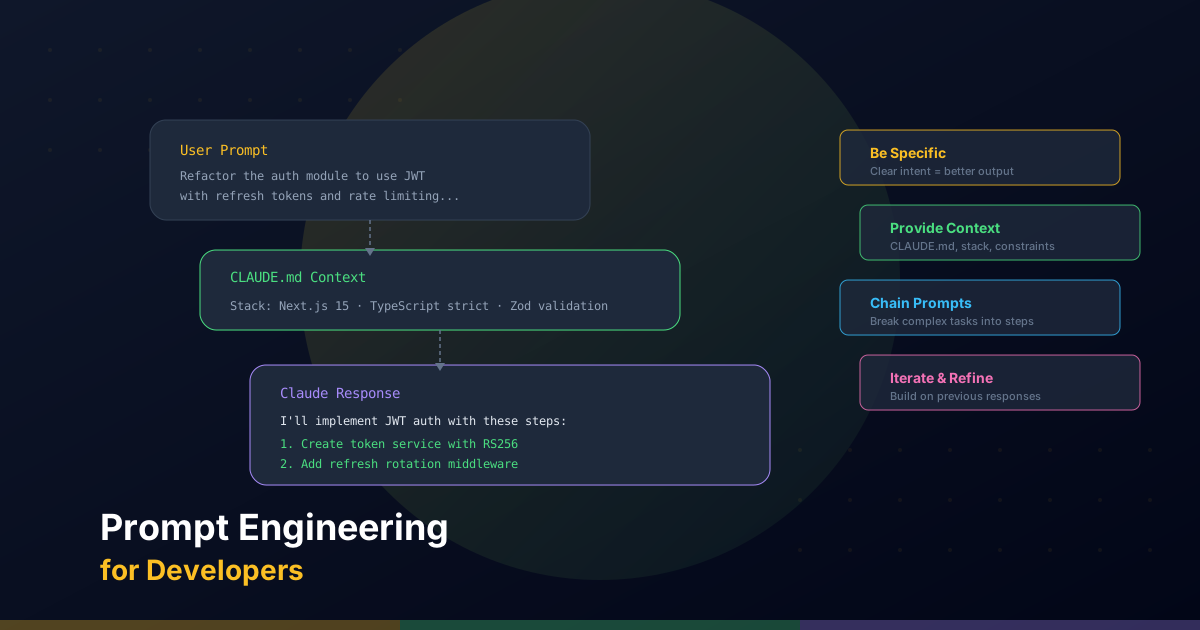
Effective prompts for coding tasks share four components:
- Context: What is the project? What tech stack? What has already been done?
- Task: What exactly do you want the AI to do? Be specific and actionable.
- Format: How should the output be structured? Code only? With explanations? In a specific file?
- Constraints: What should the AI avoid? What rules must it follow?
Here is the difference between a weak prompt and a strong one:
Weak Prompt
Add validation to the form.Strong Prompt
Add Zod validation to the contact form in /components/ContactForm.tsx.

Validate:
- name: required, min 2 chars, max 100 chars
- email: required, valid email format
- message: required, min 10 chars, max 1000 chars

Display inline error messages below each field using the existing
ErrorMessage component. Follow the validation pattern used in
/components/LoginForm.tsx.

Do not modify the form layout or styling.
The strong prompt provides context (which file, which component), a specific task (add Zod validation), the expected format (inline error messages with ErrorMessage component), and constraints (do not modify layout).
CLAUDE.md as a Persistent Prompt
If you use Claude Code, the CLAUDE.md file is the most powerful prompt you will ever write. It is read at the start of every session, giving Claude persistent context about your project without you having to repeat yourself.
Think of it as the difference between training a new hire every morning versus having them read a comprehensive onboarding document once. Your CLAUDE.md should encode:
- Project architecture: Where things live and how they connect
- Coding standards: Naming conventions, patterns, anti-patterns
- Commands: How to build, test, lint, and deploy
- Explicit rules: What the AI should never do
## Conventions
- Use React Server Components by default
- Add "use client" only when the component needs interactivity
- All API calls go through /lib/api.ts. Never call fetch directly
- Use cn() from /utils/classNames.ts for conditional Tailwind classes

## Do NOT
- Add new npm dependencies without asking first
- Create test files (no test framework configured)
- Modify the database schema
- Remove accessibility attributes (aria-label, role, etc.)
A well-maintained CLAUDE.md eliminates entire categories of mistakes and reduces the amount of instruction you need in individual prompts.
Useful Patterns
Chain of Thought
Ask Claude to reason step by step before producing a solution. This is particularly effective for debugging and architectural decisions:
The checkout flow is failing silently when users have items with
mixed shipping methods. Before suggesting a fix:

1. Trace the data flow from cart to checkout
2. Identify where mixed shipping methods are handled
3. Find the specific point of failure
4. Then propose a targeted fix
By asking Claude to trace before fixing, you get a more thorough analysis and a better solution.
Few-Shot Prompting
Show Claude examples of what you want. This is invaluable for maintaining consistency across a codebase:
Create a new API route handler for /api/products following the same
pattern as /api/users/route.ts:

- Zod schema for request validation
- Try/catch with standardized error responses
- Return NextResponse.json() with appropriate status codes
- Add JSDoc comments matching the style in the users route
By pointing to an existing file as the reference, Claude will match its structure, error handling, and style.
Role Prompting
Assign Claude a specific role to activate relevant expertise:
Acting as a senior security engineer, review the authentication
flow in /lib/auth.ts. Focus on:
- Token handling and storage
- Session expiration logic
- CSRF protection
- Input sanitization

Flag any vulnerabilities with severity ratings.
Role prompting shifts the model's perspective and often surfaces considerations that a generic review would miss.
Effective Context: What to Include and What Not
Context is the fuel that powers good AI responses, but too much context is as problematic as too little. Here is a practical guide:
Include
- The specific file paths and function names involved
- Error messages and stack traces (exact text, not paraphrased)
- The expected behavior versus the actual behavior
- Relevant constraints (performance requirements, browser support, etc.)
- References to existing patterns in the codebase
Exclude
- Entire file contents when only a section is relevant
- History of previous attempts (unless directly relevant)
- General background on well-known technologies
- Opinions or preferences that do not affect the output
Prompts for Common Development Tasks
Debugging
The UserProfile component throws "Cannot read properties of
undefined (reading 'email')" when navigating from the dashboard.

The error occurs in /components/UserProfile.tsx at the line where
we destructure user data. The user object comes from the useUser()
hook in /hooks/useUser.ts.

Find the root cause. Do not just add optional chaining. I want
to understand why user is undefined in this flow.
Refactoring
Refactor /lib/api.ts to replace the repetitive try/catch blocks
with a single wrapper function. Each API call currently has
identical error handling with slight variations.

Requirements:
- Create a generic apiCall<T> wrapper function
- Preserve all existing error logging
- Maintain the same return types for each function
- Do not change any function signatures used by other files
Code Review
Review the changes in the current git diff. For each file, check:

1. Logic errors or edge cases
2. TypeScript type safety (any use of 'any' or type assertions)
3. Missing error handling
4. Performance concerns (unnecessary re-renders, N+1 queries)
5. Accessibility issues

Format findings as a list with file path, line reference, severity
(critical/warning/suggestion), and explanation.
Common Mistakes When Giving Instructions to Claude
- Being too vague. "Make it better" tells Claude nothing. Better: "Reduce the function's cyclomatic complexity by extracting the validation logic into a separate function."
- Giving contradictory instructions. "Keep it simple but handle all edge cases" creates tension. Prioritize: "Handle the null and empty-array edge cases. Other edge cases can be addressed later."
- Assuming context that is not there. Even with Claude Code reading your files, explicitly name the files and functions you are talking about. Do not say "the component"; say "the UserProfile component in /components/UserProfile.tsx."
- Asking for too much at once. "Build the entire authentication system" is a recipe for mediocre output. Break it down: start with the login form, then the API route, then session management, then password reset.
- Not specifying what you do not want. Constraints are as important as requirements. "Do not add new dependencies" or "do not modify the database schema" prevents unwanted changes.
Advanced Tips
Multi-Turn Conversations
Long conversations with Claude benefit from periodic summarization. When a session gets deep, take a moment to restate the current state:
To summarize where we are:
- We have migrated the user service to the new API format
- The tests pass for create and read operations
- Update and delete still use the old format

Next: migrate the update endpoint following the same pattern we
used for create.
This resets the context and prevents Claude from mixing up earlier decisions with current requirements.
Sub-Agents
Claude Code supports sub-agents, which spawn focused child agents for specific subtasks. This is useful when a task has clearly separable concerns:
Use a sub-agent to analyze the performance of each API endpoint
in /src/routes/. For each endpoint, the sub-agent should measure
response time, identify N+1 queries, and suggest optimizations.
Then summarize the findings.
Sub-agents get their own context window, so they can focus deeply on a subtask without polluting the main conversation.
Plan Mode
For complex tasks, use plan mode (Shift+Tab in Claude Code) to have Claude outline its approach before executing. This is your chance to:
- Catch misunderstandings before they become code changes
- Redirect the approach if it is heading in the wrong direction
- Add constraints you forgot to mention
- Break the plan into smaller, reviewable steps
The best prompt engineers are not those who know the most tricks. They are the ones who think clearly about what they want before they start typing. Prompt engineering is fundamentally about clear communication, and that is a skill worth developing regardless of what tools you use.