React Server Components (RSC) have fundamentally changed how we build web applications with Next.js. In 2026, they're no longer an experimental feature — they're the standard. This article takes a deep dive into how they work, when to use them, and the advanced patterns you should master.
What are React Server Components?
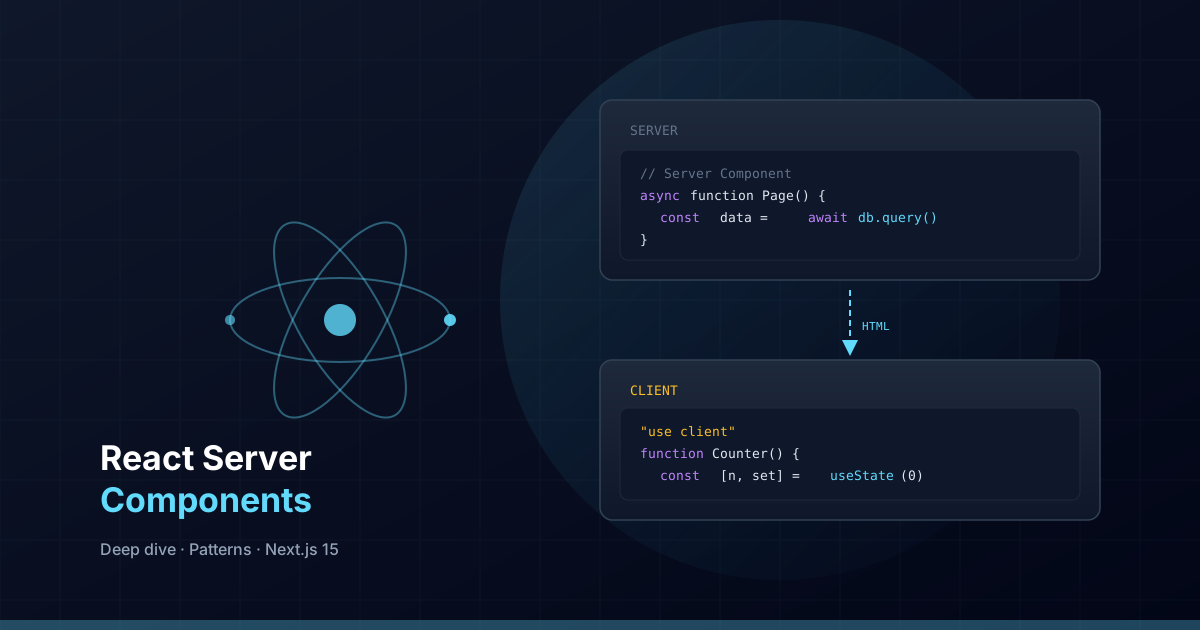
Server Components are React components that run exclusively on the server. Unlike Client Components, they never send JavaScript to the browser. This means you can directly access databases, internal APIs, and the file system without exposing logic to the client.
In Next.js 15 with App Router, all components are Server Components by default. You only need to add "use client" when you require browser interactivity.
The right mental model
Think of Server Components as templates that render on the server and send pure HTML to the client. The browser receives the final result, not the code to generate it.
// app/[locale]/blog/page.tsx — Server Component by default
import { getTranslations } from "next-intl/server";

export default async function BlogPage({
  params,
}: {
  params: Promise<{ locale: string }>;
}) {
  const { locale } = await params;
  const t = await getTranslations({ locale, namespace: "blog" });

  // Direct data access — no intermediate API needed
  const posts = await fetch("https://api.example.com/posts", {
    next: { revalidate: 3600 },
  }).then((res) => res.json());

  return (
    <main>
      <h1>{t("page_title")}</h1>
      {posts.map((post: { id: string; title: string }) => (
        <article key={post.id}>
          <h2>{post.title}</h2>
        </article>
      ))}
    </main>
  );
}
Server Components vs Client Components
The key is understanding when you need each type. It's not about choosing one over the other — it's about composing both strategically.
When to use Server Components
- Data fetching: Direct access to databases or APIs without going through public endpoints.
- Static or semi-static content: Text, listings, layouts that don't change with user interaction.
- SEO-critical content: Content renders as complete HTML, ideal for crawlers.
- Heavy components: Libraries like syntax highlighters or Markdown parsers that don't need to be sent to the client.
- Access to secrets: Server environment variables, API tokens, database credentials.
When to use Client Components
- Interactivity: onClick, onChange, onSubmit, and any event handler.
- Local state: useState, useReducer, useContext.
- Browser effects: useEffect, IntersectionObserver, localStorage.
- Third-party hooks: useTranslations (next-intl), useForm (react-hook-form).
// components/common/ThemeToggle.tsx — Client Component
"use client";

import { useState, useCallback } from "react";

export function ThemeToggle() {
  const [isDark, setIsDark] = useState(false);

  const toggle = useCallback(() => {
    setIsDark((prev) => !prev);
    document.documentElement.classList.toggle("dark");
  }, []);

  return (
    <button
      onClick={toggle}
      aria-label={isDark ? "Switch to light mode" : "Switch to dark mode"}
      className="rounded-lg p-2 hover:bg-gray-100 dark:hover:bg-gray-800"
    >
      {isDark ? "☀️" : "🌙"}
    </button>
  );
}
Advanced composition patterns
Server + Client container pattern
The most powerful RSC pattern is passing Server Components as children of Client Components. This lets you have an interactive wrapper without converting the entire tree to client code.
// components/sections/InteractiveSection.tsx
"use client";

import { useState, type ReactNode } from "react";

interface Props {
  title: string;
  children: ReactNode;
}

export function InteractiveSection({ title, children }: Props) {
  const [isExpanded, setIsExpanded] = useState(false);

  return (
    <section>
      <button
        onClick={() => setIsExpanded(!isExpanded)}
        aria-expanded={isExpanded}
      >
        {title}
      </button>
      {isExpanded && children}
    </section>
  );
}

// app/[locale]/page.tsx — Server Component
import { InteractiveSection } from "@/components/sections/InteractiveSection";

export default async function Page() {
  // This fetch runs on the server
  const data = await fetchHeavyData();

  return (
    <InteractiveSection title="View details">
      {/* This content renders on the server */}
      <HeavyDataTable data={data} />
    </InteractiveSection>
  );
}
Streaming with Suspense
One of the most powerful advantages of RSC is streaming. You can send parts of the page to the browser while others are still being generated on the server.
import { Suspense } from "react";

export default function DashboardPage() {
  return (
    <main>
      <h1>Dashboard</h1>

      {/* Shows immediately */}
      <QuickStats />

      {/* Loads with streaming */}
      <Suspense fallback={<ChartSkeleton />}>
        <RevenueChart />
      </Suspense>

      <Suspense fallback={<TableSkeleton />}>
        <RecentOrders />
      </Suspense>
    </main>
  );
}

// Each async component can take as long as it needs
async function RevenueChart() {
  const data = await getRevenueData(); // 2-3 seconds
  return <Chart data={data} />;
}

async function RecentOrders() {
  const orders = await getRecentOrders(); // 1-2 seconds
  return <OrdersTable orders={orders} />;
}
Data fetching in Server Components
Fetch with cache and revalidation
Next.js 15 extends the native fetch with caching options that integrate seamlessly with RSC.
// Static cache with hourly revalidation
const posts = await fetch("https://api.example.com/posts", {
  next: { revalidate: 3600 },
}).then((res) => res.json());

// No cache — always fresh
const user = await fetch("https://api.example.com/me", {
  cache: "no-store",
}).then((res) => res.json());

// Static cache (default for static pages)
const config = await fetch("https://api.example.com/config").then((res) =>
  res.json()
);
Direct database access
Since they run on the server, RSCs can directly access your ORM or database without exposing credentials.
// app/[locale]/projects/page.tsx
import { prisma } from "@/lib/prisma";

export default async function ProjectsPage() {
  const projects = await prisma.project.findMany({
    where: { published: true },
    orderBy: { createdAt: "desc" },
    select: {
      id: true,
      title: true,
      description: true,
      slug: true,
      image: true,
    },
  });

  return (
    <div className="grid gap-6 md:grid-cols-2 lg:grid-cols-3">
      {projects.map((project) => (
        <ProjectCard key={project.id} project={project} />
      ))}
    </div>
  );
}
Server Actions: mutations from the client
Server Actions are functions that run on the server but can be invoked from Client Components. They're the recommended way to handle forms and mutations.
// app/actions/contact.ts
"use server";

import { z } from "zod/v4";

const contactSchema = z.object({
  name: z.string().min(2),
  email: z.email(),
  message: z.string().min(10).max(1000),
});

export async function submitContact(formData: FormData) {
  const parsed = contactSchema.safeParse({
    name: formData.get("name"),
    email: formData.get("email"),
    message: formData.get("message"),
  });

  if (!parsed.success) {
    return { error: "Invalid data", issues: parsed.error.issues };
  }

  // Send email, save to DB, etc.
  await sendEmail(parsed.data);

  return { success: true };
}// components/common/ContactForm.tsx
"use client";
import { useActionState } from "react";
import { submitContact } from "@/app/actions/contact";
export function ContactForm() {
const [state, action, isPending] = useActionState(submitContact, null);
return (
<form action={action}>
<input name="name" required aria-label="Name" />
<input name="email" type="email" required aria-label="Email" />
<textarea name="message" required aria-label="Message" />
<button type="submit" disabled={isPending}>
{isPending ? "Sending..." : "Send"}
</button>
{state?.error && <p role="alert">{state.error}</p>}
{state?.success && <p role="status">Message sent successfully</p>}
</form>
);
}Common mistakes and how to avoid them
Using hooks in Server Components
This is the most frequent error. React hooks (useState, useEffect, etc.) only work in Client Components.
// ❌ Error: hooks in Server Component
export default function Page() {
  const [count, setCount] = useState(0); // Error!
  return <p>{count}</p>;
}

// ✅ Correct: extract the interactive part
// components/Counter.tsx
"use client";
export function Counter() {
  const [count, setCount] = useState(0);
  return <button onClick={() => setCount(count + 1)}>{count}</button>;
}

// app/page.tsx (Server Component)
import { Counter } from "@/components/Counter";
export default function Page() {
  return <Counter />;
}
Non-serializable props
When passing props from Server to Client Components, data must be serializable. You cannot pass functions, Dates, Maps, or Sets.
// ❌ Error: function as prop
<ClientComponent onClick={() => console.log("click")} />

// ✅ Correct: move logic to Client Component
// or use Server Actions
<ClientComponent actionUrl="/api/action" />
Incorrect boundary mixing
Once a component is "use client", all its imports will also be Client Components. You cannot import a Server Component from a Client Component.
// ❌ Error: importing Server Component in Client Component
"use client";
import { ServerOnlyComponent } from "./ServerOnlyComponent"; // Becomes Client

// ✅ Correct: pass as children
"use client";
export function ClientWrapper({ children }: { children: React.ReactNode }) {
  return <div className="interactive">{children}</div>;
}

// In the parent Server Component:
<ClientWrapper>
  <ServerOnlyComponent />
</ClientWrapper>
Performance impact
Server Components drastically reduce the JavaScript sent to the client. In a real Next.js 15 project, we measured these improvements:
- JavaScript bundle: 40-60% reduction on pages with heavy static content.
- Time to Interactive (TTI): 1.5-2 second improvement on mobile devices.
- Largest Contentful Paint (LCP): 0.8-1.2 second improvement thanks to streaming.
- Hydration: Only Client Components need hydration, reducing browser workload.
Tip: Use the
React DevTools Profilerpanel and Chrome's Network tab to compare bundle sizes before and after migrating components to Server Components.
Migration strategy
If you're migrating from Pages Router or an app with many Client Components:
- Start with layouts: Layouts rarely need interactivity.
- Identify data components: Any component that only displays data is a RSC candidate.
- Extract interactivity: Separate interactive logic into small, specific Client Components.
- Use the children pattern: Wrap Client Components with children to keep maximum code on the server.
- Migrate data fetching: Move API calls from
useEffectto async Server Components.
Conclusion
React Server Components aren't just a performance optimization — they're a paradigm shift in how we think about React application architecture. The key is composing Server and Client Components strategically, keeping as much logic as possible on the server.
In Next.js 15, this model is mature and the recommended way to build applications. If you're not yet taking full advantage, start by migrating your layouts and content pages — you'll see immediate improvements in performance and developer experience.