What Is Prisma and Why Use It?
Prisma is a next-generation ORM (Object-Relational Mapping) for Node.js and TypeScript that replaces traditional ORMs like Sequelize or TypeORM with a radically better developer experience. Instead of writing raw SQL or relying on runtime query builders, Prisma generates a fully type-safe client from your database schema, giving you autocompletion, compile-time error checking, and intuitive data access patterns.
When combined with Next.js App Router, Prisma enables a powerful full-stack workflow: define your database schema in a single file, generate type-safe queries, and use them directly in Server Components, Route Handlers, and Server Actions. There is no need for a separate API layer or manual type definitions — Prisma handles it all.
Key advantages of Prisma over traditional ORMs:
- Type safety: Every query is fully typed based on your schema. If you rename a column, TypeScript catches every broken reference at compile time.
- Auto-generated client: The Prisma Client is generated from your schema, meaning your database access layer is always in sync with your database structure.
- Declarative migrations: Schema changes are expressed declaratively, and Prisma generates the SQL migration files automatically.
- Database agnostic: Prisma supports PostgreSQL, MySQL, SQLite, SQL Server, MongoDB, and CockroachDB with the same API.
- Prisma Studio: A visual database browser for inspecting and editing data during development.
Installation and Initial Setup
Start by installing Prisma as a development dependency and the Prisma Client as a runtime dependency in your Next.js project:
# Install Prisma CLI and Client
npm install prisma --save-dev
npm install @prisma/client

# Initialize Prisma with PostgreSQL as the datasource
npx prisma init --datasource-provider postgresql
This command creates two files: a prisma/schema.prisma file where you define
your data models, and a .env file with a placeholder database connection string.
Update the .env file with your actual database connection URL:
# .env
DATABASE_URL="postgresql://username:password@localhost:5432/mydb?schema=public"
The schema.prisma file is the heart of your Prisma setup. It contains three
sections: the datasource configuration, the generator configuration, and your data models:
// prisma/schema.prisma
generator client {
  provider = "prisma-client-js"
}

datasource db {
  provider = "postgresql"
  url      = env("DATABASE_URL")
}

// Models will go here
Important: Never commit your
.envfile to version control. Add it to your.gitignoreand use environment variables in your deployment platform instead.
Defining Models with Relations
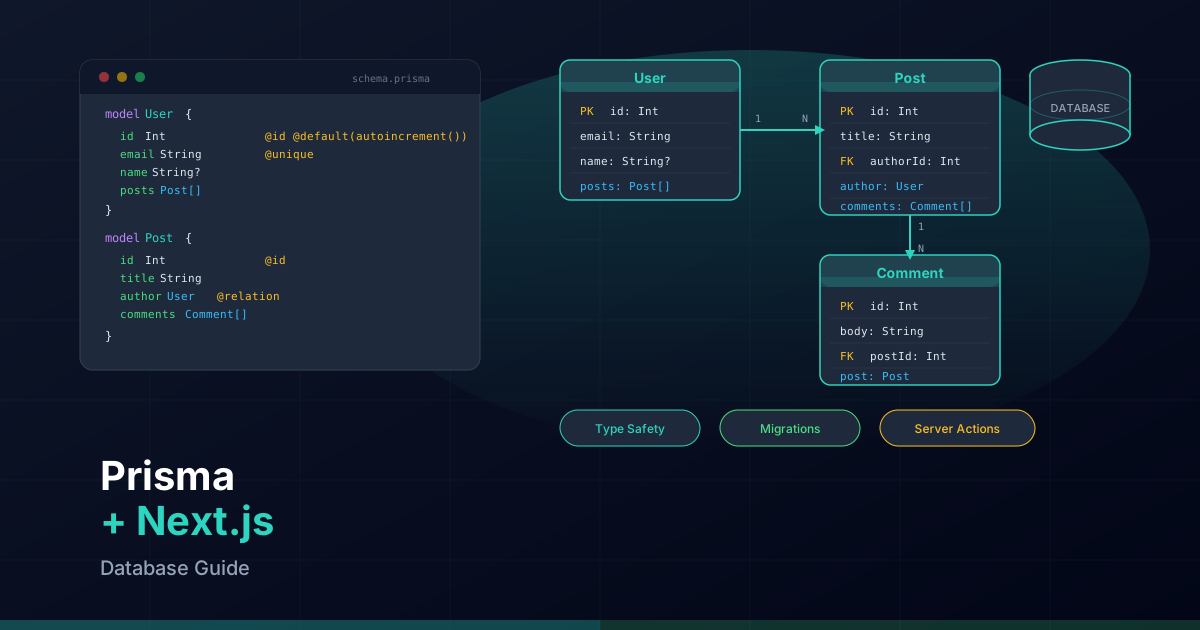
Prisma models map directly to database tables. Each field in a model corresponds to a column, and you can define relations between models using special syntax. Here is a practical example with User, Post, and Category models:
// prisma/schema.prisma
generator client {
  provider = "prisma-client-js"
}

datasource db {
  provider = "postgresql"
  url      = env("DATABASE_URL")
}

model User {
  id        String   @id @default(cuid())
  email     String   @unique
  name      String?
  avatar    String?
  role      Role     @default(USER)
  posts     Post[]
  profile   Profile?
  createdAt DateTime @default(now())
  updatedAt DateTime @updatedAt

  @@map("users")
}

model Profile {
  id     String  @id @default(cuid())
  bio    String?
  website String?
  userId String  @unique
  user   User    @relation(fields: [userId], references: [id], onDelete: Cascade)

  @@map("profiles")
}

model Post {
  id          String     @id @default(cuid())
  title       String
  slug        String     @unique
  content     String
  excerpt     String?
  published   Boolean    @default(false)
  authorId    String
  author      User       @relation(fields: [authorId], references: [id], onDelete: Cascade)
  categories  Category[]
  createdAt   DateTime   @default(now())
  updatedAt   DateTime   @updatedAt

  @@index([authorId])
  @@index([slug])
  @@map("posts")
}

model Category {
  id    String @id @default(cuid())
  name  String @unique
  slug  String @unique
  posts Post[]

  @@map("categories")
}

enum Role {
  USER
  ADMIN
  EDITOR
}
Key concepts in this schema:
@idmarks the primary key.@default(cuid())generates a unique collision-resistant ID.@uniquecreates a unique constraint on the column.@relationdefines foreign key relationships. Thefieldsparameter specifies the local column, andreferencesspecifies the target column.@@indexcreates database indexes for frequently queried columns.@@mapcustomizes the database table name (Prisma uses the model name by default).- The
Post[]field on User is a virtual relation field — it does not create a column but lets you query related posts. - The implicit many-to-many relation between Post and Category is handled automatically by Prisma through a join table.
Migrations: prisma migrate dev and deploy
Prisma Migrate translates your schema changes into SQL migration files. During development,
use prisma migrate dev to create and apply migrations:
# Create and apply a new migration
npx prisma migrate dev --name init

# This command does three things:
# 1. Generates a SQL migration file in prisma/migrations/
# 2. Applies the migration to your database
# 3. Regenerates the Prisma Client
Each migration creates a timestamped folder with a migration.sql file containing
the raw SQL statements. These files should be committed to version control so your team can
reproduce the database schema.
When you modify your schema (for example, adding a new field), run migrate dev again:
// Add a new field to the Post model
model Post {
  id          String     @id @default(cuid())
  title       String
  slug        String     @unique
  content     String
  excerpt     String?
  coverImage  String?    // New field
  readTime    Int?       // New field
  published   Boolean    @default(false)
  authorId    String
  author      User       @relation(fields: [authorId], references: [id], onDelete: Cascade)
  categories  Category[]
  createdAt   DateTime   @default(now())
  updatedAt   DateTime   @updatedAt

  @@index([authorId])
  @@index([slug])
  @@map("posts")
}# Generate migration for the new fields
npx prisma migrate dev --name add-post-cover-and-readtime
For production deployments, use prisma migrate deploy instead. This command
applies pending migrations without generating new ones:
# Apply pending migrations in production
npx prisma migrate deploy
Other useful Prisma CLI commands:
# Reset the database (drops all data and re-applies migrations)
npx prisma migrate reset

# Generate Prisma Client without running migrations
npx prisma generate

# Push schema changes directly without creating a migration file (prototyping only)
npx prisma db push

# Seed the database with initial data
npx prisma db seed
Prisma Client Singleton for Next.js
In development, Next.js uses hot module reloading (HMR) which causes modules to be re-evaluated frequently. If you instantiate a new Prisma Client on every module reload, you will quickly exhaust your database connections. The solution is a singleton pattern that reuses the same client instance across hot reloads.
// lib/prisma.ts
import { PrismaClient } from "@prisma/client";

const globalForPrisma = globalThis as unknown as {
  prisma: PrismaClient | undefined;
};

export const prisma =
  globalForPrisma.prisma ??
  new PrismaClient({
    log:
      process.env.NODE_ENV === "development"
        ? ["query", "error", "warn"]
        : ["error"],
  });

if (process.env.NODE_ENV !== "production") {
  globalForPrisma.prisma = prisma;
}
This pattern stores the Prisma Client on the globalThis object, which persists
across HMR reloads. In production, a new client is created normally since HMR does not apply.
The log configuration enables query logging during development for debugging.
Import the singleton wherever you need database access:
import { prisma } from "@/lib/prisma";Tip: If you are using Prisma with connection pooling tools like PgBouncer, add
?pgbouncer=trueto your connection URL and configure thedirectUrlfor migrations. See the connection pooling section below for details.
CRUD Operations with Server Components and Route Handlers
With the Prisma singleton in place, you can query the database directly in Server Components, Server Actions, and Route Handlers. No separate API layer is needed.
Reading Data in Server Components
// app/[locale]/blog/page.tsx
import { prisma } from "@/lib/prisma";

export default async function BlogPage() {
  const posts = await prisma.post.findMany({
    where: { published: true },
    include: {
      author: {
        select: { name: true, avatar: true },
      },
      categories: true,
    },
    orderBy: { createdAt: "desc" },
    take: 10,
  });

  return (
    <main>
      <h1>Blog</h1>
      <ul>
        {posts.map((post) => (
          <li key={post.id}>
            <h2>{post.title}</h2>
            <p>By {post.author.name}</p>
            <p>{post.excerpt}</p>
            <div>
              {post.categories.map((cat) => (
                <span key={cat.id}>{cat.name}</span>
              ))}
            </div>
          </li>
        ))}
      </ul>
    </main>
  );
}
Creating Data with Server Actions
// app/[locale]/blog/actions.ts
"use server";

import { prisma } from "@/lib/prisma";
import { revalidatePath } from "next/cache";
import { z } from "zod";

const CreatePostSchema = z.object({
  title: z.string().min(1).max(200),
  content: z.string().min(1),
  excerpt: z.string().max(300).optional(),
  slug: z.string().regex(/^[a-z0-9-]+$/),
  categoryIds: z.array(z.string()).optional(),
});

export async function createPost(formData: FormData) {
  const rawData = {
    title: formData.get("title"),
    content: formData.get("content"),
    excerpt: formData.get("excerpt"),
    slug: formData.get("slug"),
  };

  const validated = CreatePostSchema.parse(rawData);

  const post = await prisma.post.create({
    data: {
      title: validated.title,
      slug: validated.slug,
      content: validated.content,
      excerpt: validated.excerpt,
      authorId: "current-user-id", // Replace with actual auth
      categories: validated.categoryIds
        ? { connect: validated.categoryIds.map((id) => ({ id })) }
        : undefined,
    },
  });

  revalidatePath("/blog");
  return post;
}
CRUD with Route Handlers
// app/api/posts/route.ts
import { prisma } from "@/lib/prisma";
import { NextRequest, NextResponse } from "next/server";
import { z } from "zod";

export async function GET(request: NextRequest) {
  const { searchParams } = new URL(request.url);
  const page = parseInt(searchParams.get("page") ?? "1");
  const limit = parseInt(searchParams.get("limit") ?? "10");
  const skip = (page - 1) * limit;

  const [posts, total] = await Promise.all([
    prisma.post.findMany({
      where: { published: true },
      skip,
      take: limit,
      orderBy: { createdAt: "desc" },
      include: {
        author: { select: { name: true, avatar: true } },
      },
    }),
    prisma.post.count({ where: { published: true } }),
  ]);

  return NextResponse.json({
    data: posts,
    pagination: {
      page,
      limit,
      total,
      totalPages: Math.ceil(total / limit),
    },
  });
}

export async function POST(request: NextRequest) {
  try {
    const body = await request.json();
    const validated = CreatePostSchema.parse(body);

    const post = await prisma.post.create({
      data: {
        ...validated,
        authorId: "current-user-id",
      },
    });

    return NextResponse.json(post, { status: 201 });
  } catch (error) {
    if (error instanceof z.ZodError) {
      return NextResponse.json(
        { error: "Validation failed", details: error.errors },
        { status: 400 }
      );
    }
    return NextResponse.json(
      { error: "Internal server error" },
      { status: 500 }
    );
  }
}
Updating and Deleting Records
// app/api/posts/[id]/route.ts
import { prisma } from "@/lib/prisma";
import { NextRequest, NextResponse } from "next/server";

export async function PATCH(
  request: NextRequest,
  { params }: { params: Promise<{ id: string }> }
) {
  const { id } = await params;
  const body = await request.json();

  const post = await prisma.post.update({
    where: { id },
    data: {
      title: body.title,
      content: body.content,
      published: body.published,
      categories: body.categoryIds
        ? { set: body.categoryIds.map((catId: string) => ({ id: catId })) }
        : undefined,
    },
  });

  return NextResponse.json(post);
}

export async function DELETE(
  request: NextRequest,
  { params }: { params: Promise<{ id: string }> }
) {
  const { id } = await params;

  await prisma.post.delete({ where: { id } });

  return NextResponse.json({ success: true });
}
Optimizing Queries
Prisma provides several tools to optimize your database queries. Understanding these options is critical for building performant applications.
Select vs Include
By default, Prisma returns all scalar fields of a model. Use select to fetch
only the fields you need, or include to additionally load related models:
// select: Only return specified fields (reduces data transfer)
const postTitles = await prisma.post.findMany({
  select: {
    id: true,
    title: true,
    slug: true,
    createdAt: true,
    author: {
      select: { name: true },
    },
  },
});

// include: Return all scalar fields PLUS related models
const postsWithAuthor = await prisma.post.findMany({
  include: {
    author: true,
    categories: true,
  },
});

// Nested select within include
const detailed = await prisma.post.findUnique({
  where: { slug: "my-post" },
  include: {
    author: {
      select: {
        name: true,
        email: true,
        profile: {
          select: { bio: true },
        },
      },
    },
    categories: {
      select: { name: true, slug: true },
    },
  },
});
Performance tip: Always prefer
selectoverincludewhen you only need specific fields. This reduces the amount of data transferred from the database and speeds up serialization.
Cursor-Based and Offset Pagination
// Offset pagination (simple but slower for large datasets)
const page = 2;
const pageSize = 20;

const posts = await prisma.post.findMany({
  skip: (page - 1) * pageSize,
  take: pageSize,
  orderBy: { createdAt: "desc" },
});

// Cursor-based pagination (faster for large datasets)
const posts = await prisma.post.findMany({
  take: 20,
  skip: 1, // Skip the cursor itself
  cursor: {
    id: lastPostId, // The ID of the last item from the previous page
  },
  orderBy: { createdAt: "desc" },
});
Raw Queries for Complex Operations
// Use raw queries when Prisma's query API is not sufficient
const popularPosts = await prisma.$queryRaw`
  SELECT p.id, p.title, p.slug, COUNT(v.id) as view_count
  FROM posts p
  LEFT JOIN post_views v ON v.post_id = p.id
  WHERE p.published = true
  GROUP BY p.id
  ORDER BY view_count DESC
  LIMIT 10
`;

// Parameterized queries to prevent SQL injection
const searchTerm = "prisma";
const results = await prisma.$queryRaw`
  SELECT * FROM posts
  WHERE title ILIKE ${'%' + searchTerm + '%'}
  AND published = true
  ORDER BY created_at DESC
`;
Working with Relations
One-to-Many Relations
// Create a user with posts in a single transaction
const userWithPosts = await prisma.user.create({
  data: {
    email: "jane@example.com",
    name: "Jane Doe",
    posts: {
      create: [
        {
          title: "My First Post",
          slug: "my-first-post",
          content: "Hello world!",
        },
        {
          title: "My Second Post",
          slug: "my-second-post",
          content: "Another post.",
        },
      ],
    },
  },
  include: { posts: true },
});

// Query posts for a specific user
const userPosts = await prisma.post.findMany({
  where: { authorId: "user-id" },
  orderBy: { createdAt: "desc" },
});
Many-to-Many Relations
// Connect existing categories to a post
const post = await prisma.post.update({
  where: { id: "post-id" },
  data: {
    categories: {
      connect: [
        { id: "category-1" },
        { id: "category-2" },
      ],
    },
  },
  include: { categories: true },
});

// Disconnect a category from a post
const updated = await prisma.post.update({
  where: { id: "post-id" },
  data: {
    categories: {
      disconnect: [{ id: "category-1" }],
    },
  },
});

// Replace all categories on a post (set replaces the entire relation)
const replaced = await prisma.post.update({
  where: { id: "post-id" },
  data: {
    categories: {
      set: [{ id: "category-3" }, { id: "category-4" }],
    },
  },
});

// Query posts by category
const techPosts = await prisma.post.findMany({
  where: {
    categories: {
      some: { slug: "technology" },
    },
  },
});
Transactions
// Interactive transaction for complex operations
const result = await prisma.$transaction(async (tx) => {
  // Create a new category
  const category = await tx.category.create({
    data: { name: "New Category", slug: "new-category" },
  });

  // Create a post and connect it to the category
  const post = await tx.post.create({
    data: {
      title: "Transaction Example",
      slug: "transaction-example",
      content: "This post was created in a transaction.",
      authorId: "user-id",
      categories: { connect: { id: category.id } },
    },
  });

  // Update the user's post count (if you track it)
  await tx.user.update({
    where: { id: "user-id" },
    data: { /* update stats */ },
  });

  return { category, post };
});

// If any operation fails, all changes are rolled back
Prisma Studio for Debugging
Prisma Studio is a visual database browser that launches in your browser. It lets you view, create, update, and delete records without writing any code — invaluable during development and debugging.
# Launch Prisma Studio
npx prisma studio

# Opens at http://localhost:5555 by default
Prisma Studio features:
- Browse all tables and their records in a spreadsheet-like interface
- Filter and sort records by any column
- Edit records inline and save changes directly to the database
- Navigate relations by clicking on related records
- Create new records with a form-based interface
- Delete records with confirmation dialogs
While Prisma Studio is excellent for development, never use it in production environments. For production database management, use proper database administration tools with access controls and audit logging.
Best Practices
Error Handling
import { Prisma } from "@prisma/client";

async function createUser(email: string, name: string) {
  try {
    const user = await prisma.user.create({
      data: { email, name },
    });
    return { success: true, data: user };
  } catch (error) {
    if (error instanceof Prisma.PrismaClientKnownRequestError) {
      // P2002: Unique constraint violation
      if (error.code === "P2002") {
        return {
          success: false,
          error: "A user with this email already exists.",
        };
      }
      // P2025: Record not found
      if (error.code === "P2025") {
        return {
          success: false,
          error: "Record not found.",
        };
      }
    }
    // Re-throw unexpected errors
    throw error;
  }
}
Connection Pooling with PgBouncer
In serverless environments like Vercel, each function invocation may create a new database connection. Without connection pooling, this quickly exhausts your database's connection limit. Use PgBouncer or a managed pooler like Supabase's built-in connection pooler:
// prisma/schema.prisma
datasource db {
  provider  = "postgresql"
  url       = env("DATABASE_URL")       // Pooled connection for queries
  directUrl = env("DIRECT_URL")         // Direct connection for migrations
}# .env
# Pooled connection (via PgBouncer) for application queries
DATABASE_URL="postgresql://user:pass@pooler.example.com:6543/mydb?pgbouncer=true"
# Direct connection for migrations (bypasses pooler)
DIRECT_URL="postgresql://user:pass@db.example.com:5432/mydb"
The directUrl is used by prisma migrate because migrations require
a direct connection that supports DDL statements and advisory locks, which are not compatible
with PgBouncer's transaction pooling mode.
Database Seeding
// prisma/seed.ts
import { PrismaClient } from "@prisma/client";

const prisma = new PrismaClient();

async function main() {
  // Clean up existing data
  await prisma.post.deleteMany();
  await prisma.category.deleteMany();
  await prisma.user.deleteMany();

  // Create users
  const admin = await prisma.user.create({
    data: {
      email: "admin@example.com",
      name: "Admin User",
      role: "ADMIN",
      profile: {
        create: {
          bio: "Platform administrator",
          website: "https://example.com",
        },
      },
    },
  });

  // Create categories
  const categories = await Promise.all(
    ["Technology", "Design", "Business"].map((name) =>
      prisma.category.create({
        data: { name, slug: name.toLowerCase() },
      })
    )
  );

  // Create posts
  await prisma.post.create({
    data: {
      title: "Getting Started with Prisma",
      slug: "getting-started-with-prisma",
      content: "A comprehensive guide to Prisma ORM...",
      excerpt: "Learn how to use Prisma with Next.js",
      published: true,
      authorId: admin.id,
      categories: {
        connect: [{ id: categories[0].id }],
      },
    },
  });

  console.log("Database seeded successfully");
}

main()
  .catch((e) => {
    console.error(e);
    process.exit(1);
  })
  .finally(async () => {
    await prisma.$disconnect();
});// package.json
{
"prisma": {
"seed": "ts-node --compiler-options {\"module\":\"CommonJS\"} prisma/seed.ts"
}
}# Run the seed script
npx prisma db seedPrisma Client Extensions
Prisma Client extensions let you add custom behavior to your queries. Here is an example that adds soft delete functionality and query logging:
// lib/prisma.ts
import { PrismaClient } from "@prisma/client";

const basePrisma = new PrismaClient();

export const prisma = basePrisma.$extends({
  query: {
    $allModels: {
      async findMany({ model, operation, args, query }) {
        const start = performance.now();
        const result = await query(args);
        const duration = performance.now() - start;

        if (duration > 1000) {
          console.warn(
            `Slow query detected: ${model}.${operation} took ${duration.toFixed(0)}ms`
          );
        }

        return result;
      },
    },
  },
});
By combining these best practices — singleton pattern, proper error handling, connection pooling, seeding, and extensions — you build a robust and maintainable database layer that scales with your Next.js application.