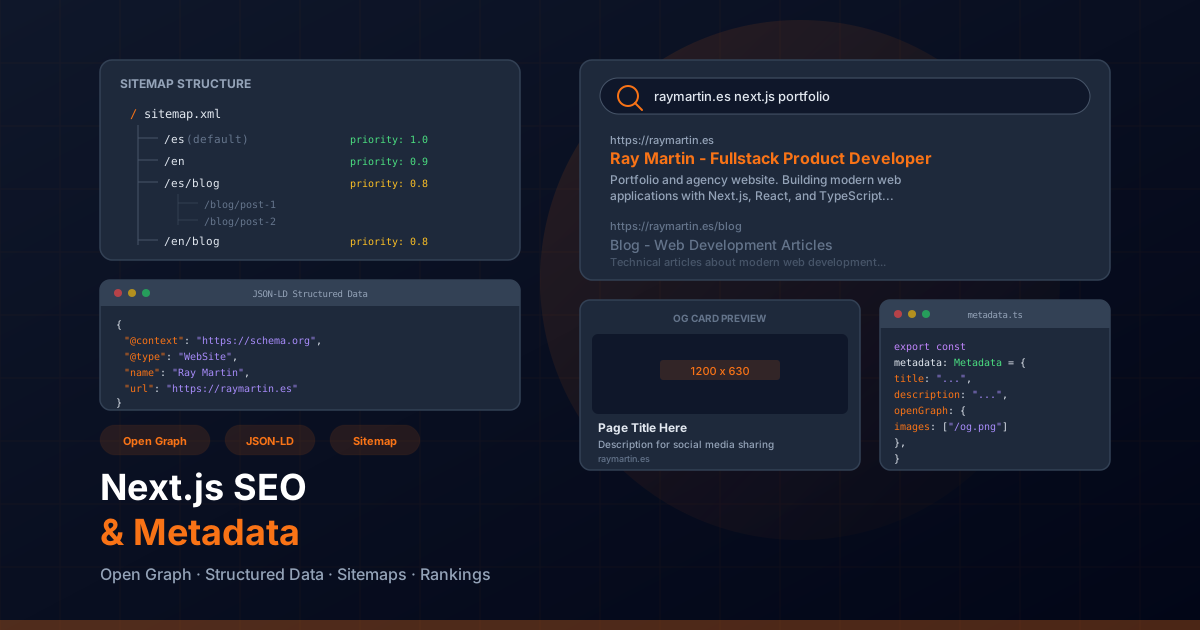
The Metadata API in Next.js App Router
Next.js App Router introduces a powerful Metadata API that gives you full control over your
application's SEO from within your components. Unlike the old next/head approach,
the new API integrates directly with Server Components, enabling both static and dynamic
metadata generation with type safety.
Proper metadata is the foundation of search engine optimization. It tells search engines what your pages are about, how they should be indexed, and how they should appear in search results. Without well-configured metadata, even the best content will struggle to rank.
Static Metadata
The simplest way to add metadata is by exporting a metadata object from your
page or layout file. This approach works for pages where the metadata does not depend on
dynamic data like URL parameters or database content.
// app/[locale]/page.tsx
import type { Metadata } from "next";

export const metadata: Metadata = {
  title: "Ray Martin — Fullstack Product Developer",
  description:
    "Portfolio and agency site for Ray Martin. Building modern web applications with Next.js, React, and TypeScript.",
  keywords: ["Next.js", "React", "TypeScript", "fullstack developer", "portfolio"],
  authors: [{ name: "Ray Martin", url: "https://raymartin.es" }],
  creator: "Ray Martin",
  publisher: "Ray Martin",
  metadataBase: new URL("https://raymartin.es"),
  alternates: {
    canonical: "/",
    languages: {
      "es": "/es",
      "en": "/en",
    },
  },
};

export default function HomePage() {
  return <main>...</main>;
}
Static metadata is evaluated at build time and embedded directly into the HTML. This is the most performant approach since no runtime computation is needed.
Dynamic Metadata with generateMetadata
For pages that depend on dynamic data — such as blog posts, product pages, or user profiles —
use the generateMetadata function. This async function receives the page params
and search params, allowing you to fetch data and construct metadata dynamically.
// app/[locale]/blog/[slug]/page.tsx
import type { Metadata } from "next";
import { getPostBySlug } from "@/lib/blog";

interface PageProps {
  params: Promise<{ locale: string; slug: string }>;
}

export async function generateMetadata({ params }: PageProps): Promise<Metadata> {
  const { locale, slug } = await params;
  const post = await getPostBySlug(slug, locale);

  if (!post) {
    return {
      title: "Post Not Found",
    };
  }

  return {
    title: post.title,
    description: post.excerpt,
    authors: [{ name: post.author }],
    openGraph: {
      title: post.title,
      description: post.excerpt,
      type: "article",
      publishedTime: post.publishedAt,
      modifiedTime: post.updatedAt,
      authors: [post.author],
      images: [
        {
          url: post.coverImage,
          width: 1200,
          height: 630,
          alt: post.title,
        },
      ],
    },
    twitter: {
      card: "summary_large_image",
      title: post.title,
      description: post.excerpt,
      images: [post.coverImage],
    },
    alternates: {
      canonical: `/${locale}/blog/${slug}`,
      languages: {
        "es": `/es/blog/${slug}`,
        "en": `/en/blog/${slug}`,
      },
    },
  };
}

export default async function BlogPostPage({ params }: PageProps) {
  const { locale, slug } = await params;
  const post = await getPostBySlug(slug, locale);
  return <article>...</article>;
}
Next.js automatically deduplicates fetch calls made in both generateMetadata
and the page component itself. This means you can safely call getPostBySlug in both
places without making redundant network requests.
Open Graph Tags
Open Graph tags control how your pages appear when shared on social media platforms like Facebook, LinkedIn, and messaging apps. A well-configured Open Graph setup can dramatically increase click-through rates from social shares.
// app/[locale]/layout.tsx
import type { Metadata } from "next";

export const metadata: Metadata = {
  openGraph: {
    title: "Ray Martin — Fullstack Product Developer",
    description: "Building modern web applications with Next.js and React.",
    url: "https://raymartin.es",
    siteName: "Ray Martin Portfolio",
    locale: "es_ES",
    alternateLocale: "en_US",
    type: "website",
    images: [
      {
        url: "https://raymartin.es/og-image.jpg",
        width: 1200,
        height: 630,
        alt: "Ray Martin Portfolio Preview",
        type: "image/jpeg",
      },
      {
        url: "https://raymartin.es/og-image-square.jpg",
        width: 600,
        height: 600,
        alt: "Ray Martin Logo",
        type: "image/jpeg",
      },
    ],
  },
};
Key Open Graph best practices:
- og:image dimensions: Use 1200x630 pixels for the primary image — this is the recommended size for most social platforms
- og:title length: Keep titles under 60 characters to avoid truncation in social previews
- og:description length: Aim for 120-160 characters for optimal display
- og:type: Use "website" for landing pages and "article" for blog posts
- og:locale: Set the correct locale for your primary language
- alternateLocale: List all other supported languages
Dynamic Open Graph Images
Next.js allows you to generate Open Graph images dynamically using the
ImageResponse API. This lets you create custom social preview images with
text, styles, and even data from your content.
// app/[locale]/blog/[slug]/opengraph-image.tsx
import { ImageResponse } from "next/og";

export const runtime = "edge";
export const alt = "Blog post cover image";
export const size = { width: 1200, height: 630 };
export const contentType = "image/png";

export default async function Image({
  params,
}: {
  params: { slug: string };
}) {
  const post = await fetch(
    `https://raymartin.es/api/posts/${params.slug}`
  ).then((res) => res.json());

  return new ImageResponse(
    (
      <div
        style={{
          display: "flex",
          flexDirection: "column",
          justifyContent: "center",
          alignItems: "flex-start",
          width: "100%",
          height: "100%",
          padding: "60px",
          background: "linear-gradient(135deg, #0c4a6e 0%, #082f49 100%)",
          color: "white",
          fontFamily: "Inter, sans-serif",
        }}
      >
        <div style={{ fontSize: 48, fontWeight: 700, marginBottom: 20 }}>
          {post.title}
        </div>
        <div style={{ fontSize: 24, opacity: 0.8 }}>
          {post.excerpt}
        </div>
        <div style={{ fontSize: 20, marginTop: "auto", opacity: 0.6 }}>
          raymartin.es
        </div>
      </div>
    ),
    { ...size }
  );
}
Twitter Card Metadata
Twitter (X) uses its own set of meta tags to generate card previews when links are shared.
Next.js supports both summary and summary_large_image card types.
// app/[locale]/layout.tsx
import type { Metadata } from "next";

export const metadata: Metadata = {
  twitter: {
    card: "summary_large_image",
    title: "Ray Martin — Fullstack Product Developer",
    description: "Building modern web applications with Next.js and React.",
    site: "@raymartin_dev",
    creator: "@raymartin_dev",
    images: {
      url: "https://raymartin.es/twitter-card.jpg",
      alt: "Ray Martin Portfolio Preview",
      width: 1200,
      height: 630,
    },
  },
};
Tip: If Twitter card tags are not provided, Twitter will fall back to Open Graph tags. However, explicitly setting Twitter metadata gives you more control over how your content appears on the platform.
JSON-LD Structured Data
JSON-LD structured data helps search engines understand the content and context of your pages. It enables rich results in Google Search, including breadcrumbs, article cards, FAQs, and organization knowledge panels.
Article Schema
// app/[locale]/blog/[slug]/page.tsx
import Script from "next/script";

interface ArticleJsonLd {
  "@context": "https://schema.org";
  "@type": "Article";
  headline: string;
  description: string;
  image: string[];
  datePublished: string;
  dateModified: string;
  author: { "@type": "Person"; name: string; url: string };
  publisher: {
    "@type": "Organization";
    name: string;
    logo: { "@type": "ImageObject"; url: string };
  };
}

function getArticleJsonLd(post: BlogPost): ArticleJsonLd {
  return {
    "@context": "https://schema.org",
    "@type": "Article",
    headline: post.title,
    description: post.excerpt,
    image: [post.coverImage],
    datePublished: post.publishedAt,
    dateModified: post.updatedAt || post.publishedAt,
    author: {
      "@type": "Person",
      name: "Ray Martin",
      url: "https://raymartin.es",
    },
    publisher: {
      "@type": "Organization",
      name: "Ray Martin Dev",
      logo: {
        "@type": "ImageObject",
        url: "https://raymartin.es/logo.png",
      },
    },
  };
}

export default async function BlogPostPage({ params }: PageProps) {
  const post = await getPostBySlug(params.slug);

  return (
    <>
      <script
        type="application/ld+json"
        dangerouslySetInnerHTML={{
          __html: JSON.stringify(getArticleJsonLd(post)),
        }}
      />
      <article>...</article>
    </>
  );
}
BreadcrumbList Schema
// components/common/Breadcrumbs.tsx
interface BreadcrumbItem {
  name: string;
  url: string;
}

function getBreadcrumbJsonLd(items: BreadcrumbItem[]) {
  return {
    "@context": "https://schema.org",
    "@type": "BreadcrumbList",
    itemListElement: items.map((item, index) => ({
      "@type": "ListItem",
      position: index + 1,
      name: item.name,
      item: item.url,
    })),
  };
}

export function Breadcrumbs({ items }: { items: BreadcrumbItem[] }) {
  return (
    <>
      <script
        type="application/ld+json"
        dangerouslySetInnerHTML={{
          __html: JSON.stringify(getBreadcrumbJsonLd(items)),
        }}
      />
      <nav aria-label="Breadcrumb">
        <ol className="flex items-center gap-2 text-sm">
          {items.map((item, index) => (
            <li key={item.url}>
              {index < items.length - 1 ? (
                <a href={item.url}>{item.name}</a>
              ) : (
                <span aria-current="page">{item.name}</span>
              )}
            </li>
          ))}
        </ol>
      </nav>
    </>
  );
}
Organization Schema
// app/[locale]/layout.tsx
const organizationJsonLd = {
  "@context": "https://schema.org",
  "@type": "Organization",
  name: "Ray Martin Dev",
  url: "https://raymartin.es",
  logo: "https://raymartin.es/logo.png",
  sameAs: [
    "https://github.com/raymartin",
    "https://linkedin.com/in/raymartin",
    "https://twitter.com/raymartin_dev",
  ],
  contactPoint: {
    "@type": "ContactPoint",
    contactType: "customer service",
    availableLanguage: ["Spanish", "English"],
  },
};
Sitemap Generation with sitemap.ts
A sitemap tells search engines which pages exist on your site and how frequently they change.
Next.js App Router supports sitemap generation through a sitemap.ts file in the
app/ directory.
// app/sitemap.ts
import type { MetadataRoute } from "next";

const baseUrl = "https://raymartin.es";
const locales = ["es", "en"];

export default async function sitemap(): Promise<MetadataRoute.Sitemap> {
  const staticRoutes = [
    "",
    "/services",
    "/experience",
    "/skills",
    "/about",
    "/projects",
  ];

  const staticEntries = locales.flatMap((locale) =>
    staticRoutes.map((route) => ({
      url: `${baseUrl}/${locale}${route}`,
      lastModified: new Date(),
      changeFrequency: "monthly" as const,
      priority: route === "" ? 1.0 : 0.8,
      alternates: {
        languages: Object.fromEntries(
          locales.map((l) => [l, `${baseUrl}/${l}${route}`])
        ),
      },
    }))
  );

  // Dynamic blog entries
  const posts = await getAllPosts();
  const blogEntries = locales.flatMap((locale) =>
    posts.map((post) => ({
      url: `${baseUrl}/${locale}/blog/${post.slug}`,
      lastModified: new Date(post.updatedAt || post.publishedAt),
      changeFrequency: "weekly" as const,
      priority: 0.6,
      alternates: {
        languages: Object.fromEntries(
          locales.map((l) => [l, `${baseUrl}/${l}/blog/${post.slug}`])
        ),
      },
    }))
  );

  return [...staticEntries, ...blogEntries];
}
The sitemap is automatically served at /sitemap.xml. For large sites with
thousands of pages, consider using the generateSitemaps function to create
multiple sitemap files with an index.
Robots.txt Configuration with robots.ts
The robots.ts file controls which pages search engines can crawl. Place it in
the app/ directory alongside your sitemap.
// app/robots.ts
import type { MetadataRoute } from "next";

export default function robots(): MetadataRoute.Robots {
  return {
    rules: [
      {
        userAgent: "*",
        allow: "/",
        disallow: ["/api/", "/admin/", "/_next/"],
      },
      {
        userAgent: "Googlebot",
        allow: "/",
        disallow: "/api/",
      },
    ],
    sitemap: "https://raymartin.es/sitemap.xml",
  };
}
Important: Always include your sitemap URL in the robots.txt output. This ensures search engines can discover your sitemap automatically without needing to manually submit it in Google Search Console.
Canonical URLs and Hreflang Tags
Canonical URLs prevent duplicate content issues by telling search engines which version of a page
is the "original." For multilingual sites, hreflang tags inform search engines about
the relationship between pages in different languages.
// app/[locale]/layout.tsx
import type { Metadata } from "next";

export async function generateMetadata({
  params,
}: {
  params: Promise<{ locale: string }>;
}): Promise<Metadata> {
  const { locale } = await params;

  return {
    metadataBase: new URL("https://raymartin.es"),
    alternates: {
      canonical: `/${locale}`,
      languages: {
        "es": "/es",
        "en": "/en",
        "x-default": "/es",
      },
    },
  };
}
This generates the following HTML in the <head>:
<link rel="canonical" href="https://raymartin.es/es" />
<link rel="alternate" hreflang="es" href="https://raymartin.es/es" />
<link rel="alternate" hreflang="en" href="https://raymartin.es/en" />
<link rel="alternate" hreflang="x-default" href="https://raymartin.es/es" />- canonical: Points to the current page's URL — prevents search engines from treating locale variants as duplicates
- hreflang: Maps each language to its corresponding URL so Google serves the right version to each user
- x-default: Specifies the fallback page for users whose language is not explicitly supported
Core Web Vitals Optimization
Core Web Vitals are a set of metrics that Google uses as ranking signals. Optimizing these metrics directly impacts your search engine rankings and user experience.
LCP — Largest Contentful Paint
LCP measures how quickly the largest visible element loads. Target under 2.5 seconds.
// Optimize LCP with priority images and font preloading
import Image from "next/image";
import { Inter } from "next/font/google";

const inter = Inter({
  subsets: ["latin"],
  display: "swap", // Prevents font-related layout shifts
});

export function HeroBanner() {
  return (
    <section className={inter.className}>
      <Image
        src="/images/hero.webp"
        alt="Hero banner showing modern web development workspace"
        width={1200}
        height={600}
        priority
        fetchPriority="high"
        sizes="100vw"
        quality={85}
      />
      <h1>Fullstack Product Developer</h1>
    </section>
  );
}- priority: Preloads the image and disables lazy loading
- fetchPriority="high": Tells the browser to prioritize this resource
- next/font: Self-hosts fonts and eliminates external network requests
- display: "swap": Shows fallback text while the font loads
CLS — Cumulative Layout Shift
CLS measures unexpected visual movement. Target under 0.1.
// Prevent CLS by reserving space for dynamic content
export function VideoEmbed({ videoId }: { videoId: string }) {
  return (
    <div className="relative w-full" style={{ aspectRatio: "16/9" }}>
      <iframe
        src={`https://www.youtube.com/embed/${videoId}`}
        title="Embedded video"
        className="absolute inset-0 w-full h-full"
        loading="lazy"
        allow="accelerometer; autoplay; clipboard-write; encrypted-media; gyroscope"
        allowFullScreen
      />
    </div>
  );
}

// Always specify width and height for images
<Image
  src="/images/photo.jpg"
  alt="Description"
  width={800}
  height={450}
/>
INP — Interaction to Next Paint
INP measures responsiveness to user interactions. Target under 200ms.
"use client";

import { useTransition } from "react";

export function SearchFilter({ onFilter }: { onFilter: (q: string) => void }) {
  const [isPending, startTransition] = useTransition();

  const handleChange = (e: React.ChangeEvent<HTMLInputElement>) => {
    // Wrap heavy state updates in startTransition to keep the UI responsive
    startTransition(() => {
      onFilter(e.target.value);
    });
  };

  return (
    <div>
      <input
        type="search"
        onChange={handleChange}
        placeholder="Search..."
        aria-label="Search"
      />
      {isPending && <span className="text-sm text-gray-500">Filtering...</span>}
    </div>
  );
}
Image Optimization for SEO
Images play a critical role in SEO. Search engines evaluate alt text, file names, loading performance, and responsive sizing. Next.js provides built-in tools to handle all of these aspects.
// Comprehensive image SEO configuration
import Image from "next/image";

export function ProjectCard({ project }: { project: Project }) {
  return (
    <article>
      <Image
        src={project.image}
        alt={`Screenshot of ${project.title} — ${project.shortDescription}`}
        width={600}
        height={400}
        sizes="(max-width: 768px) 100vw, (max-width: 1200px) 50vw, 33vw"
        loading="lazy"
        className="rounded-lg"
      />
      <h3>{project.title}</h3>
      <p>{project.description}</p>
    </article>
  );
}- Alt text: Write descriptive, unique alt text that explains the image content — avoid keyword stuffing
- File names: Use descriptive, kebab-case names like
nextjs-dashboard-screenshot.webp - sizes attribute: Helps the browser pick the optimal image size for the viewport, reducing bandwidth
- loading="lazy": Defers loading of below-fold images until they are near the viewport
- WebP/AVIF formats: Next.js automatically serves modern formats when supported by the browser
- Responsive images: The
sizesprop combined with Next.js image optimization serves appropriately sized images
Monitoring SEO with Google Search Console
Google Search Console is essential for monitoring your site's search performance and identifying SEO issues. After deploying your Next.js application, set up Search Console to track indexing, performance, and any crawl errors.
Verification Methods
// app/[locale]/layout.tsx — HTML tag verification
import type { Metadata } from "next";

export const metadata: Metadata = {
  verification: {
    google: "your-google-verification-code",
    yandex: "your-yandex-verification-code",
    other: {
      "msvalidate.01": "your-bing-verification-code",
    },
  },
};
Key Metrics to Monitor
- Index Coverage: Check which pages are indexed and identify any crawl errors or pages excluded from the index
- Performance Report: Track impressions, clicks, CTR, and average position for your target keywords
- Core Web Vitals Report: Monitor real-user data for LCP, CLS, and INP across mobile and desktop
- Mobile Usability: Ensure all pages pass mobile-friendliness tests
- Sitemaps: Submit your sitemap and verify all pages are being discovered
- Rich Results: Validate that your JSON-LD structured data generates rich results correctly
Pro tip: Use the URL Inspection tool to test individual pages. It shows you exactly how Googlebot sees your page, including rendered HTML, detected structured data, and any indexing issues. For Next.js applications using Server Components, the rendered HTML that Googlebot sees includes all server-rendered content, which is excellent for SEO.
Combining proper metadata configuration, structured data, performance optimization, and continuous monitoring creates a strong SEO foundation. The Next.js Metadata API makes it straightforward to implement all these best practices within your component architecture, keeping your SEO concerns close to the content they describe.