What Is Supabase and Why Choose It
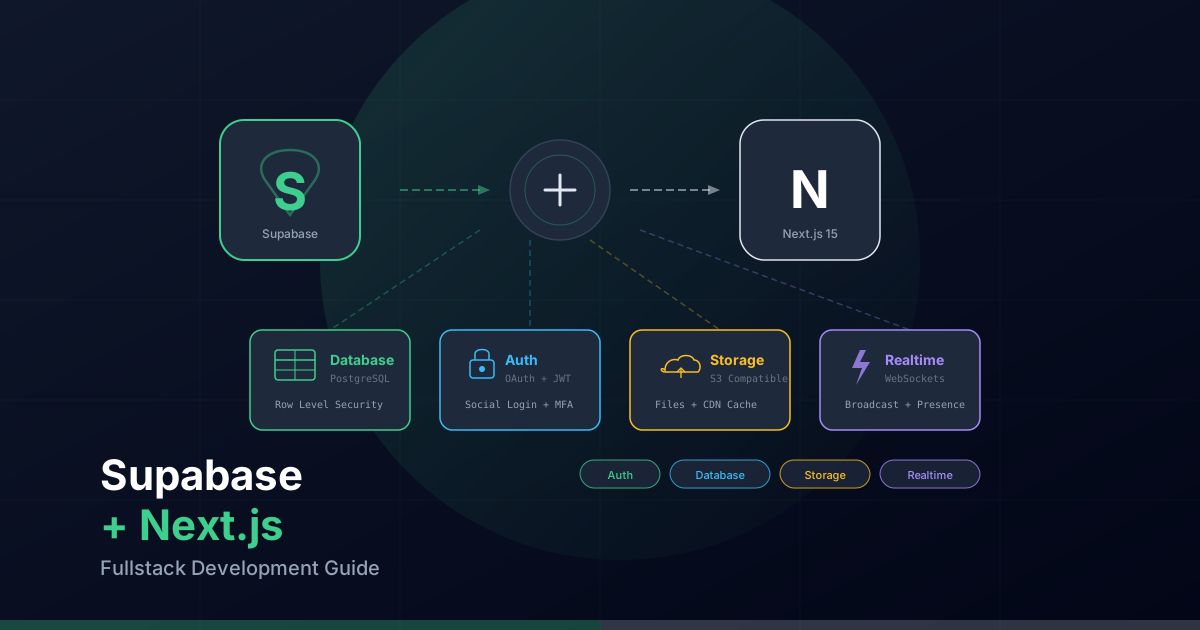
Supabase is an open-source alternative to Firebase built on top of PostgreSQL. Unlike Firebase, which uses a proprietary NoSQL database, Supabase gives you the full power of a relational database with all the advantages of a Backend-as-a-Service: authentication, file storage, edge functions, realtime subscriptions, and an intuitive admin dashboard.
What makes Supabase special is that it does not reinvent the wheel. It uses battle-tested technologies: PostgreSQL for the database, GoTrue for authentication, PostgREST for automatic REST API generation, and Realtime for WebSocket subscriptions. This means your SQL knowledge is directly applicable, and if you ever decide to migrate, your data is sitting in a standard PostgreSQL database.
Combined with Next.js 15 and the App Router, Supabase lets you build fullstack applications with Server Components, Server Actions, cookie-based authentication, and end-to-end type safety, all with an exceptional developer experience.
Creating a Supabase Project
The first step is to create an account on supabase.com and create a new project. Supabase offers a generous free tier that includes two free projects, 500MB of database storage, 1GB of file storage, and 50,000 authenticated users.
Once your project is created, you need two key credentials found under Settings > API:
- Project URL: Your project's base URL, for example
https://abcdefghij.supabase.co - Anon Key: A safe public key for client-side use. This key only allows access to data that RLS policies permit.
- Service Role Key: A private key with full database access, bypassing all RLS restrictions. Never expose this on the client.
Add these credentials to your .env.local file:
# .env.local
NEXT_PUBLIC_SUPABASE_URL=https://abcdefghij.supabase.co
NEXT_PUBLIC_SUPABASE_ANON_KEY=eyJhbGciOiJIUzI1NiIsInR5cCI6IkpXVCJ9...
SUPABASE_SERVICE_ROLE_KEY=eyJhbGciOiJIUzI1NiIsInR5cCI6IkpXVCJ9...
Important: The
SUPABASE_SERVICE_ROLE_KEYmust never have theNEXT_PUBLIC_prefix. It should only be used on the server (Server Components, Server Actions, Route Handlers).
Installing Dependencies
Supabase provides two main packages for Next.js: the base client and the SSR package that automatically handles cookies and sessions with the App Router:
npm install @supabase/supabase-js @supabase/ssr
The @supabase/ssr package is essential for Next.js 15 because it manages authentication through HTTP-only cookies, allowing both Server Components and Client Components to securely access the user's session.
Supabase Client Configuration
In a Next.js application with the App Router, you need two variants of the Supabase client: one for server components and one for client components. Each handles cookies differently.
Server Components Client
The server client reads cookies directly from the request headers:
// lib/supabase/server.ts
import { createServerClient } from "@supabase/ssr";
import { cookies } from "next/headers";

export async function createClient() {
  const cookieStore = await cookies();

  return createServerClient(
    process.env.NEXT_PUBLIC_SUPABASE_URL!,
    process.env.NEXT_PUBLIC_SUPABASE_ANON_KEY!,
    {
      cookies: {
        getAll() {
          return cookieStore.getAll();
        },
        setAll(cookiesToSet) {
          try {
            cookiesToSet.forEach(({ name, value, options }) =>
              cookieStore.set(name, value, options)
            );
          } catch {
            // setAll can fail in Server Components (read-only)
            // This is expected when called from a Server Component
          }
        },
      },
    }
  );
}
Client Components Client
The browser client uses document cookies to maintain the session:
// lib/supabase/client.ts
import { createBrowserClient } from "@supabase/ssr";

export function createClient() {
  return createBrowserClient(
    process.env.NEXT_PUBLIC_SUPABASE_URL!,
    process.env.NEXT_PUBLIC_SUPABASE_ANON_KEY!
  );
}
Middleware for Session Renewal
The middleware is crucial for keeping sessions alive. It refreshes the token on every request before it reaches your application:
// lib/supabase/middleware.ts
import { createServerClient } from "@supabase/ssr";
import { NextResponse, type NextRequest } from "next/server";

export async function updateSession(request: NextRequest) {
  let supabaseResponse = NextResponse.next({ request });

  const supabase = createServerClient(
    process.env.NEXT_PUBLIC_SUPABASE_URL!,
    process.env.NEXT_PUBLIC_SUPABASE_ANON_KEY!,
    {
      cookies: {
        getAll() {
          return request.cookies.getAll();
        },
        setAll(cookiesToSet) {
          cookiesToSet.forEach(({ name, value, options }) =>
            request.cookies.set(name, value)
          );
          supabaseResponse = NextResponse.next({ request });
          cookiesToSet.forEach(({ name, value, options }) =>
            supabaseResponse.cookies.set(name, value, options)
          );
        },
      },
    }
  );

  // Refresh the session if needed
  await supabase.auth.getUser();

  return supabaseResponse;
}

// middleware.ts
import { updateSession } from "@/lib/supabase/middleware";
import type { NextRequest } from "next/server";

export async function middleware(request: NextRequest) {
  return await updateSession(request);
}

export const config = {
  matcher: [
    "/((?!_next/static|_next/image|favicon.ico|.*\.(?:svg|png|jpg|jpeg|gif|webp)$).*)",
  ],
};
Complete Authentication
Supabase Auth supports multiple authentication methods: email and password, magic links, OAuth providers (Google, GitHub, Apple, etc.), and phone authentication. Let us walk through the most common implementations.
Sign Up and Sign In
// app/auth/actions.ts
"use server";

import { revalidatePath } from "next/cache";
import { redirect } from "next/navigation";
import { createClient } from "@/lib/supabase/server";

export async function signUp(formData: FormData) {
  const supabase = await createClient();

  const data = {
    email: formData.get("email") as string,
    password: formData.get("password") as string,
  };

  const { error } = await supabase.auth.signUp({
    ...data,
    options: {
      emailRedirectTo: `${process.env.NEXT_PUBLIC_SITE_URL}/auth/callback`,
    },
  });

  if (error) {
    return { error: error.message };
  }

  revalidatePath("/", "layout");
  redirect("/auth/verify-email");
}

export async function signIn(formData: FormData) {
  const supabase = await createClient();

  const { error } = await supabase.auth.signInWithPassword({
    email: formData.get("email") as string,
    password: formData.get("password") as string,
  });

  if (error) {
    return { error: error.message };
  }

  revalidatePath("/", "layout");
  redirect("/dashboard");
}

export async function signOut() {
  const supabase = await createClient();
  await supabase.auth.signOut();
  revalidatePath("/", "layout");
  redirect("/");
}
OAuth Providers
To sign in with Google, GitHub, or other providers, you need to configure OAuth credentials in the Supabase dashboard (Authentication > Providers) and then implement the flow in your application:
// app/auth/oauth/route.ts
import { createClient } from "@/lib/supabase/server";
import { NextResponse } from "next/server";

export async function GET(request: Request) {
  const { searchParams } = new URL(request.url);
  const provider = searchParams.get("provider") as "google" | "github";

  const supabase = await createClient();

  const { data, error } = await supabase.auth.signInWithOAuth({
    provider,
    options: {
      redirectTo: `${process.env.NEXT_PUBLIC_SITE_URL}/auth/callback`,
    },
  });

  if (error) {
    return NextResponse.redirect(
      `${process.env.NEXT_PUBLIC_SITE_URL}/auth/error`
    );
  }

  return NextResponse.redirect(data.url);
}
Authentication Callback
// app/auth/callback/route.ts
import { createClient } from "@/lib/supabase/server";
import { NextResponse } from "next/server";

export async function GET(request: Request) {
  const { searchParams, origin } = new URL(request.url);
  const code = searchParams.get("code");
  const next = searchParams.get("next") ?? "/dashboard";

  if (code) {
    const supabase = await createClient();
    const { error } = await supabase.auth.exchangeCodeForSession(code);

    if (!error) {
      return NextResponse.redirect(`${origin}${next}`);
    }
  }

  return NextResponse.redirect(`${origin}/auth/error`);
}
Session Management in Components
// app/dashboard/page.tsx
import { createClient } from "@/lib/supabase/server";
import { redirect } from "next/navigation";

export default async function DashboardPage() {
  const supabase = await createClient();
  const { data: { user } } = await supabase.auth.getUser();

  if (!user) {
    redirect("/auth/login");
  }

  return (
    <main>
      <h1>Welcome, {user.email}</h1>
      <p>User ID: {user.id}</p>
    </main>
  );
}
Database Operations
Supabase automatically generates a REST API from your PostgreSQL schema. This means any table you create in the database is immediately accessible through the JavaScript client with full type safety.
Creating Tables
You can create tables from the Supabase SQL Editor dashboard or with local migrations:
-- Create a projects table
CREATE TABLE projects (
  id UUID DEFAULT gen_random_uuid() PRIMARY KEY,
  created_at TIMESTAMPTZ DEFAULT now() NOT NULL,
  updated_at TIMESTAMPTZ DEFAULT now() NOT NULL,
  user_id UUID REFERENCES auth.users(id) ON DELETE CASCADE NOT NULL,
  title TEXT NOT NULL,
  description TEXT,
  status TEXT DEFAULT 'draft' CHECK (status IN ('draft', 'active', 'completed', 'archived')),
  is_public BOOLEAN DEFAULT false,
  metadata JSONB DEFAULT '{}'::jsonb
);

-- Create a trigger to automatically update updated_at
CREATE OR REPLACE FUNCTION update_updated_at()
RETURNS TRIGGER AS $
BEGIN
  NEW.updated_at = now();
  RETURN NEW;
END;
$ LANGUAGE plpgsql;

CREATE TRIGGER projects_updated_at
  BEFORE UPDATE ON projects
  FOR EACH ROW
  EXECUTE FUNCTION update_updated_at();
CRUD Operations
// lib/actions/projects.ts
"use server";

import { createClient } from "@/lib/supabase/server";
import { revalidatePath } from "next/cache";

// INSERT a new project
export async function createProject(formData: FormData) {
  const supabase = await createClient();
  const { data: { user } } = await supabase.auth.getUser();

  if (!user) throw new Error("Not authenticated");

  const { data, error } = await supabase
    .from("projects")
    .insert({
      user_id: user.id,
      title: formData.get("title") as string,
      description: formData.get("description") as string,
      status: "draft",
    })
    .select()
    .single();

  if (error) throw new Error(error.message);

  revalidatePath("/dashboard/projects");
  return data;
}

// SELECT projects with filters and pagination
export async function getProjects(page = 1, limit = 10) {
  const supabase = await createClient();

  const from = (page - 1) * limit;
  const to = from + limit - 1;

  const { data, error, count } = await supabase
    .from("projects")
    .select("*", { count: "exact" })
    .order("created_at", { ascending: false })
    .range(from, to);

  if (error) throw new Error(error.message);

  return {
    projects: data,
    total: count ?? 0,
    totalPages: Math.ceil((count ?? 0) / limit),
  };
}

// UPDATE a project
export async function updateProject(id: string, formData: FormData) {
  const supabase = await createClient();

  const { error } = await supabase
    .from("projects")
    .update({
      title: formData.get("title") as string,
      description: formData.get("description") as string,
      status: formData.get("status") as string,
    })
    .eq("id", id);

  if (error) throw new Error(error.message);

  revalidatePath("/dashboard/projects");
}

// DELETE a project
export async function deleteProject(id: string) {
  const supabase = await createClient();

  const { error } = await supabase
    .from("projects")
    .delete()
    .eq("id", id);

  if (error) throw new Error(error.message);

  revalidatePath("/dashboard/projects");
}
Advanced Queries
// Queries with relationships (joins)
const { data } = await supabase
  .from("projects")
  .select(`
    id,
    title,
    status,
    user:user_id (
      id,
      email,
      raw_user_meta_data->>full_name
    ),
    tasks (
      id,
      title,
      completed
    )
  `)
  .eq("is_public", true)
  .order("created_at", { ascending: false });

// Full-text search with PostgreSQL
const { data } = await supabase
  .from("projects")
  .select("*")
  .textSearch("title", "react nextjs", {
    type: "websearch",
    config: "english",
  });

// Advanced filters
const { data } = await supabase
  .from("projects")
  .select("*")
  .gte("created_at", "2025-01-01")
  .in("status", ["active", "completed"])
  .not("description", "is", null)
  .order("updated_at", { ascending: false })
  .limit(20);
Row Level Security (RLS)
RLS is the most important security layer in Supabase. Without RLS, anyone with your anonymous key could access all the data in your database. RLS policies define who can read, insert, update, or delete each row in a table.
Golden rule: Always enable RLS on every table that contains user data. No exceptions.
-- Enable RLS on the projects table
ALTER TABLE projects ENABLE ROW LEVEL SECURITY;

-- Policy: users can only view their own projects
CREATE POLICY "Users can view own projects"
  ON projects
  FOR SELECT
  USING (auth.uid() = user_id);

-- Policy: anyone can view public projects
CREATE POLICY "Anyone can view public projects"
  ON projects
  FOR SELECT
  USING (is_public = true);

-- Policy: users can only insert their own projects
CREATE POLICY "Users can insert own projects"
  ON projects
  FOR INSERT
  WITH CHECK (auth.uid() = user_id);

-- Policy: users can only update their own projects
CREATE POLICY "Users can update own projects"
  ON projects
  FOR UPDATE
  USING (auth.uid() = user_id)
  WITH CHECK (auth.uid() = user_id);

-- Policy: users can only delete their own projects
CREATE POLICY "Users can delete own projects"
  ON projects
  FOR DELETE
  USING (auth.uid() = user_id);
The auth.uid() function returns the authenticated user's ID from the current session. This allows PostgreSQL to automatically filter results without you needing to add .eq("user_id", userId) filters to every query, although it is still good practice to do so for clarity.
File Storage
Supabase Storage lets you upload and serve files (images, documents, videos) with configurable access policies. Each bucket can have its own RLS rules.
Bucket Configuration
-- Create a public bucket for avatars
INSERT INTO storage.buckets (id, name, public)
VALUES ('avatars', 'avatars', true);

-- Policy: users can upload their own avatar
CREATE POLICY "Users can upload own avatar"
  ON storage.objects
  FOR INSERT
  WITH CHECK (
    bucket_id = 'avatars'
    AND auth.uid()::text = (storage.foldername(name))[1]
  );

-- Policy: anyone can view avatars (public bucket)
CREATE POLICY "Anyone can view avatars"
  ON storage.objects
  FOR SELECT
  USING (bucket_id = 'avatars');
Uploading and Serving Files
// components/AvatarUpload.tsx
"use client";

import { useState } from "react";
import { createClient } from "@/lib/supabase/client";

export function AvatarUpload({ userId }: { userId: string }) {
  const [uploading, setUploading] = useState(false);
  const supabase = createClient();

  async function handleUpload(event: React.ChangeEvent<HTMLInputElement>) {
    const file = event.target.files?.[0];
    if (!file) return;

    setUploading(true);

    // Generate a unique file name
    const fileExt = file.name.split(".").pop();
    const filePath = `${userId}/avatar.${fileExt}`;

    const { error } = await supabase.storage
      .from("avatars")
      .upload(filePath, file, {
        cacheControl: "3600",
        upsert: true, // Replace if already exists
      });

    if (error) {
      console.error("Upload error:", error.message);
    } else {
      // Get the public URL
      const { data } = supabase.storage
        .from("avatars")
        .getPublicUrl(filePath);

      console.log("Avatar URL:", data.publicUrl);
    }

    setUploading(false);
  }

  return (
    <label className="cursor-pointer">
      <input
        type="file"
        accept="image/*"
        onChange={handleUpload}
        disabled={uploading}
        className="hidden"
        aria-label="Upload avatar"
      />
      <span className="inline-flex items-center rounded-lg bg-primary px-4 py-2 text-white">
        {uploading ? "Uploading..." : "Change avatar"}
      </span>
    </label>
  );
}
Realtime Subscriptions
Supabase Realtime lets you listen to database changes through WebSockets. This is perfect for features like chat, live notifications, collaborative updates, and realtime dashboards.
// hooks/useRealtimeProjects.ts
"use client";

import { useEffect, useState } from "react";
import { createClient } from "@/lib/supabase/client";
import type { RealtimePostgresChangesPayload } from "@supabase/supabase-js";

interface Project {
  id: string;
  title: string;
  status: string;
  created_at: string;
}

export function useRealtimeProjects(initialProjects: Project[]) {
  const [projects, setProjects] = useState<Project[]>(initialProjects);
  const supabase = createClient();

  useEffect(() => {
    const channel = supabase
      .channel("projects-changes")
      .on(
        "postgres_changes",
        {
          event: "*", // INSERT, UPDATE, DELETE
          schema: "public",
          table: "projects",
        },
        (payload: RealtimePostgresChangesPayload<Project>) => {
          switch (payload.eventType) {
            case "INSERT":
              setProjects((prev) => [payload.new, ...prev]);
              break;
            case "UPDATE":
              setProjects((prev) =>
                prev.map((p) =>
                  p.id === payload.new.id ? payload.new : p
                )
              );
              break;
            case "DELETE":
              setProjects((prev) =>
                prev.filter((p) => p.id !== payload.old.id)
              );
              break;
          }
        }
      )
      .subscribe();

    return () => {
      supabase.removeChannel(channel);
    };
  }, [supabase]);

  return projects;
}
To use this hook in a page with Server Components, pass the initial data from the server:
// app/dashboard/projects/page.tsx
import { createClient } from "@/lib/supabase/server";
import { ProjectList } from "./ProjectList";

export default async function ProjectsPage() {
  const supabase = await createClient();
  const { data: projects } = await supabase
    .from("projects")
    .select("*")
    .order("created_at", { ascending: false });

  return <ProjectList initialProjects={projects ?? []} />;
}

// app/dashboard/projects/ProjectList.tsx
"use client";

import { useRealtimeProjects } from "@/hooks/useRealtimeProjects";

export function ProjectList({
  initialProjects,
}: {
  initialProjects: Project[];
}) {
  const projects = useRealtimeProjects(initialProjects);

  return (
    <ul>
      {projects.map((project) => (
        <li key={project.id}>
          <h3>{project.title}</h3>
          <span>{project.status}</span>
        </li>
      ))}
    </ul>
  );
}
Note: For Realtime to work, you need to enable replication on the table. Go to Database > Publications in the Supabase dashboard and make sure your table is included in the
supabase_realtimepublication.
TypeScript Type Generation
One of the biggest advantages of Supabase is automatic TypeScript type generation from your database schema. This provides complete end-to-end type safety, from the database all the way to your React components.
# Install the Supabase CLI
npm install -D supabase

# Log in
npx supabase login

# Generate types from your remote project
npx supabase gen types typescript --project-id abcdefghij > lib/database.types.ts

# Or from a local database (if using supabase start)
npx supabase gen types typescript --local > lib/database.types.ts
The generated file contains all type definitions for your tables, views, functions, and enums:
// lib/database.types.ts (auto-generated)
export type Database = {
  public: {
    Tables: {
      projects: {
        Row: {
          id: string;
          created_at: string;
          updated_at: string;
          user_id: string;
          title: string;
          description: string | null;
          status: "draft" | "active" | "completed" | "archived";
          is_public: boolean;
          metadata: Record<string, unknown>;
        };
        Insert: {
          id?: string;
          created_at?: string;
          updated_at?: string;
          user_id: string;
          title: string;
          description?: string | null;
          status?: "draft" | "active" | "completed" | "archived";
          is_public?: boolean;
          metadata?: Record<string, unknown>;
        };
        Update: {
          id?: string;
          created_at?: string;
          updated_at?: string;
          user_id?: string;
          title?: string;
          description?: string | null;
          status?: "draft" | "active" | "completed" | "archived";
          is_public?: boolean;
          metadata?: Record<string, unknown>;
        };
      };
    };
  };
};
Then type your Supabase client with these types:
// lib/supabase/server.ts
import { createServerClient } from "@supabase/ssr";
import { cookies } from "next/headers";
import type { Database } from "@/lib/database.types";

export async function createClient() {
  const cookieStore = await cookies();

  return createServerClient<Database>(
    process.env.NEXT_PUBLIC_SUPABASE_URL!,
    process.env.NEXT_PUBLIC_SUPABASE_ANON_KEY!,
    {
      cookies: {
        getAll() {
          return cookieStore.getAll();
        },
        setAll(cookiesToSet) {
          try {
            cookiesToSet.forEach(({ name, value, options }) =>
              cookieStore.set(name, value, options)
            );
          } catch {
            // Expected in Server Components
          }
        },
      },
    }
  );
}
Now all queries have autocomplete and type checking:
const supabase = await createClient();

// TypeScript knows 'data' is of type Project[] | null
const { data } = await supabase
  .from("projects") // Autocomplete for table names
  .select("title, status") // Autocomplete for columns
  .eq("status", "active"); // Type checking on values
Deploying to Production
When deploying your Next.js application with Supabase to production, there are several important considerations to ensure security, performance, and reliability.
Environment Variables
Configure environment variables in your deployment platform (Vercel, Railway, etc.):
NEXT_PUBLIC_SUPABASE_URL: Your production Supabase project URL.NEXT_PUBLIC_SUPABASE_ANON_KEY: The anonymous key for your production project.SUPABASE_SERVICE_ROLE_KEY: The service key (server only). Never expose it to the client.NEXT_PUBLIC_SITE_URL: Your website URL for authentication callbacks.
Connection Pooling
For high-traffic applications, use the Supabase connection pooler (Supavisor) instead of direct connections. This prevents exhausting the PostgreSQL connection limit:
// For connections from serverless functions (Vercel, etc.)
// Use the pooler's "Transaction" mode
// The pooler URL is available in Settings > Database > Connection Pooling

// .env.local (production)
DATABASE_URL=postgresql://postgres.[project-ref]:[password]@aws-0-[region].pooler.supabase.com:6543/postgres?pgbouncer=true
DIRECT_URL=postgresql://postgres.[project-ref]:[password]@aws-0-[region].pooler.supabase.com:5432/postgres
Production Checklist
- RLS enabled: Verify that all tables with user data have RLS activated and policies configured.
- Email confirmation: Enable email confirmation under Authentication > Settings to prevent fake accounts.
- Rate limiting: Configure rate limits on authentication functions to prevent brute-force attacks.
- Backups: Supabase includes automatic daily backups on paid plans. Verify they are configured.
- Monitoring: Use the Supabase dashboard to monitor slow queries, connection usage, and authentication errors.
- SSL: All connections to Supabase use SSL by default. Make sure you do not disable it.
- Updated types: Add
npx supabase gen typesto your CI pipeline to keep types in sync with your schema.
Final tip: Supabase combines the power of PostgreSQL with the ease of use of a modern BaaS. With Next.js 15, this combination lets you build production-ready fullstack applications with authentication, database, storage, and realtime, all with end-to-end type safety and the security that Row Level Security provides.