Route Handlers in Next.js App Router
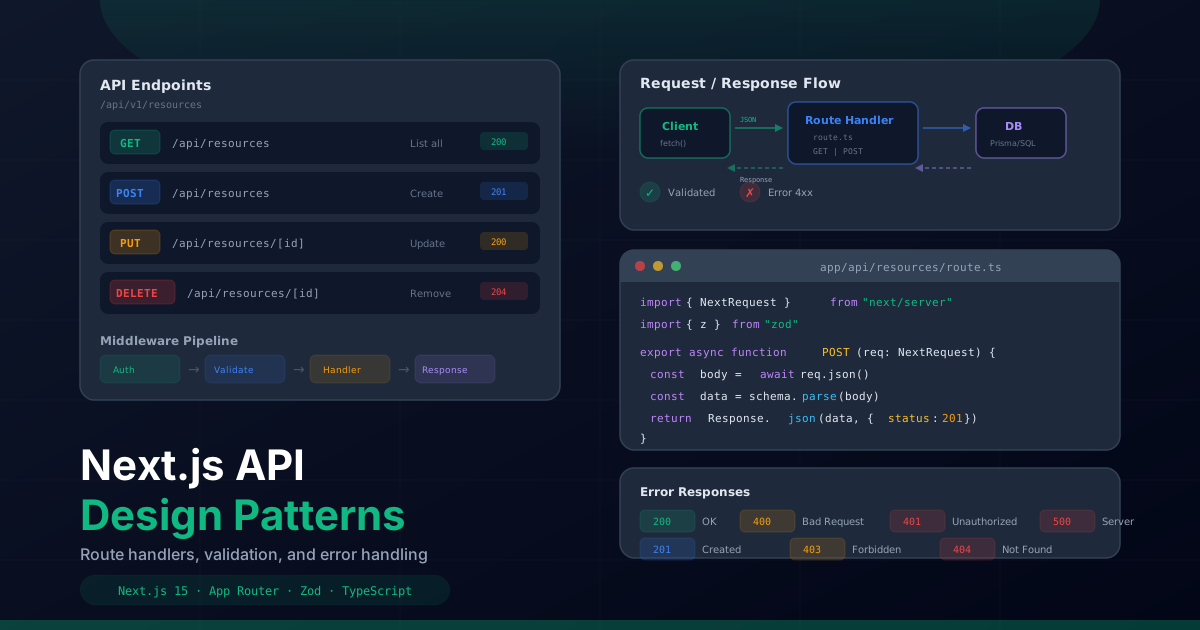
The App Router in Next.js introduced a new paradigm for building API endpoints: Route Handlers.
Unlike the legacy pages/api directory, Route Handlers use the Web standard
Request and Response APIs, making them more portable, testable, and
aligned with modern web standards. They live alongside your pages in the app/
directory, following the same file-based routing conventions.
A Route Handler is defined by exporting async functions named after HTTP methods from a
route.ts file. Each function receives a standard Request object and
returns a Response or NextResponse.
// app/api/hello/route.ts
import { NextResponse } from "next/server";

export async function GET() {
  return NextResponse.json({ message: "Hello from the API" });
}

export async function POST(request: Request) {
  const body = await request.json();
  return NextResponse.json(
    { received: body },
    { status: 201 }
  );
}

export async function PUT(request: Request) {
  const body = await request.json();
  return NextResponse.json({ updated: body });
}

export async function DELETE(request: Request) {
  return NextResponse.json(
    { deleted: true },
    { status: 200 }
  );
}
Only the HTTP methods you export will be available. If a client sends a request with an
unsupported method, Next.js automatically returns a 405 Method Not Allowed response.
Request Parsing: Params, SearchParams, and Body
Understanding how to extract data from incoming requests is fundamental. Route Handlers provide three main sources of data: route parameters, URL search parameters, and the request body.
Route Parameters
Dynamic route segments are defined using brackets in the folder name and passed as the second argument to the handler:
// app/api/projects/[id]/route.ts
import { NextResponse } from "next/server";

interface RouteParams {
  params: Promise<{ id: string }>;
}

export async function GET(request: Request, { params }: RouteParams) {
  const { id } = await params;

  // Validate the ID format
  if (!id || typeof id !== "string") {
    return NextResponse.json(
      { error: "Invalid project ID" },
      { status: 400 }
    );
  }

  const project = await getProjectById(id);

  if (!project) {
    return NextResponse.json(
      { error: "Project not found" },
      { status: 404 }
    );
  }

  return NextResponse.json(project);
}
Search Parameters
URL query parameters are extracted from the request URL using the standard
URL API:
// app/api/projects/route.ts
import { NextResponse } from "next/server";

export async function GET(request: Request) {
  const { searchParams } = new URL(request.url);

  const page = parseInt(searchParams.get("page") || "1", 10);
  const limit = parseInt(searchParams.get("limit") || "10", 10);
  const category = searchParams.get("category");
  const sortBy = searchParams.get("sortBy") || "createdAt";
  const order = searchParams.get("order") || "desc";

  const projects = await getProjects({
    page,
    limit,
    category: category || undefined,
    sortBy,
    order: order as "asc" | "desc",
  });

  return NextResponse.json(projects);
}
Request Body
The request body can be parsed as JSON, FormData, text, or a binary blob depending on the content type:
// JSON body
export async function POST(request: Request) {
  const body = await request.json();
  // body is typed as 'any' — validate with Zod next
}

// FormData body
export async function POST(request: Request) {
  const formData = await request.formData();
  const name = formData.get("name") as string;
  const file = formData.get("file") as File;
}

// Text body
export async function POST(request: Request) {
  const text = await request.text();
}

// Binary body
export async function POST(request: Request) {
  const buffer = await request.arrayBuffer();
}
Input Validation with Zod
Never trust user input. Every API route should validate its input before processing it. Zod is the standard for TypeScript-first schema validation — it validates at runtime and infers TypeScript types from the schema definition.
npm install zod// lib/validations/contact.ts
import { z } from "zod";
export const contactSchema = z.object({
name: z
.string()
.min(2, "Name must be at least 2 characters")
.max(100, "Name must be under 100 characters")
.trim(),
email: z
.string()
.email("Invalid email address")
.toLowerCase(),
subject: z
.string()
.min(5, "Subject must be at least 5 characters")
.max(200, "Subject must be under 200 characters")
.trim(),
message: z
.string()
.min(10, "Message must be at least 10 characters")
.max(5000, "Message must be under 5000 characters")
.trim(),
locale: z.enum(["en", "es"]).default("en"),
});
export type ContactInput = z.infer<typeof contactSchema>;// app/api/contact/route.ts
import { NextResponse } from "next/server";
import { contactSchema } from "@/lib/validations/contact";
import { ZodError } from "zod";
export async function POST(request: Request) {
try {
const body = await request.json();
const validatedData = contactSchema.parse(body);
// validatedData is fully typed as ContactInput
await sendEmail({
to: process.env.MAILJET_TO_EMAIL!,
subject: validatedData.subject,
name: validatedData.name,
email: validatedData.email,
message: validatedData.message,
});
return NextResponse.json(
{ success: true, message: "Email sent successfully" },
{ status: 200 }
);
} catch (error) {
if (error instanceof ZodError) {
return NextResponse.json(
{
error: "Validation failed",
details: error.errors.map((err) => ({
field: err.path.join("."),
message: err.message,
})),
},
{ status: 400 }
);
}
console.error("Contact API error:", error);
return NextResponse.json(
{ error: "Internal server error" },
{ status: 500 }
);
}
}For more complex validations, Zod supports refinements, transforms, and discriminated unions:
// Advanced Zod patterns
const projectSchema = z.object({
  title: z.string().min(3).max(100),
  description: z.string().min(10).max(2000),
  url: z.string().url().optional(),
  tags: z.array(z.string()).min(1).max(10),
  budget: z.number().positive().max(1000000),
  startDate: z.string().datetime(),
  endDate: z.string().datetime().optional(),
}).refine(
  (data) => {
    if (data.endDate) {
      return new Date(data.endDate) > new Date(data.startDate);
    }
    return true;
  },
  {
    message: "End date must be after start date",
    path: ["endDate"],
  }
);
Error Handling Patterns
Consistent error handling is essential for a reliable API. Define a standard error response format and use it across all your routes. This makes it easy for frontend code to handle errors predictably.
// lib/api/errors.ts
export class ApiError extends Error {
  constructor(
    message: string,
    public statusCode: number,
    public code: string,
    public details?: Record<string, unknown>
  ) {
    super(message);
    this.name = "ApiError";
  }
}

export class NotFoundError extends ApiError {
  constructor(resource: string) {
    super(
      `${resource} not found`,
      404,
      "NOT_FOUND"
    );
  }
}

export class ValidationError extends ApiError {
  constructor(message: string, details?: Record<string, unknown>) {
    super(message, 400, "VALIDATION_ERROR", details);
  }
}

export class UnauthorizedError extends ApiError {
  constructor(message = "Authentication required") {
    super(message, 401, "UNAUTHORIZED");
  }
}

export class ForbiddenError extends ApiError {
  constructor(message = "Insufficient permissions") {
    super(message, 403, "FORBIDDEN");
  }
}

export class RateLimitError extends ApiError {
  constructor(retryAfter: number) {
    super(
      "Too many requests",
      429,
      "RATE_LIMIT_EXCEEDED",
      { retryAfter }
    );
  }
}// lib/api/handler.ts
import { NextResponse } from "next/server";
import { ZodError } from "zod";
import { ApiError } from "./errors";
interface ApiErrorResponse {
error: {
code: string;
message: string;
details?: Record<string, unknown>;
};
}
export function handleApiError(error: unknown): NextResponse<ApiErrorResponse> {
// Known API errors
if (error instanceof ApiError) {
return NextResponse.json(
{
error: {
code: error.code,
message: error.message,
details: error.details,
},
},
{ status: error.statusCode }
);
}
// Zod validation errors
if (error instanceof ZodError) {
return NextResponse.json(
{
error: {
code: "VALIDATION_ERROR",
message: "Invalid input data",
details: {
fields: error.errors.map((e) => ({
path: e.path.join("."),
message: e.message,
})),
},
},
},
{ status: 400 }
);
}
// Unknown errors
console.error("Unhandled API error:", error);
return NextResponse.json(
{
error: {
code: "INTERNAL_ERROR",
message: "An unexpected error occurred",
},
},
{ status: 500 }
);
}Now your route handlers become clean and focused on business logic:
// app/api/projects/[id]/route.ts
import { NextResponse } from "next/server";
import { handleApiError } from "@/lib/api/handler";
import { NotFoundError } from "@/lib/api/errors";

export async function GET(
  request: Request,
  { params }: { params: Promise<{ id: string }> }
) {
  try {
    const { id } = await params;
    const project = await getProjectById(id);

    if (!project) {
      throw new NotFoundError("Project");
    }

    return NextResponse.json(project);
  } catch (error) {
    return handleApiError(error);
  }
}
Auth Middleware with Higher-Order Functions
Protecting API routes with authentication is a cross-cutting concern that should not be duplicated in every route handler. Use a higher-order function pattern to wrap routes with authentication logic:
// lib/api/withAuth.ts
import { NextResponse } from "next/server";
import { headers } from "next/headers";
import { verifyToken } from "@/lib/auth";
import { UnauthorizedError, ForbiddenError } from "./errors";
import { handleApiError } from "./handler";

interface AuthenticatedUser {
  id: string;
  email: string;
  role: "admin" | "user";
}

type AuthenticatedHandler = (
  request: Request,
  context: {
    params: Promise<Record<string, string>>;
    user: AuthenticatedUser;
  }
) => Promise<NextResponse>;

export function withAuth(
  handler: AuthenticatedHandler,
  options?: { roles?: string[] }
) {
  return async (
    request: Request,
    context: { params: Promise<Record<string, string>> }
  ) => {
    try {
      const headersList = await headers();
      const authorization = headersList.get("authorization");

      if (!authorization || !authorization.startsWith("Bearer ")) {
        throw new UnauthorizedError("Missing or invalid authorization header");
      }

      const token = authorization.slice(7);
      const user = await verifyToken(token);

      if (!user) {
        throw new UnauthorizedError("Invalid or expired token");
      }

      // Check role-based access
      if (options?.roles && !options.roles.includes(user.role)) {
        throw new ForbiddenError("Insufficient permissions for this resource");
      }

      return handler(request, { ...context, user });
    } catch (error) {
      return handleApiError(error);
    }
  };
}// app/api/admin/users/route.ts
import { NextResponse } from "next/server";
import { withAuth } from "@/lib/api/withAuth";
export const GET = withAuth(
async (request, { user }) => {
// user is typed and guaranteed to be authenticated
const users = await getAllUsers();
return NextResponse.json(users);
},
{ roles: ["admin"] } // Only admins can access this endpoint
);
export const POST = withAuth(
async (request, { user }) => {
const body = await request.json();
const newUser = await createUser(body);
return NextResponse.json(newUser, { status: 201 });
},
{ roles: ["admin"] }
);CORS Configuration
If your API is consumed by external clients or different domains, you need to configure Cross-Origin Resource Sharing (CORS). Next.js does not enable CORS by default for API routes.
// lib/api/cors.ts
import { NextResponse } from "next/server";

const ALLOWED_ORIGINS = [
  "https://raymartin.es",
  "https://www.raymartin.es",
  process.env.NODE_ENV === "development" && "http://localhost:3000",
].filter(Boolean) as string[];

export function corsHeaders(origin: string | null) {
  const headers = new Headers();

  if (origin && ALLOWED_ORIGINS.includes(origin)) {
    headers.set("Access-Control-Allow-Origin", origin);
  }

  headers.set("Access-Control-Allow-Methods", "GET, POST, PUT, DELETE, OPTIONS");
  headers.set("Access-Control-Allow-Headers", "Content-Type, Authorization");
  headers.set("Access-Control-Max-Age", "86400");

  return headers;
}

export function withCors(handler: (request: Request) => Promise<NextResponse>) {
  return async (request: Request) => {
    const origin = request.headers.get("origin");

    // Handle preflight requests
    if (request.method === "OPTIONS") {
      return new NextResponse(null, {
        status: 204,
        headers: corsHeaders(origin),
      });
    }

    const response = await handler(request);

    // Add CORS headers to the response
    const headers = corsHeaders(origin);
    headers.forEach((value, key) => {
      response.headers.set(key, value);
    });

    return response;
  };
}// app/api/public/data/route.ts
import { NextResponse } from "next/server";
import { withCors } from "@/lib/api/cors";
export const GET = withCors(async (request: Request) => {
const data = await getPublicData();
return NextResponse.json(data);
});
// Handle OPTIONS preflight
export const OPTIONS = withCors(async () => {
return new NextResponse(null, { status: 204 });
});Rate Limiting Strategies
Rate limiting protects your API from abuse and ensures fair usage. For Next.js deployed on Vercel, you can implement rate limiting with an in-memory store for development and a Redis-based store for production.
// lib/api/rateLimit.ts
interface RateLimitEntry {
  count: number;
  resetAt: number;
}

const rateLimitMap = new Map<string, RateLimitEntry>();

interface RateLimitOptions {
  windowMs: number;    // Time window in milliseconds
  maxRequests: number; // Max requests per window
}

export function rateLimit(
  identifier: string,
  options: RateLimitOptions = { windowMs: 60_000, maxRequests: 10 }
): { success: boolean; remaining: number; resetAt: number } {
  const now = Date.now();
  const entry = rateLimitMap.get(identifier);

  // Clean expired entries
  if (entry && now > entry.resetAt) {
    rateLimitMap.delete(identifier);
  }

  const current = rateLimitMap.get(identifier);

  if (!current) {
    const resetAt = now + options.windowMs;
    rateLimitMap.set(identifier, { count: 1, resetAt });
    return { success: true, remaining: options.maxRequests - 1, resetAt };
  }

  if (current.count >= options.maxRequests) {
    return { success: false, remaining: 0, resetAt: current.resetAt };
  }

  current.count += 1;
  return {
    success: true,
    remaining: options.maxRequests - current.count,
    resetAt: current.resetAt,
  };
}// app/api/contact/route.ts
import { NextResponse } from "next/server";
import { rateLimit } from "@/lib/api/rateLimit";
export async function POST(request: Request) {
// Rate limit by IP address
const forwarded = request.headers.get("x-forwarded-for");
const ip = forwarded?.split(",")[0]?.trim() || "unknown";
const { success, remaining, resetAt } = rateLimit(ip, {
windowMs: 60_000, // 1 minute window
maxRequests: 5, // 5 requests per minute
});
if (!success) {
return NextResponse.json(
{ error: "Too many requests. Please try again later." },
{
status: 429,
headers: {
"Retry-After": String(Math.ceil((resetAt - Date.now()) / 1000)),
"X-RateLimit-Remaining": "0",
},
}
);
}
// Process the request normally...
const body = await request.json();
const response = NextResponse.json({ success: true });
response.headers.set("X-RateLimit-Remaining", String(remaining));
return response;
}Pagination Patterns
There are two common pagination strategies: offset-based and cursor-based. Each has tradeoffs that make it suitable for different use cases.
Offset-Based Pagination
Offset pagination uses a page number and page size. It is simple to implement and allows jumping to any page, but can be slow on large datasets and suffers from consistency issues when data is inserted or deleted between pages.
// app/api/projects/route.ts
import { NextResponse } from "next/server";
import { z } from "zod";

const paginationSchema = z.object({
  page: z.coerce.number().int().positive().default(1),
  limit: z.coerce.number().int().min(1).max(100).default(20),
});

export async function GET(request: Request) {
  const { searchParams } = new URL(request.url);

  const { page, limit } = paginationSchema.parse({
    page: searchParams.get("page"),
    limit: searchParams.get("limit"),
  });

  const offset = (page - 1) * limit;
  const [projects, total] = await Promise.all([
    getProjects({ offset, limit }),
    countProjects(),
  ]);

  const totalPages = Math.ceil(total / limit);

  return NextResponse.json({
    data: projects,
    pagination: {
      page,
      limit,
      total,
      totalPages,
      hasNext: page < totalPages,
      hasPrev: page > 1,
    },
  });
}
Cursor-Based Pagination
Cursor pagination uses an opaque cursor (typically an encoded ID or timestamp) to fetch the next set of results. It is more performant on large datasets and handles insertions and deletions gracefully, but does not support jumping to arbitrary pages.
// app/api/feed/route.ts
import { NextResponse } from "next/server";
import { z } from "zod";

const cursorSchema = z.object({
  cursor: z.string().optional(),
  limit: z.coerce.number().int().min(1).max(50).default(20),
});

export async function GET(request: Request) {
  const { searchParams } = new URL(request.url);

  const { cursor, limit } = cursorSchema.parse({
    cursor: searchParams.get("cursor"),
    limit: searchParams.get("limit"),
  });

  const decodedCursor = cursor
    ? JSON.parse(Buffer.from(cursor, "base64url").toString())
    : null;

  // Fetch one extra item to determine if there are more results
  const items = await getFeedItems({
    cursor: decodedCursor,
    limit: limit + 1,
  });

  const hasMore = items.length > limit;
  const data = hasMore ? items.slice(0, limit) : items;

  const nextCursor = hasMore
    ? Buffer.from(
        JSON.stringify({ id: data[data.length - 1].id })
      ).toString("base64url")
    : null;

  return NextResponse.json({
    data,
    pagination: {
      nextCursor,
      hasMore,
    },
  });
}
File Uploads with FormData
Handling file uploads in Route Handlers uses the standard FormData API. The key is
to validate file types and sizes before processing.
// app/api/upload/route.ts
import { NextResponse } from "next/server";
import { writeFile, mkdir } from "fs/promises";
import path from "path";

const ALLOWED_TYPES = ["image/jpeg", "image/png", "image/webp", "application/pdf"];
const MAX_SIZE = 5 * 1024 * 1024; // 5MB

export async function POST(request: Request) {
  try {
    const formData = await request.formData();
    const file = formData.get("file") as File | null;

    if (!file) {
      return NextResponse.json(
        { error: "No file provided" },
        { status: 400 }
      );
    }

    // Validate file type
    if (!ALLOWED_TYPES.includes(file.type)) {
      return NextResponse.json(
        { error: `File type ${file.type} is not allowed. Allowed types: ${ALLOWED_TYPES.join(", ")}` },
        { status: 400 }
      );
    }

    // Validate file size
    if (file.size > MAX_SIZE) {
      return NextResponse.json(
        { error: `File size exceeds the ${MAX_SIZE / 1024 / 1024}MB limit` },
        { status: 400 }
      );
    }

    // Generate a unique filename
    const timestamp = Date.now();
    const extension = file.name.split(".").pop();
    const filename = `${timestamp}-${Math.random().toString(36).slice(2)}.${extension}`;

    // Convert the file to a buffer
    const bytes = await file.arrayBuffer();
    const buffer = Buffer.from(bytes);

    // Save to the uploads directory
    const uploadsDir = path.join(process.cwd(), "public", "uploads");
    await mkdir(uploadsDir, { recursive: true });
    await writeFile(path.join(uploadsDir, filename), buffer);

    return NextResponse.json(
      {
        success: true,
        file: {
          name: filename,
          url: `/uploads/${filename}`,
          size: file.size,
          type: file.type,
        },
      },
      { status: 201 }
    );
  } catch (error) {
    console.error("Upload error:", error);
    return NextResponse.json(
      { error: "Failed to upload file" },
      { status: 500 }
    );
  }
}
On the client side, send files using FormData:
"use client";

async function uploadFile(file: File) {
  const formData = new FormData();
  formData.append("file", file);

  const response = await fetch("/api/upload", {
    method: "POST",
    body: formData,
    // Do NOT set Content-Type header — the browser sets it with the boundary
  });

  if (!response.ok) {
    const error = await response.json();
    throw new Error(error.error);
  }

  return response.json();
}
Testing API Routes
Route Handlers are functions that take a Request and return a Response,
making them straightforward to test without spinning up a server. You can test them directly
by constructing Request objects and asserting on the returned Response.
// __tests__/api/contact.test.ts
import { POST } from "@/app/api/contact/route";

describe("POST /api/contact", () => {
  it("returns 200 for valid input", async () => {
    const request = new Request("http://localhost:3000/api/contact", {
      method: "POST",
      headers: { "Content-Type": "application/json" },
      body: JSON.stringify({
        name: "John Doe",
        email: "john@example.com",
        subject: "Hello from the test",
        message: "This is a test message with enough characters.",
      }),
    });

    const response = await POST(request);
    const data = await response.json();

    expect(response.status).toBe(200);
    expect(data.success).toBe(true);
  });

  it("returns 400 for invalid email", async () => {
    const request = new Request("http://localhost:3000/api/contact", {
      method: "POST",
      headers: { "Content-Type": "application/json" },
      body: JSON.stringify({
        name: "John Doe",
        email: "not-an-email",
        subject: "Test subject",
        message: "This is a test message with enough characters.",
      }),
    });

    const response = await POST(request);
    const data = await response.json();

    expect(response.status).toBe(400);
    expect(data.error).toBeDefined();
  });

  it("returns 400 for missing required fields", async () => {
    const request = new Request("http://localhost:3000/api/contact", {
      method: "POST",
      headers: { "Content-Type": "application/json" },
      body: JSON.stringify({ name: "John" }),
    });

    const response = await POST(request);
    expect(response.status).toBe(400);
  });
});
Organizing Routes: RESTful Conventions
The App Router's file-based routing naturally maps to RESTful API conventions. Organize your routes to follow a consistent pattern that makes your API predictable and easy to navigate.
# RESTful route structure in the App Router
app/
  api/
    # Resource: Projects
    projects/
      route.ts              # GET (list), POST (create)
      [id]/
        route.ts            # GET (read), PUT (update), DELETE (delete)
        publish/
          route.ts          # POST (custom action)

    # Resource: Users
    users/
      route.ts              # GET (list), POST (create)
      [id]/
        route.ts            # GET, PUT, DELETE
        projects/
          route.ts          # GET (nested: user's projects)

    # Non-resource endpoints
    contact/
      route.ts              # POST only
    upload/
      route.ts              # POST only
    health/
      route.ts              # GET only (health check)
Follow these conventions for a clean, predictable API:
- Use plural nouns for resources:
/api/projects, not/api/project. - Use HTTP methods for operations: GET for reading, POST for creating, PUT for updating, DELETE for removing.
- Nest related resources:
/api/users/[id]/projectsfor a user's projects. - Use verbs for non-CRUD actions:
/api/projects/[id]/publishfor publishing a project. - Return appropriate status codes: 200 for success, 201 for creation, 204 for deletion, 400 for bad input, 401 for unauthorized, 404 for not found, 500 for server errors.
- Use consistent response shapes: Always include a
datafield for success and anerrorfield for failures.
Designing robust API routes in Next.js requires thinking beyond just handling requests. By combining Zod validation, structured error handling, authentication middleware, rate limiting, and RESTful conventions, you create an API layer that is secure, maintainable, and a pleasure to work with — both for the developers building it and the clients consuming it.