Why Roll Your Own Auth
Libraries like NextAuth (now Auth.js) are excellent for adding authentication quickly, but they abstract so much that many developers never understand what happens under the hood. Building your own authentication system with JWT, HttpOnly cookies, and Next.js middleware gives you full control over the flow, teaches you web security fundamentals, and lets you customize every aspect without being constrained by a library's limitations.
In this guide, we will build a complete authentication system from scratch using
Next.js 15
with App Router, the jose library for JWT, bcryptjs for password
hashing, and HttpOnly cookies for secure token storage.
Before getting started, install the required dependencies:
# Library for signing and verifying JWT (Edge Runtime compatible)
npm install jose

# Password hashing
npm install bcryptjs
npm install -D @types/bcryptjs
Important note: We use
joseinstead ofjsonwebtokenbecause jose is compatible with the Next.js Edge Runtime, which is where middleware runs.jsonwebtokendepends on native Node.js modules that are not available in Edge.
Password Hashing with bcryptjs
Never store passwords in plain text. bcryptjs generates a secure hash with an
embedded salt that makes each hash unique, even for identical passwords.
// lib/auth/password.ts
import bcrypt from "bcryptjs";

const SALT_ROUNDS = 12;

export async function hashPassword(password: string): Promise<string> {
  return bcrypt.hash(password, SALT_ROUNDS);
}

export async function verifyPassword(
  password: string,
  hashedPassword: string
): Promise<boolean> {
  return bcrypt.compare(password, hashedPassword);
}
The SALT_ROUNDS parameter controls the computational complexity of the hashing.
A value of 12 provides a good balance between security and performance. Higher values make
the hash slower (and more resistant to brute-force attacks), but also increase the response
time of the login endpoint.
Creating User Records
When registering a new user, hash the password before saving it to the database:
// app/api/register/route.ts
import { NextRequest, NextResponse } from "next/server";
import { hashPassword } from "@/lib/auth/password";
import { z } from "zod";

const registerSchema = z.object({
  email: z.string().email("Invalid email"),
  password: z
    .string()
    .min(8, "Password must be at least 8 characters")
    .regex(/[A-Z]/, "Must contain at least one uppercase letter")
    .regex(/[0-9]/, "Must contain at least one number"),
  name: z.string().min(2, "Name must be at least 2 characters"),
});

export async function POST(request: NextRequest) {
  try {
    const body = await request.json();
    const { email, password, name } = registerSchema.parse(body);

    // Check if user already exists
    const existingUser = await db.user.findUnique({ where: { email } });
    if (existingUser) {
      return NextResponse.json(
        { error: "Email is already registered" },
        { status: 409 }
      );
    }

    // Hash the password before saving
    const hashedPassword = await hashPassword(password);

    const user = await db.user.create({
      data: { email, password: hashedPassword, name },
    });

    return NextResponse.json(
      { message: "User created successfully", userId: user.id },
      { status: 201 }
    );
  } catch (error) {
    if (error instanceof z.ZodError) {
      return NextResponse.json(
        { error: "Invalid data", details: error.errors },
        { status: 400 }
      );
    }
    return NextResponse.json(
      { error: "Internal server error" },
      { status: 500 }
    );
  }
}
Creating and Verifying JWT Tokens with jose
A JSON Web Token (JWT) is a Base64-encoded string containing a digitally signed payload. The server signs the token with a secret and can verify its authenticity on every request without querying the database.
// lib/auth/jwt.ts
import { SignJWT, jwtVerify, type JWTPayload } from "jose";

const JWT_SECRET = new TextEncoder().encode(
  process.env.JWT_SECRET || "your-secret-key-min-32-characters-long!"
);

const JWT_ISSUER = "your-app-name";
const JWT_AUDIENCE = "your-app-users";

export interface TokenPayload extends JWTPayload {
  userId: string;
  email: string;
  role: "user" | "admin";
}

export async function signToken(
  payload: Omit<TokenPayload, "iat" | "exp" | "iss" | "aud">
): Promise<string> {
  return new SignJWT({ ...payload })
    .setProtectedHeader({ alg: "HS256" })
    .setIssuedAt()
    .setIssuer(JWT_ISSUER)
    .setAudience(JWT_AUDIENCE)
    .setExpirationTime("24h")
    .sign(JWT_SECRET);
}

export async function verifyToken(token: string): Promise<TokenPayload> {
  try {
    const { payload } = await jwtVerify(token, JWT_SECRET, {
      issuer: JWT_ISSUER,
      audience: JWT_AUDIENCE,
    });

    return payload as TokenPayload;
  } catch (error) {
    throw new Error("Invalid or expired token");
  }
}
Key aspects of this implementation:
- HS256 algorithm: Uses HMAC with SHA-256 to sign the token. It is symmetric, meaning the same secret is used to both sign and verify.
- setIssuedAt(): Automatically adds the issuance timestamp (
iat) to the token. - setExpirationTime("24h"): The token automatically expires in 24 hours. After that,
jwtVerifywill reject the token. - Issuer and Audience: Additional security fields that prevent tokens from other services from being valid in your application.
Refresh Tokens
For long-lived sessions, implement a refresh token system. The access token has a short lifespan (15 minutes) while the refresh token lasts longer (7 days):
// lib/auth/tokens.ts
import { SignJWT } from "jose";

export async function generateTokenPair(user: {
  id: string;
  email: string;
  role: "user" | "admin";
}) {
  const accessToken = await new SignJWT({
    userId: user.id,
    email: user.email,
    role: user.role,
    type: "access",
  })
    .setProtectedHeader({ alg: "HS256" })
    .setIssuedAt()
    .setExpirationTime("15m")
    .sign(JWT_SECRET);

  const refreshToken = await new SignJWT({
    userId: user.id,
    type: "refresh",
  })
    .setProtectedHeader({ alg: "HS256" })
    .setIssuedAt()
    .setExpirationTime("7d")
    .sign(JWT_SECRET);

  return { accessToken, refreshToken };
}
HttpOnly Cookies for Secure Token Storage
HttpOnly cookies are the most secure way to store authentication tokens in the browser.
Unlike localStorage or sessionStorage, HttpOnly cookies are not
accessible from JavaScript, which protects them against XSS attacks.
// lib/auth/cookies.ts
import { cookies } from "next/headers";

const COOKIE_NAME = "auth-token";
const REFRESH_COOKIE_NAME = "refresh-token";

interface CookieOptions {
  maxAge?: number;
  path?: string;
}

export async function setAuthCookie(
  token: string,
  options: CookieOptions = {}
) {
  const cookieStore = await cookies();

  cookieStore.set(COOKIE_NAME, token, {
    httpOnly: true,
    secure: process.env.NODE_ENV === "production",
    sameSite: "lax",
    path: options.path || "/",
    maxAge: options.maxAge || 60 * 60 * 24, // 24 hours
  });
}

export async function setRefreshCookie(token: string) {
  const cookieStore = await cookies();

  cookieStore.set(REFRESH_COOKIE_NAME, token, {
    httpOnly: true,
    secure: process.env.NODE_ENV === "production",
    sameSite: "lax",
    path: "/api/auth/refresh",
    maxAge: 60 * 60 * 24 * 7, // 7 days
  });
}

export async function getAuthCookie(): Promise<string | undefined> {
  const cookieStore = await cookies();
  return cookieStore.get(COOKIE_NAME)?.value;
}

export async function removeAuthCookies() {
  const cookieStore = await cookies();
  cookieStore.delete(COOKIE_NAME);
  cookieStore.delete(REFRESH_COOKIE_NAME);
}
Each cookie attribute serves a specific security purpose:
- httpOnly: true — Prevents client-side JavaScript from accessing the cookie, protecting against XSS.
- secure: true — The cookie is only sent over HTTPS (enabled only in production).
- sameSite: "lax" — Prevents the cookie from being sent on cross-site requests (CSRF protection), while still allowing normal navigation from external links.
- path: "/" — The cookie is available on all routes of the application.
- maxAge — The cookie's time to live in seconds.
Login API Route
The login endpoint validates user credentials, generates a JWT, and sets it as an HttpOnly cookie in the response:
// app/api/auth/login/route.ts
import { NextRequest, NextResponse } from "next/server";
import { z } from "zod";
import { verifyPassword } from "@/lib/auth/password";
import { signToken } from "@/lib/auth/jwt";
import { setAuthCookie } from "@/lib/auth/cookies";

const loginSchema = z.object({
  email: z.string().email("Invalid email"),
  password: z.string().min(1, "Password is required"),
});

export async function POST(request: NextRequest) {
  try {
    const body = await request.json();
    const { email, password } = loginSchema.parse(body);

    // Find the user in the database
    const user = await db.user.findUnique({
      where: { email },
      select: { id: true, email: true, password: true, role: true, name: true },
    });

    if (!user) {
      return NextResponse.json(
        { error: "Invalid credentials" },
        { status: 401 }
      );
    }

    // Verify the password
    const isValid = await verifyPassword(password, user.password);

    if (!isValid) {
      return NextResponse.json(
        { error: "Invalid credentials" },
        { status: 401 }
      );
    }

    // Generate the JWT token
    const token = await signToken({
      userId: user.id,
      email: user.email,
      role: user.role,
    });

    // Set the HttpOnly cookie
    await setAuthCookie(token);

    // Return user data (without the password)
    return NextResponse.json({
      user: {
        id: user.id,
        email: user.email,
        name: user.name,
        role: user.role,
      },
    });
  } catch (error) {
    if (error instanceof z.ZodError) {
      return NextResponse.json(
        { error: "Invalid data", details: error.errors },
        { status: 400 }
      );
    }
    return NextResponse.json(
      { error: "Internal server error" },
      { status: 500 }
    );
  }
}
Security best practice: Never reveal whether the email exists in your database. Always return the same generic error message ("Invalid credentials") whether the email does not exist or the password is wrong. This prevents user enumeration attacks.
Middleware for Route Protection
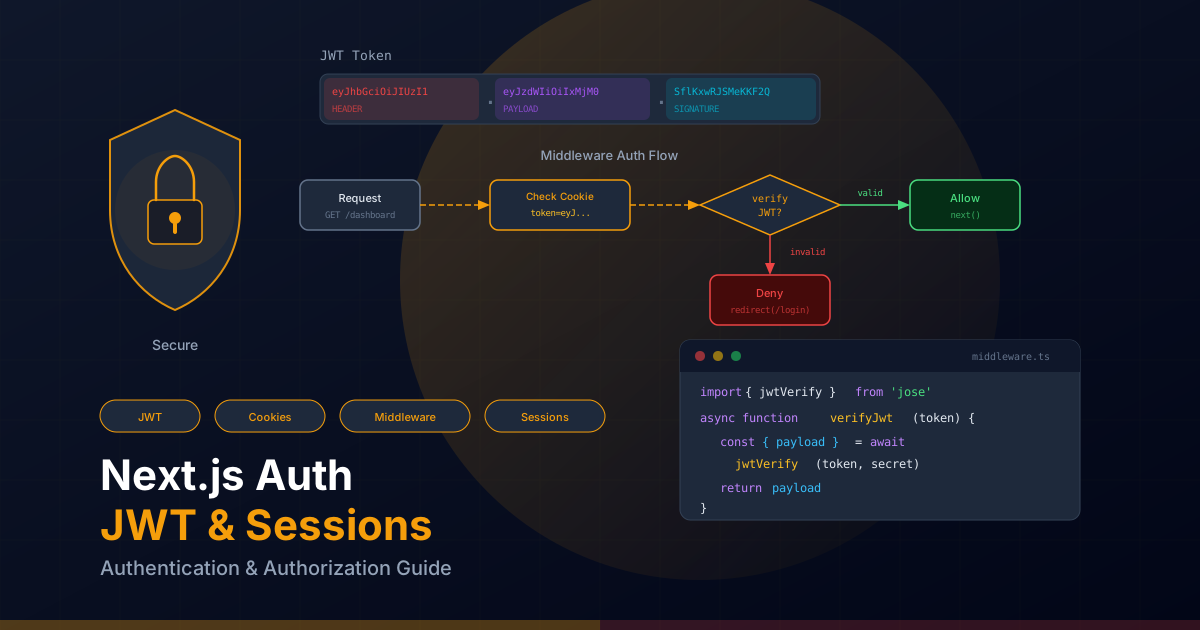
Next.js middleware runs before every request, making it ideal for verifying authentication.
It runs in the Edge Runtime, which is why we need the jose library (Edge compatible)
instead of jsonwebtoken.
// middleware.ts
import { NextRequest, NextResponse } from "next/server";
import { jwtVerify } from "jose";

const JWT_SECRET = new TextEncoder().encode(
  process.env.JWT_SECRET || "your-secret-key-min-32-characters-long!"
);

// Routes that require authentication
const protectedRoutes = ["/dashboard", "/profile", "/settings", "/admin"];

// Routes that are only accessible without authentication
const authRoutes = ["/login", "/register"];

export async function middleware(request: NextRequest) {
  const { pathname } = request.nextUrl;
  const token = request.cookies.get("auth-token")?.value;

  // Check if the route is protected
  const isProtectedRoute = protectedRoutes.some((route) =>
    pathname.startsWith(route)
  );
  const isAuthRoute = authRoutes.some((route) =>
    pathname.startsWith(route)
  );

  // If there is no token and the route is protected, redirect to login
  if (isProtectedRoute && !token) {
    const loginUrl = new URL("/login", request.url);
    loginUrl.searchParams.set("callbackUrl", pathname);
    return NextResponse.redirect(loginUrl);
  }

  // If there is a token, verify that it is valid
  if (token) {
    try {
      const { payload } = await jwtVerify(token, JWT_SECRET);

      // If the authenticated user tries to access auth routes, redirect to dashboard
      if (isAuthRoute) {
        return NextResponse.redirect(new URL("/dashboard", request.url));
      }

      // Check admin permissions
      if (pathname.startsWith("/admin") && payload.role !== "admin") {
        return NextResponse.redirect(new URL("/dashboard", request.url));
      }

      // Add user data to headers for downstream use
      const requestHeaders = new Headers(request.headers);
      requestHeaders.set("x-user-id", payload.userId as string);
      requestHeaders.set("x-user-role", payload.role as string);

      return NextResponse.next({
        request: { headers: requestHeaders },
      });
    } catch (error) {
      // Invalid or expired token: delete cookie and redirect
      if (isProtectedRoute) {
        const response = NextResponse.redirect(
          new URL("/login", request.url)
        );
        response.cookies.delete("auth-token");
        return response;
      }
    }
  }

  return NextResponse.next();
}

export const config = {
  matcher: [
    "/((?!api|_next/static|_next/image|favicon.ico|public).*)",
  ],
};
The matcher in the middleware configuration defines which routes trigger the
middleware. We exclude API routes, static files, and images to avoid unnecessary checks.
Auth Context Provider for Client Components
To allow client components to access the authentication state, we create a Context Provider that fetches user data when the application mounts:
// contexts/AuthContext.tsx
"use client";

import {
  createContext,
  useContext,
  useState,
  useEffect,
  useCallback,
  type ReactNode,
} from "react";
import { useRouter } from "next/navigation";

interface User {
  id: string;
  email: string;
  name: string;
  role: "user" | "admin";
}

interface AuthContextType {
  user: User | null;
  isLoading: boolean;
  login: (email: string, password: string) => Promise<void>;
  logout: () => Promise<void>;
  refreshUser: () => Promise<void>;
}

const AuthContext = createContext<AuthContextType | undefined>(undefined);

export function AuthProvider({ children }: { children: ReactNode }) {
  const [user, setUser] = useState<User | null>(null);
  const [isLoading, setIsLoading] = useState(true);
  const router = useRouter();

  const refreshUser = useCallback(async () => {
    try {
      const response = await fetch("/api/auth/me");
      if (response.ok) {
        const data = await response.json();
        setUser(data.user);
      } else {
        setUser(null);
      }
    } catch {
      setUser(null);
    } finally {
      setIsLoading(false);
    }
  }, []);

  useEffect(() => {
    refreshUser();
  }, [refreshUser]);

  const login = useCallback(
    async (email: string, password: string) => {
      const response = await fetch("/api/auth/login", {
        method: "POST",
        headers: { "Content-Type": "application/json" },
        body: JSON.stringify({ email, password }),
      });

      if (!response.ok) {
        const data = await response.json();
        throw new Error(data.error || "Login failed");
      }

      const data = await response.json();
      setUser(data.user);
      router.push("/dashboard");
    },
    [router]
  );

  const logout = useCallback(async () => {
    await fetch("/api/auth/logout", { method: "POST" });
    setUser(null);
    router.push("/login");
  }, [router]);

  return (
    <AuthContext.Provider
      value={{ user, isLoading, login, logout, refreshUser }}
    >
      {children}
    </AuthContext.Provider>
  );
}

export function useAuth() {
  const context = useContext(AuthContext);
  if (context === undefined) {
    throw new Error("useAuth must be used within an AuthProvider");
  }
  return context;
}
Use the Provider in your root layout and the useAuth() hook in any client
component that needs access to the authentication state:
// Example usage in a component
"use client";

import { useAuth } from "@/contexts/AuthContext";

export function UserMenu() {
  const { user, isLoading, logout } = useAuth();

  if (isLoading) return <div className="animate-pulse h-8 w-8 rounded-full bg-gray-200" />;
  if (!user) return null;

  return (
    <div className="flex items-center gap-3">
      <span className="text-sm text-gray-700">{user.name}</span>
      <button
        onClick={logout}
        className="text-sm text-red-600 hover:text-red-800"
      >
        Sign out
      </button>
    </div>
  );
}
Protected API Routes with withAuth
To protect individual API routes, we create a higher-order function that verifies authentication before executing the handler:
// lib/auth/withAuth.ts
import { NextRequest, NextResponse } from "next/server";
import { getAuthCookie } from "./cookies";
import { verifyToken, type TokenPayload } from "./jwt";

type AuthenticatedHandler = (
  request: NextRequest,
  context: { params: Promise<Record<string, string>>; user: TokenPayload }
) => Promise<NextResponse>;

export function withAuth(handler: AuthenticatedHandler) {
  return async (
    request: NextRequest,
    context: { params: Promise<Record<string, string>> }
  ) => {
    const token = await getAuthCookie();

    if (!token) {
      return NextResponse.json(
        { error: "Not authenticated" },
        { status: 401 }
      );
    }

    try {
      const user = await verifyToken(token);

      return handler(request, { ...context, user });
    } catch (error) {
      return NextResponse.json(
        { error: "Invalid or expired token" },
        { status: 401 }
      );
    }
  };
}

// Variant that requires admin role
export function withAdmin(handler: AuthenticatedHandler) {
  return withAuth(async (request, context) => {
    if (context.user.role !== "admin") {
      return NextResponse.json(
        { error: "Access denied: admin role required" },
        { status: 403 }
      );
    }
    return handler(request, context);
  });
}
Usage in a protected API route:
// app/api/profile/route.ts
import { NextRequest, NextResponse } from "next/server";
import { withAuth } from "@/lib/auth/withAuth";

export const GET = withAuth(async (request, { user }) => {
  const profile = await db.user.findUnique({
    where: { id: user.userId },
    select: { id: true, email: true, name: true, role: true, createdAt: true },
  });

  return NextResponse.json({ profile });
});

export const PUT = withAuth(async (request, { user }) => {
  const body = await request.json();

  const updatedProfile = await db.user.update({
    where: { id: user.userId },
    data: { name: body.name },
    select: { id: true, email: true, name: true },
  });

  return NextResponse.json({ profile: updatedProfile });
});
Logout and Session Expiration
Logging out removes the authentication cookies from the browser. Since JWTs are stateless (not stored on the server), you cannot directly "invalidate" a token. However, there are strategies to handle this correctly.
// app/api/auth/logout/route.ts
import { NextResponse } from "next/server";
import { removeAuthCookies } from "@/lib/auth/cookies";

export async function POST() {
  await removeAuthCookies();

  return NextResponse.json({ message: "Logged out successfully" });
}
Token Blacklist (Optional)
If you need to invalidate tokens before their natural expiration (for example, when an admin revokes a user's access), implement a blacklist using Redis or a database:
// lib/auth/tokenBlacklist.ts
const blacklistedTokens = new Set<string>();

export function blacklistToken(token: string, expiresAt: number) {
  blacklistedTokens.add(token);

  // Automatically clean up when it expires
  const ttl = (expiresAt * 1000) - Date.now();
  if (ttl > 0) {
    setTimeout(() => blacklistedTokens.delete(token), ttl);
  }
}

export function isTokenBlacklisted(token: string): boolean {
  return blacklistedTokens.has(token);
}

// In production, use Redis:
// import { Redis } from "@upstash/redis";
// const redis = new Redis({ url: "...", token: "..." });
// export async function blacklistToken(token: string, expiresAt: number) {
//   const ttl = expiresAt - Math.floor(Date.now() / 1000);
//   await redis.set(`blacklist:${token}`, "1", { ex: ttl });
// }
The /api/auth/me Endpoint
This endpoint allows the client to check whether the current session is valid and retrieve user data:
// app/api/auth/me/route.ts
import { NextResponse } from "next/server";
import { getAuthCookie } from "@/lib/auth/cookies";
import { verifyToken } from "@/lib/auth/jwt";

export async function GET() {
  const token = await getAuthCookie();

  if (!token) {
    return NextResponse.json({ user: null }, { status: 401 });
  }

  try {
    const payload = await verifyToken(token);

    const user = await db.user.findUnique({
      where: { id: payload.userId },
      select: { id: true, email: true, name: true, role: true },
    });

    if (!user) {
      return NextResponse.json({ user: null }, { status: 401 });
    }

    return NextResponse.json({ user });
  } catch {
    return NextResponse.json({ user: null }, { status: 401 });
  }
}
Security Best Practices
Implementing authentication correctly requires attention to multiple attack vectors. These are the essential practices you should follow:
CSRF Protection
Cookies with SameSite: "lax" prevent most CSRF attacks, but for maximum
security you can implement additional CSRF tokens:
// lib/auth/csrf.ts
import { randomBytes } from "crypto";

export function generateCsrfToken(): string {
  return randomBytes(32).toString("hex");
}

export function validateCsrfToken(
  requestToken: string | null,
  sessionToken: string
): boolean {
  if (!requestToken) return false;

  // Constant-time comparison to prevent timing attacks
  if (requestToken.length !== sessionToken.length) return false;

  let result = 0;
  for (let i = 0; i < requestToken.length; i++) {
    result |= requestToken.charCodeAt(i) ^ sessionToken.charCodeAt(i);
  }
  return result === 0;
}
Rate Limiting on Login
Protect the login endpoint against brute-force attacks by limiting the number of attempts per IP address:
// lib/auth/rateLimit.ts
const loginAttempts = new Map<string, { count: number; lastAttempt: number }>();

const MAX_ATTEMPTS = 5;
const WINDOW_MS = 15 * 60 * 1000; // 15 minutes

export function checkRateLimit(ip: string): {
  allowed: boolean;
  remainingAttempts: number;
  retryAfter?: number;
} {
  const now = Date.now();
  const record = loginAttempts.get(ip);

  if (!record || now - record.lastAttempt > WINDOW_MS) {
    loginAttempts.set(ip, { count: 1, lastAttempt: now });
    return { allowed: true, remainingAttempts: MAX_ATTEMPTS - 1 };
  }

  if (record.count >= MAX_ATTEMPTS) {
    const retryAfter = Math.ceil(
      (record.lastAttempt + WINDOW_MS - now) / 1000
    );
    return { allowed: false, remainingAttempts: 0, retryAfter };
  }

  record.count++;
  record.lastAttempt = now;
  return { allowed: true, remainingAttempts: MAX_ATTEMPTS - record.count };
}
Secure Cookie Flags
Let us recap the essential cookie attributes and when to use each combination:
- HttpOnly: Always
truefor authentication tokens. Prevents access from client-side JavaScript. - Secure:
truein production. Requires HTTPS to send the cookie. - SameSite: Use
"strict"for maximum security (the cookie is not sent on any cross-site request) or"lax"to allow navigation from external links. - Path: Restrict the cookie scope. For refresh tokens, use
"/api/auth/refresh"so they are only sent to that endpoint. - MaxAge: Defines the cookie duration. Align it with the JWT expiration.
Token Rotation
Token rotation minimizes the risk if a token is compromised. Every time the refresh token is used, generate a new pair of tokens and revoke the previous one:
// app/api/auth/refresh/route.ts
import { NextRequest, NextResponse } from "next/server";
import { jwtVerify } from "jose";
import { generateTokenPair } from "@/lib/auth/tokens";
import { setAuthCookie, setRefreshCookie } from "@/lib/auth/cookies";

export async function POST(request: NextRequest) {
  const refreshToken = request.cookies.get("refresh-token")?.value;

  if (!refreshToken) {
    return NextResponse.json(
      { error: "No refresh token" },
      { status: 401 }
    );
  }

  try {
    const { payload } = await jwtVerify(refreshToken, JWT_SECRET);

    if (payload.type !== "refresh") {
      return NextResponse.json(
        { error: "Invalid token" },
        { status: 401 }
      );
    }

    // Verify the user still exists and is active
    const user = await db.user.findUnique({
      where: { id: payload.userId as string },
      select: { id: true, email: true, role: true, isActive: true },
    });

    if (!user || !user.isActive) {
      return NextResponse.json(
        { error: "User not found or deactivated" },
        { status: 401 }
      );
    }

    // Generate a new token pair
    const tokens = await generateTokenPair(user);

    // Set new cookies
    await setAuthCookie(tokens.accessToken);
    await setRefreshCookie(tokens.refreshToken);

    return NextResponse.json({ message: "Tokens refreshed" });
  } catch (error) {
    return NextResponse.json(
      { error: "Invalid or expired refresh token" },
      { status: 401 }
    );
  }
}
Required Environment Variables
Make sure to configure these environment variables in your project:
# .env.local (NEVER commit this file to the repository)
JWT_SECRET=your-randomly-generated-secret-at-least-32-characters
DATABASE_URL=postgresql://user:password@localhost:5432/mydb// environment.d.ts
declare namespace NodeJS {
interface ProcessEnv {
JWT_SECRET: string;
DATABASE_URL: string;
}
}Summary: Building your own authentication with JWT and HttpOnly cookies gives you full control over your application's security. The key takeaways are: always hash passwords with bcrypt, use jose for JWT tokens compatible with Edge Runtime, store tokens in HttpOnly cookies with the correct security flags, protect routes with Next.js middleware, and rotate tokens periodically. While it requires more initial effort than using NextAuth, the knowledge you gain is invaluable for any fullstack developer.