What Are Server Components and Why They Matter
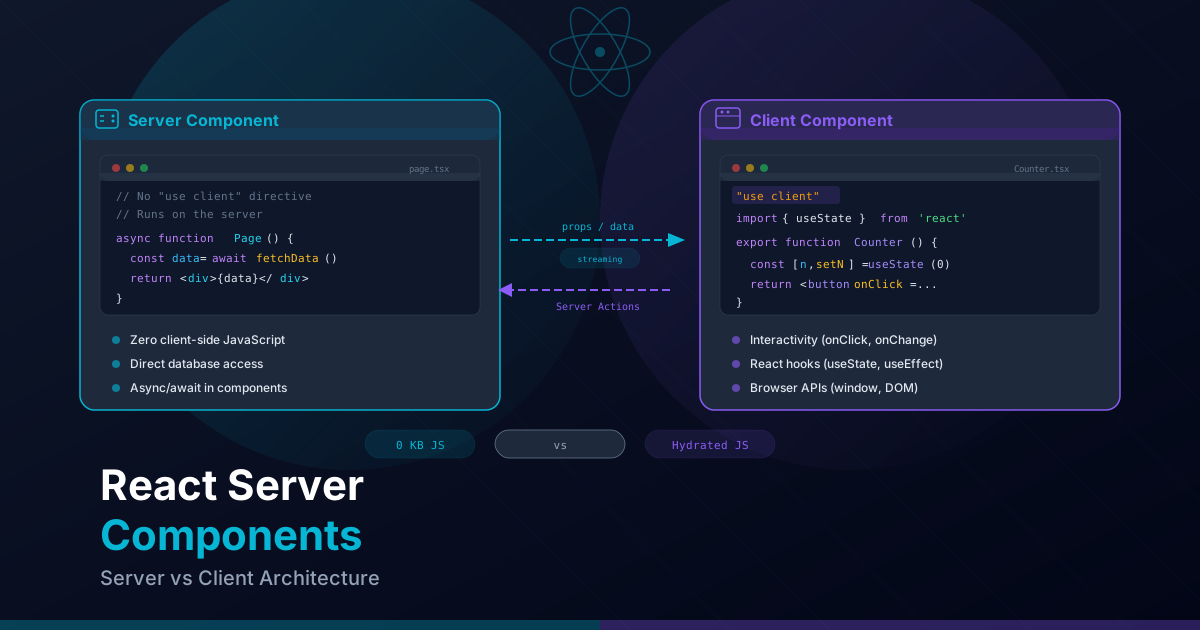
React Server Components (RSC) represent the most significant shift in React architecture since the introduction of hooks. They are components that run exclusively on the server: their code is never sent to the browser, which means zero kilobytes of JavaScript in the client bundle for those components.
In a traditional React model, all of your component code — including data transformation logic, formatting libraries, and validations — is sent to the client even though it only runs once during the initial render. With Server Components, that code stays on the server and only the resulting HTML reaches the browser.
// This component is a Server Component by default in Next.js 15
// Its code is NEVER sent to the browser
import { formatDistance } from "date-fns";
import { enUS } from "date-fns/locale";

interface Article {
  id: string;
  title: string;
  content: string;
  createdAt: Date;
}

export default async function ArticlePage({
  params,
}: {
  params: Promise<{ id: string }>;
}) {
  const { id } = await params;

  // Fetch directly in the component — no useEffect, no useState
  const article: Article = await fetch(
    `https://api.example.com/articles/${id}`,
    { next: { revalidate: 3600 } }
  ).then((res) => res.json());

  const timeAgo = formatDistance(new Date(article.createdAt), new Date(), {
    addSuffix: true,
    locale: enUS,
  });

  return (
    <article className="prose prose-lg max-w-3xl mx-auto">
      <h1>{article.title}</h1>
      <time className="text-gray-500">{timeAgo}</time>
      <div dangerouslySetInnerHTML={{ __html: article.content }} />
    </article>
  );
}
In this example, the date-fns library (which weighs over 70KB) is never included
in the client bundle. The server performs the formatting, generates the HTML, and sends only
the result. The user receives a lighter, faster page.
Server vs Client Components: When to Use Each
The decision between a Server and Client Component depends on what the component needs to do. Here is the general rule:
- Server Component (default in Next.js 15): For everything that does not require user interactivity or browser APIs.
- Client Component (with
"use client"): For interactivity, state, effects, and browser APIs.
When to Use Server Components
- Data fetching: Direct access to databases, APIs, or file systems.
- Content rendering: Markdown, HTML, static lists.
- Heavy business logic: Data transformations, calculations, formatting.
- Accessing secrets: Server environment variables, API keys, tokens.
- Layout components: Headers, footers, sidebars without interactivity.
When to Use Client Components
- Interactivity: onClick, onChange, onSubmit and other event handlers.
- Local state: useState, useReducer.
- Effects: useEffect, useLayoutEffect.
- Browser APIs: localStorage, window, navigator, IntersectionObserver.
- Custom hooks: Any hook that uses state or effects.
- Third-party libraries with state: Forms (react-hook-form), animations (framer-motion).
// Quick decision table
// ┌─────────────────────────────┬────────┬────────┐
// │ Requirement                 │ Server │ Client │
// ├─────────────────────────────┼────────┼────────┤
// │ Data fetching               │   ✓    │        │
// │ Direct backend access       │   ✓    │        │
// │ Server secrets              │   ✓    │        │
// │ Heavy dependencies          │   ✓    │        │
// │ onClick / onChange          │        │   ✓    │
// │ useState / useReducer       │        │   ✓    │
// │ useEffect                   │        │   ✓    │
// │ Browser APIs                │        │   ✓    │
// │ Context providers           │        │   ✓    │
// │ Class-based components      │        │   ✓    │
// └─────────────────────────────┴────────┴────────┘
The "use client" Directive and Its Boundaries
The "use client" directive is placed at the top of a file to mark that module
(and everything it imports) as code that runs on the client. It is a boundary: everything
below that directive in the import tree becomes part of the client bundle.
// components/Counter.tsx
"use client"; // This line marks the server-client boundary

import { useState } from "react";

export function Counter() {
  const [count, setCount] = useState(0);

  return (
    <div className="flex items-center gap-4">
      <button
        onClick={() => setCount((c) => c - 1)}
        className="rounded-lg bg-gray-200 px-4 py-2 hover:bg-gray-300"
        aria-label="Decrement"
      >
        -
      </button>
      <span className="text-2xl font-bold tabular-nums">{count}</span>
      <button
        onClick={() => setCount((c) => c + 1)}
        className="rounded-lg bg-primary-600 px-4 py-2 text-white hover:bg-primary-700"
        aria-label="Increment"
      >
        +
      </button>
    </div>
  );
}
Important points about the directive:
- It is a module boundary: It affects the file where it is declared and all modules that file imports. You cannot have a Server Component importing directly from a file marked with
"use client"and expect it to run on the server. - It does not infect upward: A Server Component can render a Client Component as a child. The directive only affects downward in the import tree.
- It must be the first statement: The directive must be literally the first line of the file (excluding comments).
Common mistake: Placing
"use client"in a layout file or in a high-level parent component. This converts the entire branch into Client Components, losing all the benefits of RSC. The directive should be placed as low as possible in the component tree.
Data Fetching in Server Components
One of the most powerful advantages of Server Components is that they can be async
functions. You can use await directly in the component without needing
useEffect, useState, or any data fetching libraries.
// app/[locale]/projects/page.tsx
// This component is async — it runs on the server
interface Project {
  id: string;
  title: string;
  description: string;
  stack: string[];
  url: string;
}

async function getProjects(): Promise<Project[]> {
  const res = await fetch("https://api.example.com/projects", {
    next: { revalidate: 3600 }, // Revalidate every hour
  });

  if (!res.ok) throw new Error("Failed to fetch projects");
  return res.json();
}

export default async function ProjectsPage() {
  const projects = await getProjects();

  return (
    <main className="container mx-auto px-4 py-12">
      <h1 className="text-4xl font-bold mb-8">Projects</h1>
      <div className="grid grid-cols-1 md:grid-cols-2 lg:grid-cols-3 gap-6">
        {projects.map((project) => (
          <article
            key={project.id}
            className="rounded-xl border border-gray-200 p-6 hover:shadow-lg transition-shadow"
          >
            <h2 className="text-xl font-semibold">{project.title}</h2>
            <p className="mt-2 text-gray-600">{project.description}</p>
            <div className="mt-4 flex flex-wrap gap-2">
              {project.stack.map((tech) => (
                <span
                  key={tech}
                  className="rounded-full bg-primary-100 px-3 py-1 text-xs font-medium text-primary-800"
                >
                  {tech}
                </span>
              ))}
            </div>
          </article>
        ))}
      </div>
    </main>
  );
}
Direct Database Access
Server Components can access databases directly without exposing credentials or creating intermediate API endpoints:
// app/[locale]/blog/[slug]/page.tsx
import { db } from "@/lib/database";
import { notFound } from "next/navigation";

export default async function BlogPost({
  params,
}: {
  params: Promise<{ slug: string }>;
}) {
  const { slug } = await params;

  const post = await db.post.findUnique({
    where: { slug, published: true },
    include: {
      author: { select: { name: true, avatar: true } },
      tags: true,
    },
  });

  if (!post) notFound();

  return (
    <article className="prose prose-lg max-w-3xl mx-auto py-12">
      <header>
        <h1>{post.title}</h1>
        <div className="flex items-center gap-3 not-prose">
          <img
            src={post.author.avatar}
            alt={post.author.name}
            className="h-10 w-10 rounded-full"
          />
          <span className="text-gray-600">{post.author.name}</span>
        </div>
      </header>
      <div dangerouslySetInnerHTML={{ __html: post.content }} />
    </article>
  );
}
Composition Patterns: Server Parent with Client Children
The most powerful RSC pattern is composition: a Server Component can render Client Components as children, passing data to them through props. This allows you to keep fetching logic on the server while interactivity is handled on the client.
// app/[locale]/dashboard/page.tsx (Server Component)
import { db } from "@/lib/database";
import { DashboardChart } from "@/components/dashboard/DashboardChart";
import { DashboardFilters } from "@/components/dashboard/DashboardFilters";
import { StatsCards } from "@/components/dashboard/StatsCards";

export default async function DashboardPage() {
  // Fetch data on the server
  const [stats, chartData, recentActivity] = await Promise.all([
    db.analytics.getStats(),
    db.analytics.getChartData({ period: "30d" }),
    db.activity.getRecent({ limit: 10 }),
  ]);

  return (
    <main className="container mx-auto px-4 py-8">
      <h1 className="text-3xl font-bold mb-8">Dashboard</h1>

      {/* StatsCards is a Server Component — just HTML */}
      <StatsCards stats={stats} />

      {/* DashboardFilters is a Client Component — has state */}
      <DashboardFilters />

      {/* DashboardChart is a Client Component — uses a charting library */}
      <DashboardChart data={chartData} />

      {/* The list is a Server Component — no interactivity */}
      <section className="mt-8">
        <h2 className="text-xl font-semibold mb-4">Recent Activity</h2>
        <ul className="space-y-3">
          {recentActivity.map((item) => (
            <li key={item.id} className="rounded-lg border p-4">
              <p className="font-medium">{item.description}</p>
              <time className="text-sm text-gray-500">{item.timestamp}</time>
            </li>
          ))}
        </ul>
      </section>
    </main>
  );
}// components/dashboard/DashboardChart.tsx
"use client";
import { useState } from "react";
interface ChartDataPoint {
date: string;
value: number;
}
interface DashboardChartProps {
data: ChartDataPoint[];
}
export function DashboardChart({ data }: DashboardChartProps) {
const [period, setPeriod] = useState<"7d" | "30d" | "90d">("30d");
// Initial data comes from the server via props
// Local state handles client-side interactivity
const filteredData = data.filter((point) => {
const daysAgo = period === "7d" ? 7 : period === "30d" ? 30 : 90;
const cutoff = new Date();
cutoff.setDate(cutoff.getDate() - daysAgo);
return new Date(point.date) >= cutoff;
});
return (
<div className="rounded-xl border p-6">
<div className="flex gap-2 mb-4">
{(["7d", "30d", "90d"] as const).map((p) => (
<button
key={p}
onClick={() => setPeriod(p)}
className={
period === p
? "bg-primary-600 text-white rounded-lg px-3 py-1"
: "bg-gray-100 rounded-lg px-3 py-1 hover:bg-gray-200"
}
>
{p}
</button>
))}
</div>
{/* Render the chart with filtered data */}
<div className="h-64 flex items-end gap-1">
{filteredData.map((point) => (
<div
key={point.date}
className="bg-primary-500 rounded-t flex-1 min-w-[4px]"
style={{ height: `${(point.value / Math.max(...filteredData.map(d => d.value))) * 100}%` }}
title={`${point.date}: ${point.value}`}
/>
))}
</div>
</div>
);
}Passing Server Data to Client Components
Data passed from Server to Client Components must be serializable: strings, numbers,
booleans, arrays, plain objects, and null. You cannot pass functions, Dates,
Maps, Sets, or class instances.
// CORRECT: Serialize data before passing it
// app/[locale]/users/page.tsx (Server Component)
export default async function UsersPage() {
  const users = await db.user.findMany({
    select: {
      id: true,
      name: true,
      email: true,
      createdAt: true,
    },
  });

  // Serialize dates to ISO strings before passing to client
  const serializedUsers = users.map((user) => ({
    ...user,
    createdAt: user.createdAt.toISOString(),
  }));

  return <UserTable users={serializedUsers} />;
}

// WRONG: Passing non-serializable data
// This would cause a runtime error:
// <UserTable
//   users={users}        // Date objects are not serializable
//   onDelete={deleteUser} // Functions are not serializable
// />// components/UserTable.tsx
"use client";
import { useState } from "react";
interface SerializedUser {
id: string;
name: string;
email: string;
createdAt: string; // ISO string, not Date
}
export function UserTable({ users }: { users: SerializedUser[] }) {
const [sortBy, setSortBy] = useState<"name" | "createdAt">("name");
const sorted = [...users].sort((a, b) =>
sortBy === "name"
? a.name.localeCompare(b.name)
: new Date(b.createdAt).getTime() - new Date(a.createdAt).getTime()
);
return (
<table className="w-full border-collapse">
<thead>
<tr className="border-b">
<th
className="p-3 text-left cursor-pointer hover:text-primary-600"
onClick={() => setSortBy("name")}
>
Name {sortBy === "name" && "↓"}
</th>
<th className="p-3 text-left">Email</th>
<th
className="p-3 text-left cursor-pointer hover:text-primary-600"
onClick={() => setSortBy("createdAt")}
>
Date {sortBy === "createdAt" && "↓"}
</th>
</tr>
</thead>
<tbody>
{sorted.map((user) => (
<tr key={user.id} className="border-b hover:bg-gray-50">
<td className="p-3">{user.name}</td>
<td className="p-3 text-gray-600">{user.email}</td>
<td className="p-3 text-gray-500">
{new Date(user.createdAt).toLocaleDateString("en-US")}
</td>
</tr>
))}
</tbody>
</table>
);
}Streaming with Suspense and loading.tsx
Streaming allows you to send parts of the page to the browser as they become ready, instead of waiting for all the content to be generated on the server. This significantly improves the Time to First Byte (TTFB) metric and the perceived user experience.
The loading.tsx File
Next.js automatically uses a loading.tsx file as a Suspense fallback for the
route where it is placed:
// app/[locale]/dashboard/loading.tsx
export default function DashboardLoading() {
  return (
    <div className="container mx-auto px-4 py-8 animate-pulse">
      <div className="h-10 w-48 bg-gray-200 rounded mb-8" />

      {/* Stats cards skeleton */}
      <div className="grid grid-cols-1 md:grid-cols-4 gap-4 mb-8">
        {Array.from({ length: 4 }).map((_, i) => (
          <div key={i} className="h-24 bg-gray-200 rounded-xl" />
        ))}
      </div>

      {/* Chart skeleton */}
      <div className="h-80 bg-gray-200 rounded-xl mb-8" />

      {/* List skeleton */}
      <div className="space-y-3">
        {Array.from({ length: 5 }).map((_, i) => (
          <div key={i} className="h-16 bg-gray-200 rounded-lg" />
        ))}
      </div>
    </div>
  );
}
Granular Suspense
For finer control, wrap individual components with Suspense so that each
section loads independently:
// app/[locale]/dashboard/page.tsx
import { Suspense } from "react";
import { StatsCards, StatsCardsSkeleton } from "@/components/dashboard/StatsCards";
import { RecentActivity, ActivitySkeleton } from "@/components/dashboard/RecentActivity";
import { DashboardChart, ChartSkeleton } from "@/components/dashboard/DashboardChart";

export default function DashboardPage() {
  return (
    <main className="container mx-auto px-4 py-8">
      <h1 className="text-3xl font-bold mb-8">Dashboard</h1>

      {/* Each section loads independently */}
      <Suspense fallback={<StatsCardsSkeleton />}>
        <StatsCards />
      </Suspense>

      <Suspense fallback={<ChartSkeleton />}>
        <DashboardChart />
      </Suspense>

      <Suspense fallback={<ActivitySkeleton />}>
        <RecentActivity />
      </Suspense>
    </main>
  );
}

// Each child component does its own fetch
// components/dashboard/StatsCards.tsx (Server Component)
async function StatsCards() {
  const stats = await db.analytics.getStats(); // May take 200ms

  return (
    <div className="grid grid-cols-1 md:grid-cols-4 gap-4 mb-8">
      {stats.map((stat) => (
        <div key={stat.label} className="rounded-xl border p-4">
          <p className="text-sm text-gray-500">{stat.label}</p>
          <p className="text-3xl font-bold">{stat.value}</p>
        </div>
      ))}
    </div>
  );
}
Error Boundaries with error.tsx
Next.js provides a built-in error handling mechanism at the route level through the
error.tsx file. It acts as a React Error Boundary that catches errors in
both Server and Client Components within its route segment.
// app/[locale]/dashboard/error.tsx
"use client"; // Error boundaries MUST be Client Components

import { useEffect } from "react";

export default function DashboardError({
  error,
  reset,
}: {
  error: Error & { digest?: string };
  reset: () => void;
}) {
  useEffect(() => {
    // Log the error to a monitoring service
    console.error("Dashboard error:", error);
  }, [error]);

  return (
    <div className="flex flex-col items-center justify-center py-20">
      <div className="rounded-xl border border-red-200 bg-red-50 p-8 text-center max-w-md">
        <h2 className="text-xl font-semibold text-red-800">
          Something went wrong
        </h2>
        <p className="mt-2 text-red-600">
          Failed to load dashboard data.
        </p>
        {error.digest && (
          <p className="mt-1 text-sm text-red-400">
            Error code: {error.digest}
          </p>
        )}
        <button
          onClick={reset}
          className="mt-4 rounded-lg bg-red-600 px-4 py-2 text-white hover:bg-red-700 transition-colors"
        >
          Try again
        </button>
      </div>
    </div>
  );
}
Key points about error.tsx:
- Always a Client Component: It must have
"use client"because Error Boundaries are a client-side feature in React. - Receives
reset: A function that lets the user retry rendering the route segment. digestproperty: A hash of the error automatically generated by Next.js that can be used to track the error in server logs without exposing sensitive details.- Segment scope: Each folder can have its own
error.tsx, enabling granular error UI per section.
Not Found Handling
// app/[locale]/blog/[slug]/page.tsx
import { notFound } from "next/navigation";

export default async function BlogPost({
  params,
}: {
  params: Promise<{ slug: string }>;
}) {
  const { slug } = await params;
  const post = await db.post.findUnique({ where: { slug } });

  if (!post) notFound(); // Renders the nearest not-found.tsx

  return <article>{/* ... */}</article>;
}

// app/[locale]/blog/not-found.tsx
export default function BlogNotFound() {
  return (
    <div className="flex flex-col items-center justify-center py-20">
      <h2 className="text-2xl font-bold">Article Not Found</h2>
      <p className="mt-2 text-gray-600">
        The article you are looking for does not exist or has been removed.
      </p>
    </div>
  );
}
Dynamic Imports with next/dynamic
next/dynamic allows you to load components lazily, splitting them into separate
chunks that are only downloaded when needed. This is especially useful for heavy components
or those that depend on browser APIs.
// app/[locale]/page.tsx
import dynamic from "next/dynamic";

// The component is only loaded when it renders
const HeavyEditor = dynamic(
  () => import("@/components/editor/RichTextEditor"),
  {
    loading: () => (
      <div className="h-64 animate-pulse rounded-xl bg-gray-200" />
    ),
    ssr: false, // Do not render on the server (uses browser APIs)
  }
);

// Component that only works in the browser
const MapComponent = dynamic(
  () => import("@/components/maps/InteractiveMap"),
  {
    loading: () => (
      <div className="h-96 rounded-xl bg-gray-100 flex items-center justify-center">
        <p className="text-gray-500">Loading map...</p>
      </div>
    ),
    ssr: false,
  }
);

export default function HomePage() {
  return (
    <main>
      <section className="py-12">
        <h2 className="text-2xl font-bold mb-4">Editor</h2>
        <HeavyEditor />
      </section>

      <section className="py-12">
        <h2 className="text-2xl font-bold mb-4">Location</h2>
        <MapComponent />
      </section>
    </main>
  );
}
When to use dynamic() vs when to use Suspense:
- dynamic() with ssr: false: For components that depend on browser APIs (window, document, canvas). Prevents hydration errors.
- dynamic() with ssr: true (default): For code-splitting heavy components. They render on the server but the JS is loaded as a separate chunk.
- Suspense: For streaming async Server Components. Lets you show a fallback while the component resolves on the server.
Common Mistakes and How to Avoid Them
Mistake 1: Using Hooks in Server Components
// WRONG: useState does not work in Server Components
// app/[locale]/page.tsx
import { useState } from "react"; // Runtime error

export default function Page() {
  const [count, setCount] = useState(0); // Error: hooks not available
  return <p>{count}</p>;
}

// CORRECT: Extract the interactive part into a Client Component
// app/[locale]/page.tsx (Server Component)
import { Counter } from "@/components/Counter";

export default function Page() {
  return (
    <main>
      <h1>My Page</h1>
      <Counter /> {/* Client Component with useState */}
    </main>
  );
}
Mistake 2: Importing Server Code in Client Components
// WRONG: Importing server logic in a Client Component
"use client";

import { db } from "@/lib/database"; // ERROR: db uses Node.js APIs

export function UserList() {
  // This will never work on the client
  const users = db.user.findMany(); // Runtime error
  return <ul>{/* ... */}</ul>;
}

// CORRECT: Fetch from an API route or pass data via props
"use client";

import { useState, useEffect } from "react";

export function UserList() {
  const [users, setUsers] = useState([]);

  useEffect(() => {
    fetch("/api/users")
      .then((res) => res.json())
      .then((data) => setUsers(data));
  }, []);

  return <ul>{/* ... */}</ul>;
}
Mistake 3: Placing "use client" Too High
// WRONG: Marking the entire layout as a Client Component
// app/[locale]/layout.tsx
"use client"; // Now NOTHING in this branch can be a Server Component

export default function Layout({ children }) {
  return <div>{children}</div>;
}

// CORRECT: Keep the layout as a Server Component
// Extract only the interactive parts into Client Components
// app/[locale]/layout.tsx (Server Component)
import { Navbar } from "@/components/common/Navbar"; // Client Component
import { Footer } from "@/components/common/Footer"; // Server Component

export default function Layout({
  children,
}: {
  children: React.ReactNode;
}) {
  return (
    <div>
      <Navbar /> {/* Only this is a Client Component */}
      {children}  {/* Can contain Server Components */}
      <Footer /> {/* Server Component: no interactivity */}
    </div>
  );
}
Mistake 4: Passing Non-Serializable Data to Client Components
// WRONG: Passing functions or Dates to Client Components
export default async function Page() {
  const data = await getData();

  return (
    <ClientComponent
      date={new Date()}        // Error: Date is not serializable
      onClick={() => {}}       // Error: functions are not serializable
      map={new Map()}          // Error: Map is not serializable
    />
  );
}

// CORRECT: Serialize everything before passing it
export default async function Page() {
  const data = await getData();

  return (
    <ClientComponent
      date={new Date().toISOString()} // ISO string
      items={Array.from(someMap)}     // Array of tuples
    />
  );
}
Final tip: React Server Components are not a replacement for Client Components but a complement to them. The key is finding the right balance: use Server Components for fetching, data transformation, and static rendering; use Client Components exclusively for interactivity. Keep the
"use client"directive as low as possible in the component tree to maximize the benefits of RSC. This architecture produces faster, lighter, and more maintainable applications.